
AI Agent Complete Guide - Concepts, Architecture, Frameworks, and Production
A comprehensive guide covering AI Agent core concepts, ReAct/Plan-and-Execute architecture, Tool Use, memory management, framework comparison, implementation practice, safety design, and enterprise use cases.
An AI Agent is a system where an LLM autonomously reasons, uses tools, and takes actions to achieve goals. This post systematically covers AI Agent concepts, architecture, framework comparison, implementation practice, and enterprise applications.
1. What is an AI Agent?
Definition and Concept
An AI Agent is an AI system that perceives its environment, reasons, and autonomously takes actions to achieve given goals. Going beyond simply answering questions, it decomposes complex tasks into multiple steps, selectively uses necessary tools, and determines next actions based on intermediate results.
Differences from Traditional LLM Chatbots
| Aspect | LLM Chatbot | AI Agent |
|---|---|---|
| Interaction | Single Q&A | Multi-step autonomous execution |
| Tool usage | None (text only) | Search, API calls, code execution, etc. |
| Planning | None | Goal decomposition → step-by-step planning |
| State management | Conversation history only | Task state, intermediate results tracking |
| Autonomy | Passive (responds to questions) | Active (reasons and acts independently) |
| Error handling | None | Detect failure → modify strategy → retry |
| Examples | ChatGPT conversation | Claude Code, Devin, AutoGPT |
Core Components of an Agent
An AI Agent consists of four core components.
1. Perception: Understand user input, tool execution results, and environment state
2. Reasoning: Analyze the current situation and plan the next action
3. Action: Perform actual work — tool calls, API requests, code execution
4. Memory: Store and utilize conversation history, intermediate results, and learned knowledge
2. AI Agent Architecture
ReAct (Reasoning + Acting) Pattern
ReAct is the most fundamental Agent pattern that alternates between reasoning and acting. Proposed by Yao et al. in 2022.
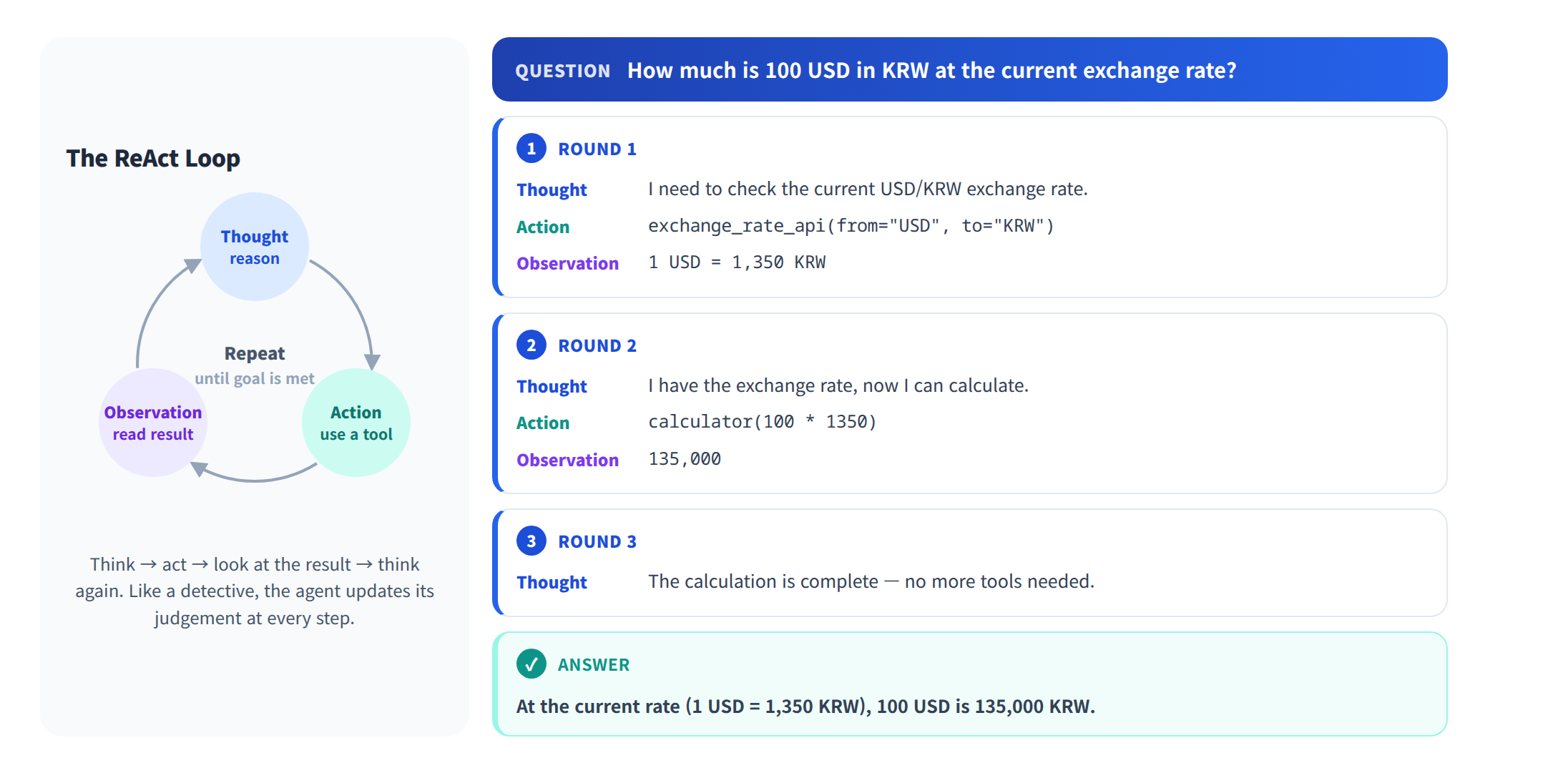
ReAct advantages:
- Transparent reasoning process for easy debugging
- Naturally integrates tool usage
- Flexibly adapts based on intermediate observations
ReAct limitations:
- Requires LLM call at every step (increased cost/latency)
- Loops can become long for complex tasks
- Weak at long-term planning
Plan-and-Execute Pattern
A pattern that first creates an overall plan, then executes each step sequentially. More efficient than ReAct for complex tasks.
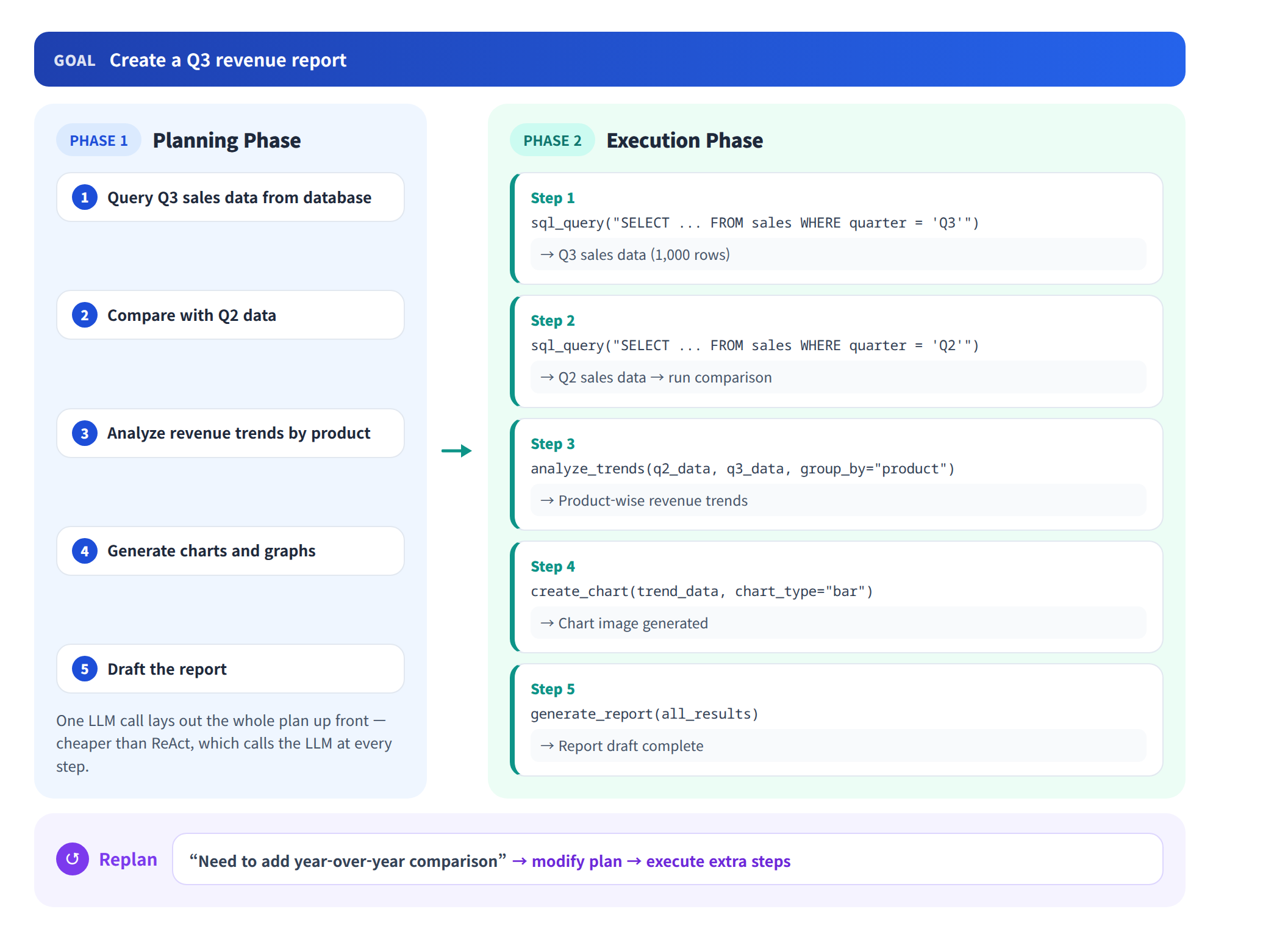
ReAct vs Plan-and-Execute comparison:
| Aspect | ReAct | Plan-and-Execute |
|---|---|---|
| Planning | None (improvised each step) | Upfront planning |
| Flexibility | Very high | Medium (can replan) |
| Efficiency | Low (many LLM calls) | High (1 plan + execution) |
| Suitable tasks | Simple, exploratory | Complex, multi-step |
| Error recovery | Can adjust each step | Requires replanning |
Multi-Agent Architecture
An architecture where multiple specialized agents collaborate on complex tasks.
Key multi-agent patterns:
| Pattern | Description | Suitable For |
|---|---|---|
| Supervisor | Manager distributes tasks and aggregates results | Complex project management |
| Hierarchical | Manage sub-agents in hierarchy | Large organization simulation |
| Peer-to-Peer | Direct message exchange between agents | Discussion, code review |
| Pipeline | Pass results sequentially | Data processing pipelines |
| Debate | Improve quality through agent discussion | Decision making, verification |
Agent Loop Structure
The core loop structure underlying all Agent architectures.
# Agent Loop pseudocode
def agent_loop(goal: str, tools: list, max_steps: int = 10):
    messages = [{"role": "user", "content": goal}]

    for step in range(max_steps):
        # 1. Ask LLM to determine next action
        response = llm.generate(messages, tools=tools)

        # 2. If final answer, terminate
        if response.is_final_answer:
            return response.content

        # 3. If tool call, execute
        if response.tool_calls:
            for tool_call in response.tool_calls:
                result = execute_tool(tool_call)
                messages.append({
                    "role": "tool",
                    "content": result,
                    "tool_call_id": tool_call.id
                })

        # 4. Add result to messages and continue
        messages.append(response)

    return "Maximum steps reached."
3. Tool Use / Function Calling
Concept and Principles of Tool Use
Tool Use (or Function Calling) is a mechanism where LLMs call external tools to handle tasks they cannot perform directly.
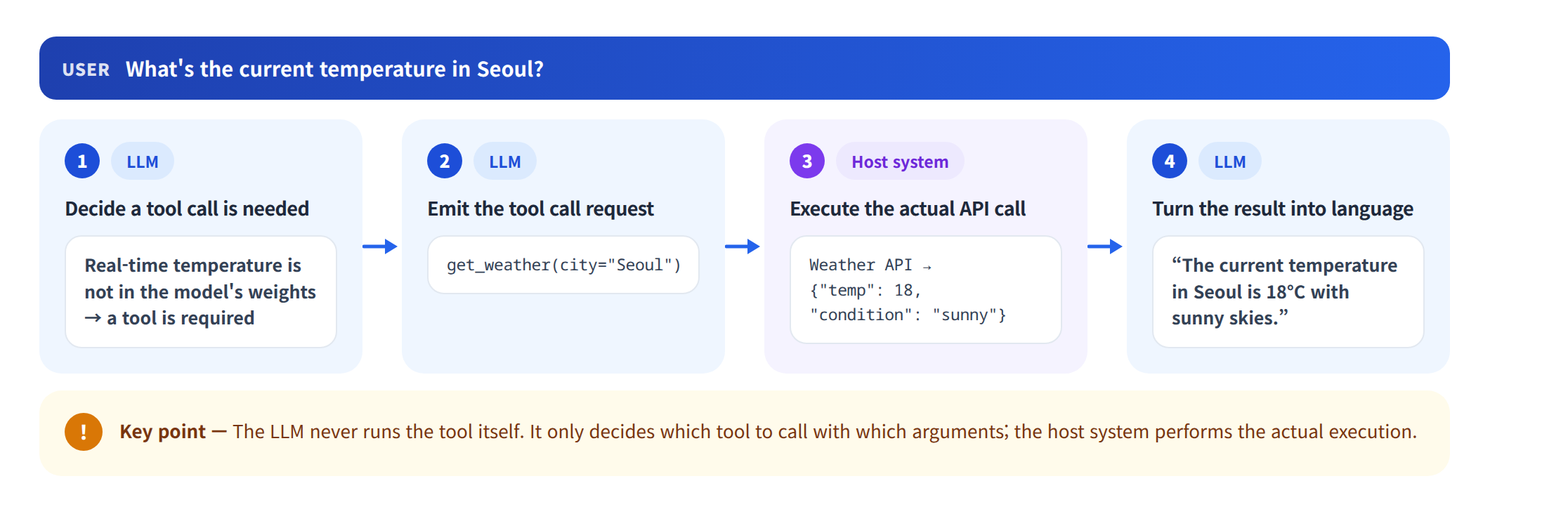
Note: The LLM does not directly execute tools. The LLM decides "which tool to call with which arguments," and the host system handles actual execution.
Tool Definition and Schema Design
Tools are defined by name, description, and parameter schema.
# Anthropic Claude Tool Use example
import anthropic

client = anthropic.Anthropic()

tools = [
    {
        "name": "execute_sql",
        "description": "Executes an SQL query against the database and returns results. Only SELECT queries are allowed.",
        "input_schema": {
            "type": "object",
            "properties": {
                "query": {
                    "type": "string",
                    "description": "SQL SELECT query to execute"
                },
                "database": {
                    "type": "string",
                    "enum": ["analytics", "production", "staging"],
                    "description": "Database to query"
                }
            },
            "required": ["query", "database"]
        }
    },
    {
        "name": "send_slack_message",
        "description": "Sends a message to a Slack channel.",
        "input_schema": {
            "type": "object",
            "properties": {
                "channel": {
                    "type": "string",
                    "description": "Slack channel name (e.g., #engineering)"
                },
                "message": {
                    "type": "string",
                    "description": "Message content to send"
                }
            },
            "required": ["channel", "message"]
        }
    }
]

response = client.messages.create(
    model="claude-sonnet-4-6",
    max_tokens=1024,
    tools=tools,
    messages=[{
        "role": "user",
        "content": "Query total revenue this month from analytics DB and share results in #sales channel."
    }]
)
Tool design best practices:
| Principle | Description | Example |
|---|---|---|
| Clear naming | Accurately reflect tool function | execute_sql (O), do_stuff (X) |
| Detailed description | Help LLM decide when to use | Specify "SELECT queries only" |
| Type specification | Include parameter types, enums | "enum": ["analytics", "production"] |
| Least privilege | Grant only necessary permissions | Separate read-only and write tools |
| Error returns | Clear error messages on failure | {"error": "Query syntax error"} |
Major Tool Types
| Tool Type | Description | Examples |
|---|---|---|
| Retrieval | Search information from external sources | Vector DB search, web search, wiki search |
| API Call | Call external service APIs | Weather, exchange rates, Slack, Jira, GitHub |
| Code Execution | Run programming code | Python code, SQL queries, Bash commands |
| File Operations | Read/write/modify files | Document creation, CSV processing, log analysis |
| Calculation | Perform mathematical computations | Statistics, currency conversion, data analysis |
| Browser | Control web browsers | Web page navigation, form filling, screenshots |
4. Memory and State Management
Short-Term Memory (Conversation Context)
The most basic memory that maintains message history for the current conversation session.
# Short-term memory: conversation message list
messages = [
    {"role": "system", "content": "You are a data engineering assistant."},
    {"role": "user", "content": "Check the Spark cluster status"},
    {"role": "assistant", "content": "...", "tool_calls": [...]},
    {"role": "tool", "content": "Cluster status: healthy, 5 nodes active"},
    {"role": "assistant", "content": "The Spark cluster is healthy. 5 nodes are active."},
    {"role": "user", "content": "Also check yesterday's batch job status"},
    # ... conversation continues
]
Short-term memory challenges:
- Context window limits: Early messages may be truncated as conversations grow
- Management strategies: Summarize, sliding window, retain important messages
# Context window management: summarization approach
def manage_context(messages, max_tokens=4096):
    if count_tokens(messages) > max_tokens:
        # Compress old messages into summary
        old_messages = messages[1:-5]  # Exclude system prompt and recent 5
        summary = llm.summarize(old_messages)

        return [
            messages[0],  # Keep system prompt
            {"role": "system", "content": f"Previous conversation summary: {summary}"},
            *messages[-5:]  # Keep recent 5 messages
        ]
    return messages
Long-Term Memory (Vector DB, External Storage)
Memory that persists knowledge and experiences across sessions.
# Long-term memory: store and retrieve experiences in vector DB
from langchain_chroma import Chroma
from langchain_openai import OpenAIEmbeddings

# Long-term memory store
long_term_memory = Chroma(
    collection_name="agent_memory",
    embedding_function=OpenAIEmbeddings(),
    persist_directory="./memory_db"
)

# Save experience
def save_experience(task: str, result: str, success: bool):
    long_term_memory.add_texts(
        texts=[f"Task: {task}\nResult: {result}\nSuccess: {success}"],
        metadatas=[{
            "task_type": classify_task(task),
            "success": success,
            "timestamp": datetime.now().isoformat()
        }]
    )

# Recall past experience (reference when performing similar tasks)
def recall_experience(current_task: str, k: int = 3):
    results = long_term_memory.similarity_search(current_task, k=k)
    return results
Long-term memory applications:
| Type | Stored Content | Application |
|---|---|---|
| User preferences | Preferred response format, domain knowledge level | Adjust response style |
| Past tasks | Previously performed tasks and results | Reference for similar tasks |
| Learned rules | Lessons from trial and error | Prevent repeating mistakes |
| Domain knowledge | Internal tech stack, architecture info | Context-appropriate responses |
Working Memory (Scratchpad, Intermediate Results)
Memory that tracks intermediate results and state during current task execution.
# Working memory: Scratchpad
class AgentScratchpad:
    def __init__(self):
        self.plan = []           # Current plan
        self.completed = []      # Completed steps
        self.intermediate = {}   # Intermediate results
        self.observations = []   # Observation records

    def update_plan(self, plan: list):
        self.plan = plan

    def mark_complete(self, step: int, result: str):
        self.completed.append(step)
        self.intermediate[f"step_{step}"] = result

    def get_context(self) -> str:
        """Convert current work state to text"""
        return f"""
Current plan: {self.plan}
Completed steps: {self.completed}
Intermediate results: {self.intermediate}
Remaining steps: {[s for s in self.plan if s not in self.completed]}
"""
5. Agent Framework Comparison
LangChain / LangGraph
The most widely used LLM application framework.
LangChain: Linear workflow composition based on chains
LangGraph: Complex Agent workflow composition based on graphs
# ReAct Agent with LangGraph
from langgraph.prebuilt import create_react_agent
from langchain_openai import ChatOpenAI
from langchain_core.tools import tool

@tool
def search_database(query: str) -> str:
    """Search for information in the internal database."""
    return f"Search results: data for {query}..."

@tool
def run_sql(sql: str) -> str:
    """Execute SQL query and return results."""
    return f"Query results: ..."

llm = ChatOpenAI(model="gpt-4o")
tools = [search_database, run_sql]

# Create ReAct Agent
agent = create_react_agent(llm, tools)

# Execute
result = agent.invoke({
    "messages": [{"role": "user", "content": "Query this quarter's revenue"}]
})
CrewAI
A role-based multi-agent framework. Assigns roles, goals, and backstories to each Agent for collaboration.
from crewai import Agent, Task, Crew

# Define agents
researcher = Agent(
    role="Data Researcher",
    goal="Research accurate market data and trends",
    backstory="A market analysis expert with 10 years of experience.",
    tools=[search_tool, web_scraper],
    llm="gpt-4o"
)

writer = Agent(
    role="Report Writer",
    goal="Write research results into clear reports",
    backstory="An experienced technical writer.",
    llm="gpt-4o"
)

reviewer = Agent(
    role="Quality Reviewer",
    goal="Review report accuracy and completeness",
    backstory="A data verification and QA specialist.",
    llm="gpt-4o"
)

# Define tasks
research_task = Task(
    description="Research 2025 AI market trends.",
    agent=researcher,
    expected_output="Market size, growth rate, key trends summary"
)

write_task = Task(
    description="Write a report based on research results.",
    agent=writer,
    expected_output="Structured market trend report"
)

review_task = Task(
    description="Review report data accuracy and logic.",
    agent=reviewer,
    expected_output="Review comments and revisions"
)

# Build and run Crew
crew = Crew(
    agents=[researcher, writer, reviewer],
    tasks=[research_task, write_task, review_task],
    verbose=True
)

result = crew.kickoff()
AutoGen (Microsoft)
Microsoft's conversation-based multi-agent framework. Agents perform tasks through conversation.
from autogen import AssistantAgent, UserProxyAgent

assistant = AssistantAgent(
    name="data_engineer",
    system_message="You are a data engineer. Perform data analysis tasks with Python code.",
    llm_config={"model": "gpt-4o"}
)

user_proxy = UserProxyAgent(
    name="executor",
    human_input_mode="NEVER",
    code_execution_config={"work_dir": "workspace"}
)

user_proxy.initiate_chat(
    assistant,
    message="Read sales.csv, analyze monthly revenue trends, and create a chart."
)
Claude Agent SDK (Anthropic)
Anthropic's agent building SDK for constructing safe and controllable Agents based on Claude models.
import anthropic
from anthropic.types import ToolUseBlock

client = anthropic.Anthropic()

tools = [
    {
        "name": "read_file",
        "description": "Read and return file contents.",
        "input_schema": {
            "type": "object",
            "properties": {
                "path": {"type": "string", "description": "File path"}
            },
            "required": ["path"]
        }
    },
    {
        "name": "write_file",
        "description": "Write content to a file.",
        "input_schema": {
            "type": "object",
            "properties": {
                "path": {"type": "string", "description": "File path"},
                "content": {"type": "string", "description": "Content to write"}
            },
            "required": ["path", "content"]
        }
    }
]

def agent_loop(goal: str):
    messages = [{"role": "user", "content": goal}]

    while True:
        response = client.messages.create(
            model="claude-sonnet-4-6",
            max_tokens=4096,
            tools=tools,
            messages=messages
        )

        if response.stop_reason == "end_turn":
            return extract_text(response)

        messages.append({"role": "assistant", "content": response.content})

        tool_results = []
        for block in response.content:
            if isinstance(block, ToolUseBlock):
                result = execute_tool(block.name, block.input)
                tool_results.append({
                    "type": "tool_result",
                    "tool_use_id": block.id,
                    "content": result
                })

        messages.append({"role": "user", "content": tool_results})

result = agent_loop("Read config.yaml and change the port setting to 8080")
Framework Comparison Summary
| Framework | Developer | Pattern | Strengths | Suitable For |
|---|---|---|---|---|
| LangGraph | LangChain | Graph-based workflow | Flexible state management, custom workflows | Complex custom Agents |
| CrewAI | CrewAI | Role-based multi-agent | Intuitive role design | Team simulation, multi-step tasks |
| AutoGen | Microsoft | Conversation-based multi-agent | Code execution, research | Code generation, data analysis |
| Claude Agent SDK | Anthropic | Tool Use + Agent Loop | Safety, long context | Enterprise Agents |
| OpenAI Agents SDK | OpenAI | Responses API based | Integrated tools (search, code) | General-purpose Agents |
6. Agent Implementation Practice
Single Agent Implementation (Tool Use + ReAct)
Implementing an Agent that performs database queries and analysis.
import anthropic
import json

client = anthropic.Anthropic()

tools = [
    {
        "name": "query_sales_db",
        "description": "Query data from the sales database. Executes SQL queries.",
        "input_schema": {
            "type": "object",
            "properties": {
                "sql": {"type": "string", "description": "SQL query to execute"}
            },
            "required": ["sql"]
        }
    },
    {
        "name": "calculate",
        "description": "Perform mathematical calculations. Evaluates Python expressions.",
        "input_schema": {
            "type": "object",
            "properties": {
                "expression": {"type": "string", "description": "Python expression"}
            },
            "required": ["expression"]
        }
    },
    {
        "name": "create_report",
        "description": "Create a report from analysis results.",
        "input_schema": {
            "type": "object",
            "properties": {
                "title": {"type": "string"},
                "content": {"type": "string"},
                "format": {"type": "string", "enum": ["markdown", "html", "text"]}
            },
            "required": ["title", "content"]
        }
    }
]

def execute_tool(name: str, input_data: dict) -> str:
    if name == "query_sales_db":
        return json.dumps({"rows": [
            {"month": "2025-01", "revenue": 1200000},
            {"month": "2025-02", "revenue": 1350000},
            {"month": "2025-03", "revenue": 1180000}
        ]})
    elif name == "calculate":
        result = eval(input_data["expression"])
        return str(result)
    elif name == "create_report":
        return f"Report '{input_data['title']}' created successfully"
    return "Unknown tool"

def run_agent(goal: str):
    messages = [{"role": "user", "content": goal}]

    for step in range(10):
        response = client.messages.create(
            model="claude-sonnet-4-6",
            max_tokens=4096,
            system="You are a data analysis Agent. Use tools to fulfill user requests.",
            tools=tools,
            messages=messages
        )

        if response.stop_reason == "end_turn":
            break

        messages.append({"role": "assistant", "content": response.content})
        tool_results = []

        for block in response.content:
            if block.type == "tool_use":
                result = execute_tool(block.name, block.input)
                tool_results.append({
                    "type": "tool_result",
                    "tool_use_id": block.id,
                    "content": result
                })

        messages.append({"role": "user", "content": tool_results})

run_agent("Query Q1 revenue data, calculate month-over-month growth rates, and create a report.")
Practical Example: RAG + Agent Integration
Implementing an Agent that uses RAG search as a tool.
from langchain_chroma import Chroma
from langchain_openai import OpenAIEmbeddings, ChatOpenAI
from langchain_core.tools import tool
from langgraph.prebuilt import create_react_agent

vectorstore = Chroma(
    persist_directory="./company_docs_db",
    embedding_function=OpenAIEmbeddings()
)

@tool
def search_internal_docs(query: str) -> str:
    """Search internal technical docs, policies, and guides.
    Use for finding Spark, Kafka, NiFi, Kudu documentation."""
    results = vectorstore.similarity_search(query, k=3)
    return "\n\n---\n\n".join([
        f"[Source: {r.metadata.get('source', 'unknown')}]\n{r.page_content}"
        for r in results
    ])

@tool
def run_spark_query(sql: str) -> str:
    """Execute Spark SQL query and return results."""
    return f"Query results: ..."

@tool
def create_jira_ticket(title: str, description: str, priority: str) -> str:
    """Create a Jira ticket for bug reports, task requests, or improvements."""
    return f"Jira ticket created: PROJ-1234 '{title}'"

llm = ChatOpenAI(model="gpt-4o")
tools = [search_internal_docs, run_spark_query, create_jira_ticket]

agent = create_react_agent(
    llm, tools,
    prompt="You are a senior data engineer at Data Dynamics. "
           "Search internal docs, analyze data, and create Jira tickets as needed."
)

result = agent.invoke({
    "messages": [{
        "role": "user",
        "content": "Find Kudu table partitioning strategies in our internal guides, "
                   "analyze optimization options for the orders table, "
                   "and create a Jira ticket for any improvements."
    }]
})
7. Safety and Control
Guardrails Design
Setting constraints to prevent agents from taking unintended actions.
class AgentGuardrails:
    def __init__(self):
        self.allowed_tools = {"search_docs", "run_sql", "calculate"}
        self.blocked_patterns = [
            r"DROP\s+TABLE",
            r"DELETE\s+FROM",
            r"UPDATE\s+.*SET",
            r"INSERT\s+INTO",
            r"rm\s+-rf",
        ]
        self.max_steps = 15
        self.max_cost_usd = 1.0

    def validate_tool_call(self, tool_name: str, tool_input: dict) -> tuple:
        """Validate before tool execution"""
        if tool_name not in self.allowed_tools:
            return False, f"Tool not allowed: {tool_name}"

        input_str = json.dumps(tool_input)
        for pattern in self.blocked_patterns:
            if re.search(pattern, input_str, re.IGNORECASE):
                return False, f"Dangerous pattern detected: {pattern}"

        return True, "OK"
Human-in-the-Loop
A mechanism to get human approval before important decisions or risky operations.
def human_approval_required(tool_name: str, tool_input: dict) -> bool:
    """Determine if human approval is needed"""
    high_risk_tools = {"send_email", "create_jira_ticket", "deploy", "delete_file"}
    return tool_name in high_risk_tools

def request_human_approval(tool_name: str, tool_input: dict) -> bool:
    """Request human approval"""
    print(f"\n[Approval Request] Agent wants to perform:")
    print(f"  Tool: {tool_name}")
    print(f"  Input: {json.dumps(tool_input, indent=2)}")

    approval = input("Approve? (y/n): ")
    return approval.lower() == "y"
Permission Management and Sandboxing
| Control Level | Description | Implementation |
|---|---|---|
| Tool level | Restrict available tools | Whitelist-based tool list |
| Input validation | Validate tool inputs | Regex, schema validation |
| Execution isolation | Run code in sandboxed environment | Docker containers, VMs |
| Network restriction | Limit accessible network scope | Firewalls, proxies |
| Time limits | Max execution time per task | Timeout settings |
| Cost limits | LLM API call budget cap | Token counting, budget management |
Error Handling and Fallback Strategies
class AgentErrorHandler:
    def __init__(self, max_retries: int = 3):
        self.max_retries = max_retries
        self.error_counts = {}

    def handle_tool_error(self, tool_name: str, error: Exception) -> str:
        self.error_counts[tool_name] = self.error_counts.get(tool_name, 0) + 1

        if self.error_counts[tool_name] >= self.max_retries:
            return f"Tool '{tool_name}' failed {self.max_retries} times. Try a different approach."

        return f"Error: {str(error)}. Retry available. ({self.error_counts[tool_name]}/{self.max_retries})"

    def handle_llm_error(self, error: Exception) -> str:
        if "rate_limit" in str(error).lower():
            time.sleep(5)
            return "RETRY"
        elif "context_length" in str(error).lower():
            return "TRUNCATE"
        return "ABORT"
8. Enterprise AI Agent Use Cases
Code Generation Agents
Examples: Claude Code, GitHub Copilot, Cursor
Code generation agents are comprehensive development assistants that read code, make modifications, run tests, and fix bugs.
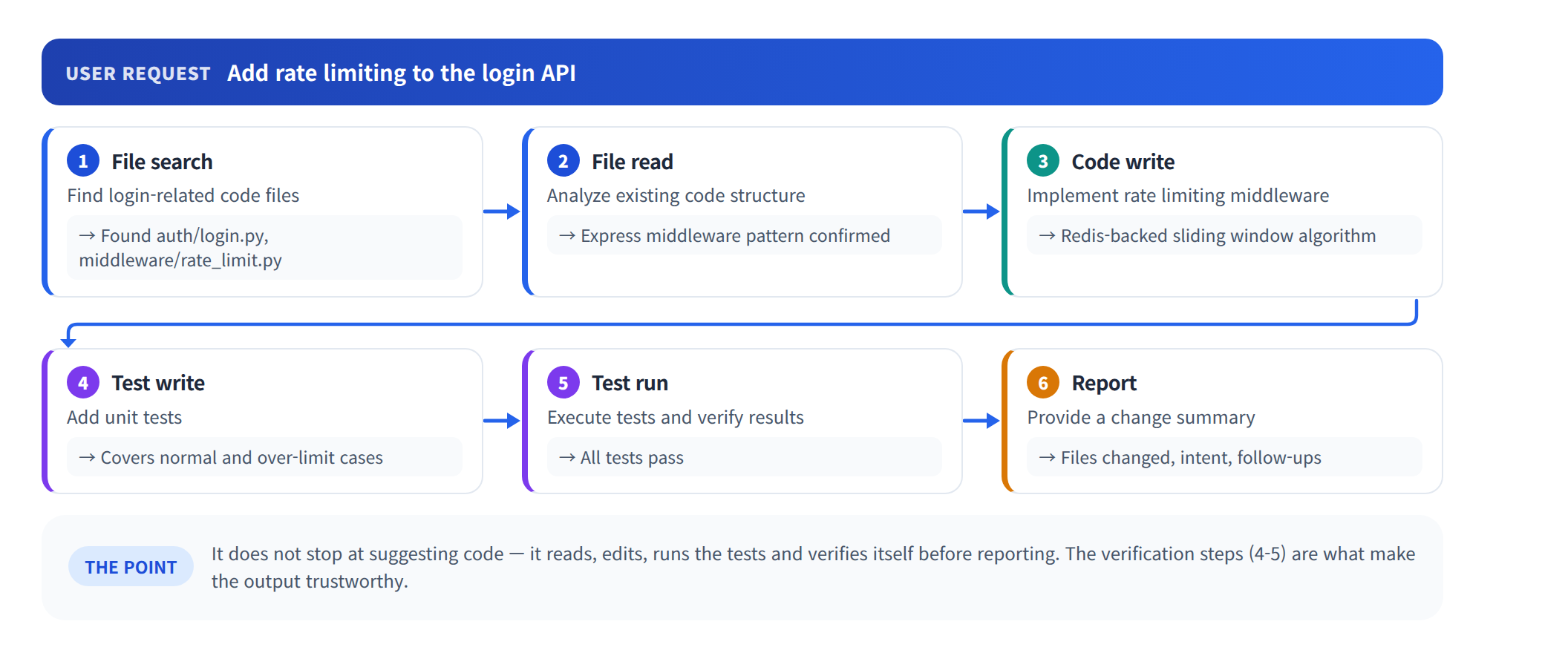
Impact:
| Metric | Before | After | Change |
|---|---|---|---|
| Code writing speed | Baseline | 2-3x improvement | Automated repetitive work |
| Code review time | 30min/PR | 10min/PR | Auto-review drafts |
| Bug detection rate | Manual testing | +40% improvement | Auto test generation |
Data Analysis Agents
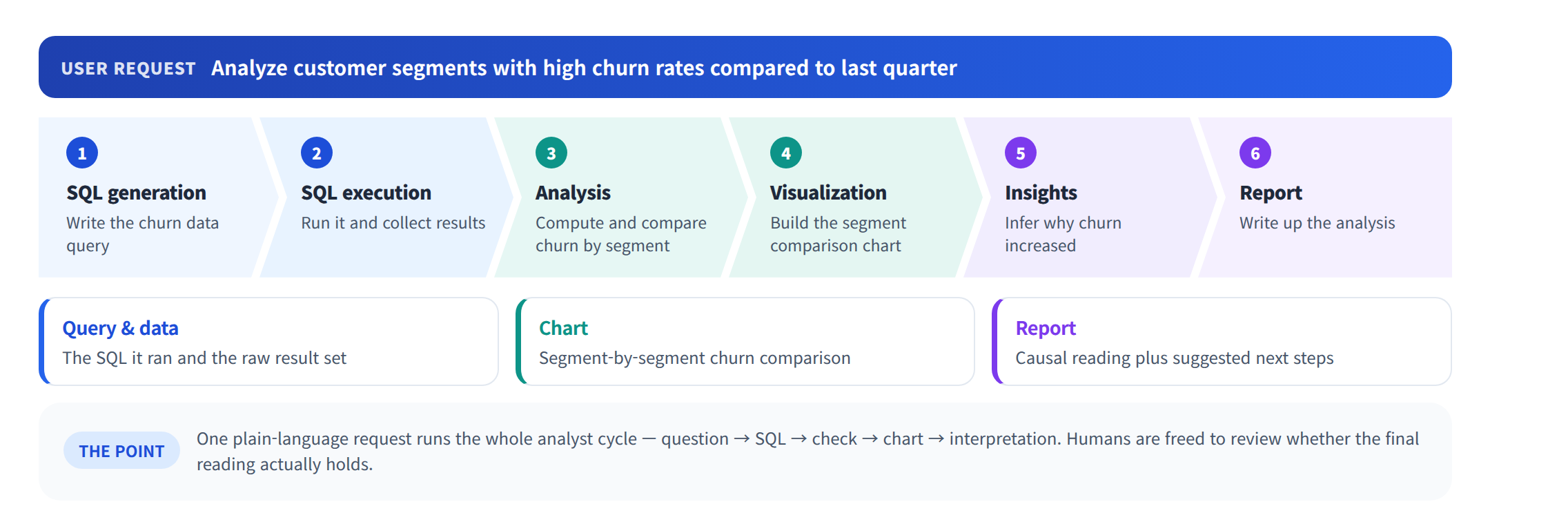
Request data analysis in natural language, and the agent automatically writes SQL, executes it, and creates visualizations.
Customer Service Automation
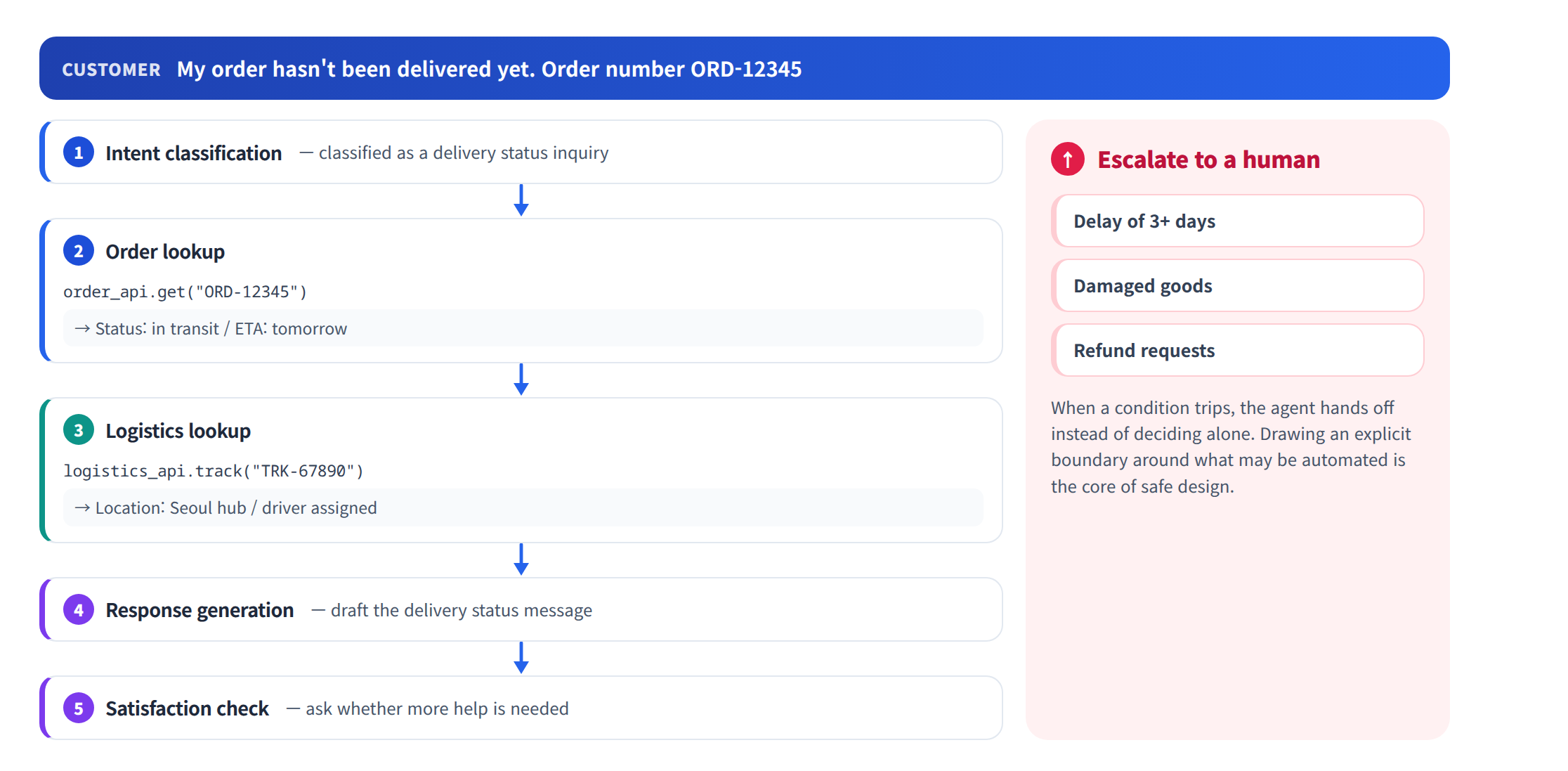
Classifies customer inquiries, searches internal documents, generates answers, and escalates to humans when needed.
IT Operations Automation (AIOps)
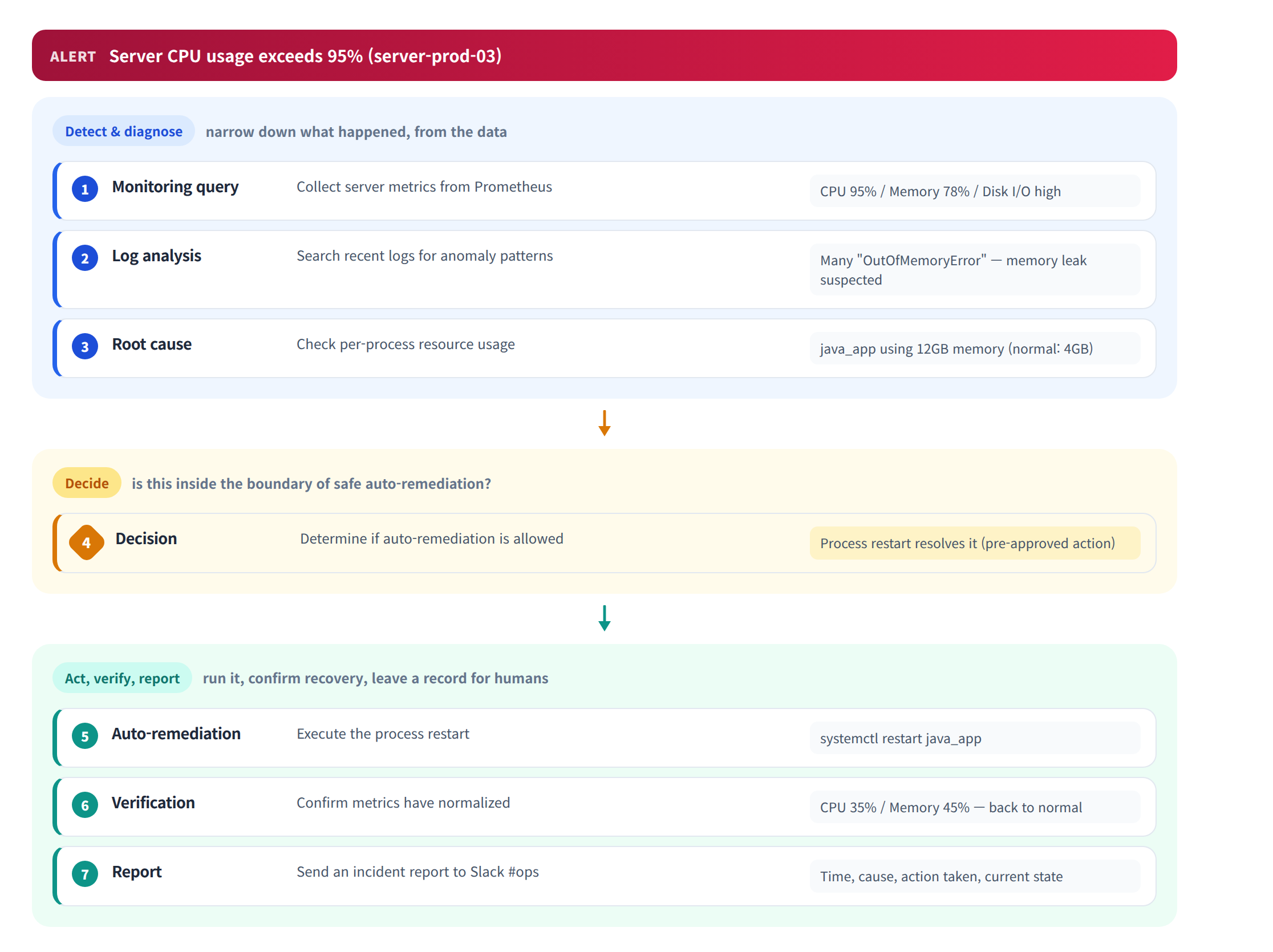
An Agent that performs system monitoring, incident detection, root cause analysis, and automatic remediation.
AIOps Agent impact:
| Metric | Manual Ops | AIOps Agent | Improvement |
|---|---|---|---|
| Mean Time to Detect (MTTD) | ~15 min | ~1 min | 93% reduction |
| Mean Time to Resolve (MTTR) | ~45 min | ~5 min | 89% reduction |
| After-hours on-call pages | 20/month | 3/month | 85% reduction |
| Recurring incidents | Frequent | Pattern learning prevents | 60% reduction |
References
- Yao, S. et al. (2023). "ReAct: Synergizing Reasoning and Acting in Language Models." ICLR
- Wang, L. et al. (2024). "A Survey on Large Language Model based Autonomous Agents." arXiv
- Xi, Z. et al. (2023). "The Rise and Potential of Large Language Model Based Agents: A Survey." arXiv
- Shinn, N. et al. (2023). "Reflexion: Language Agents with Verbal Reinforcement Learning." NeurIPS
- Anthropic. "Tool Use (Function Calling)" — https://docs.anthropic.com/en/docs/build-with-claude/tool-use
- LangGraph Documentation — https://langchain-ai.github.io/langgraph/
- CrewAI Documentation — https://docs.crewai.com/
- AutoGen Documentation — https://microsoft.github.io/autogen/
— Data Dynamics Engineering Team