
Starburst (Trino)
A Trino-based enterprise lakehouse analytics platform. Analyze data across sources with SQL without first loading everything into one central store. Starburst Enterprise and fully managed Galaxy provide security, governance and operational capabilities.
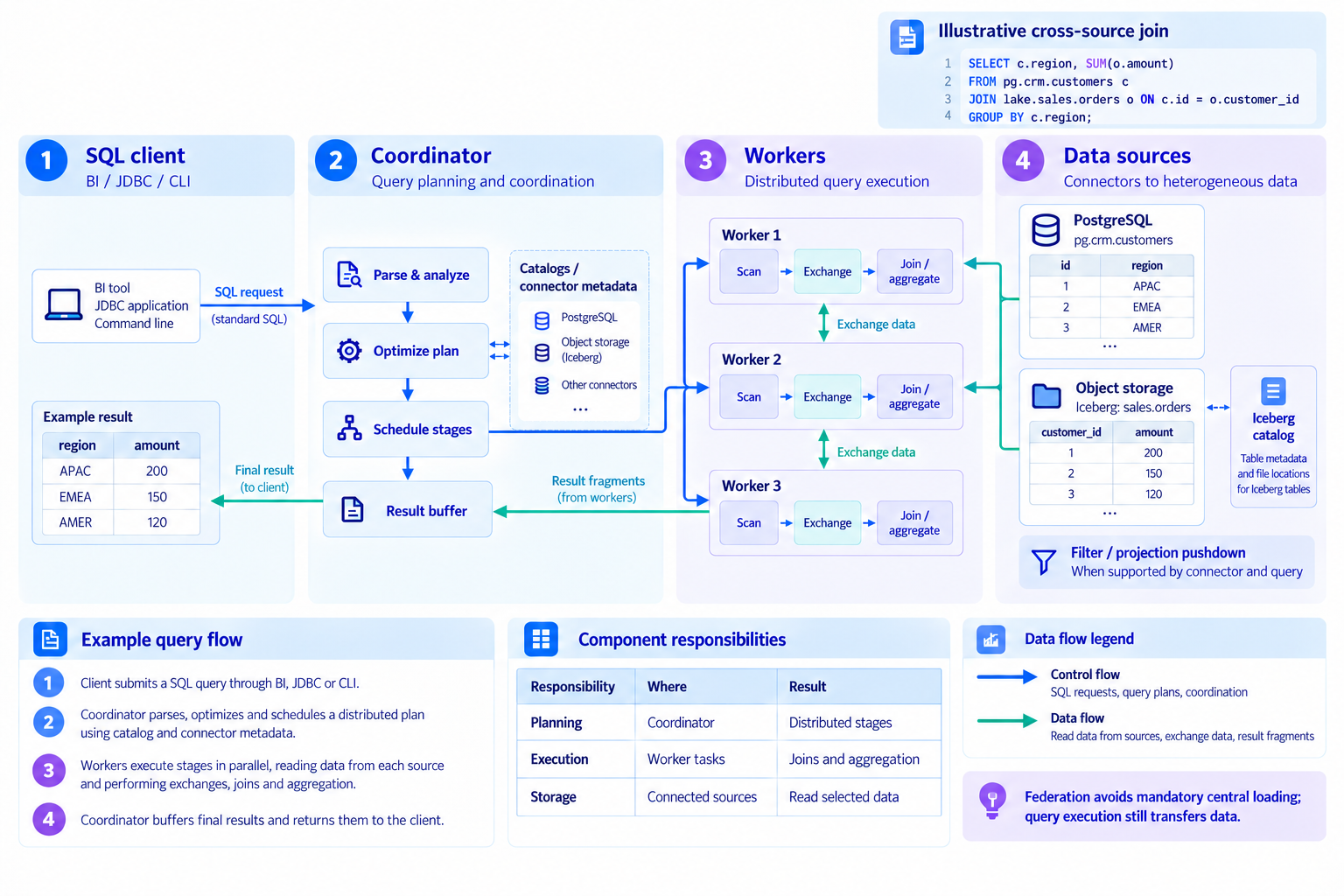
How one SQL query connects multiple data sources
Analyze data across sources without first consolidating everything into one repository.
Read diagram, product and service details
- 1.SQL request
- A BI client submits SQL joining customer and order tables to aggregate order amounts by region.
- 2.Execution plan
- The coordinator analyzes the query and plans execution using sources and available statistics.
- 3.Distributed processing
- Workers read sources, join and aggregate returned data. Supported filters and aggregations can be pushed down.
- 4.Data sources
- Read the required customer records from PostgreSQL and orders from Iceberg, then return the results.
Starburst and Trino at a Glance
Starburst combines a Trino-based distributed SQL engine with enterprise security, operations and performance features. Connect lakehouses, databases and other sources through connectors, and start SQL analysis without first loading all data into one place. Verify supported sources and features for the selected product and version.
- Trino-based MPP query engine: always-on coordinator + worker architecture delivering interactive response on petabyte-scale data
- Data federation: 50+ connectors — Iceberg, Delta Lake, RDBMS, NoSQL, Kafka, SaaS — in a single SQL
- Warp Speed acceleration: smart indexing and caching for up to 5× faster queries and up to 10× less CPU
- Enterprise governance: row/column-level RBAC and ABAC, dynamic masking, Ranger integration, query audit
Federation performance depends on connectors, source load, networking, data distribution and concurrency. Repeated queries may benefit from precomputed or ingested data.
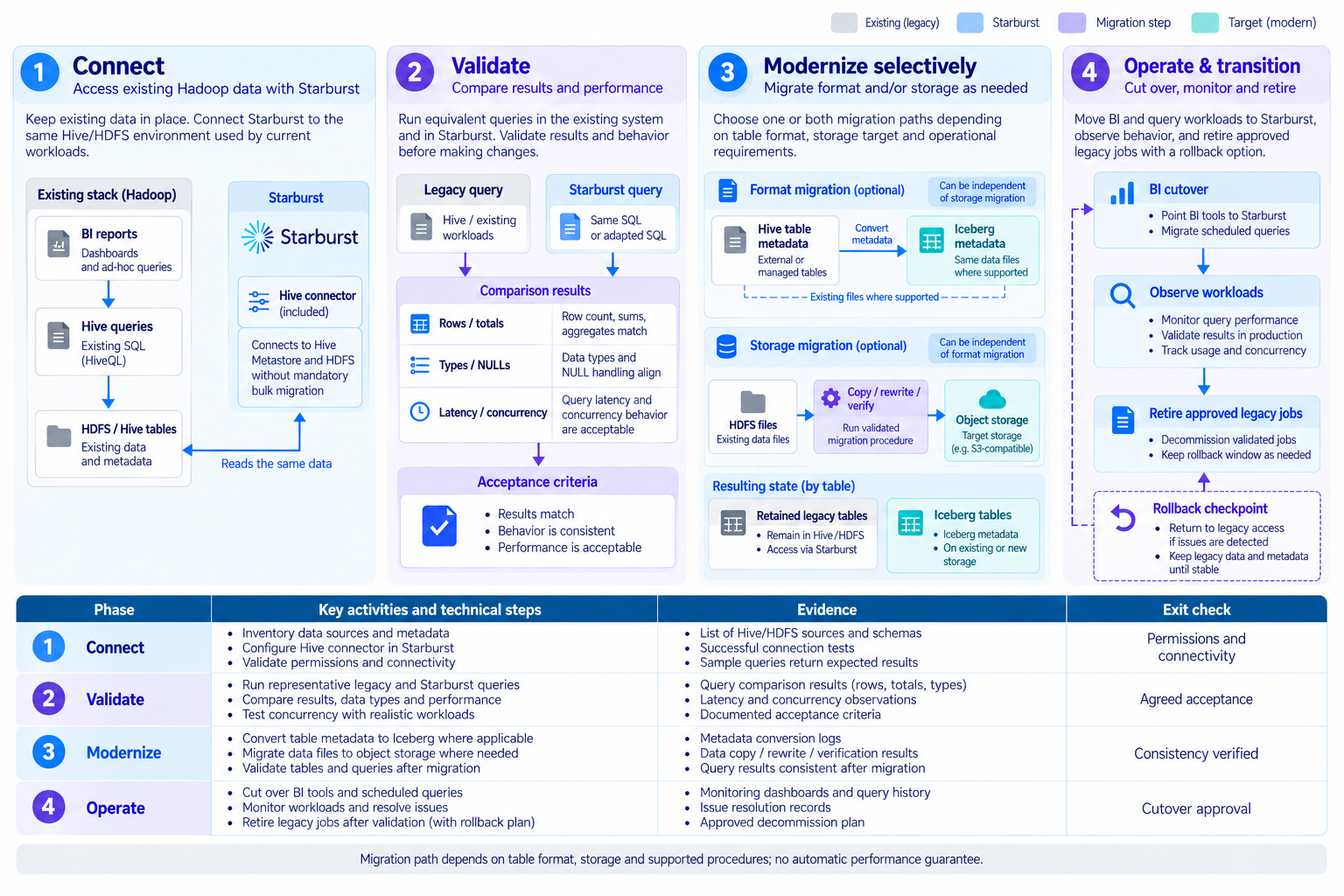
Official documentationModernize Hadoop and Hive in stages
Expand the migration scope through connection, validation, selective conversion and operational readiness.
Read diagram, product and service details
- 1.Connect
- Connect existing storage and metastores, then check permissions and query compatibility.
- 2.Validate in parallel
- Run selected analytical queries side by side to measure result correctness, latency and source load.
- 3.Modernize selectively
- Separate table-format conversion from storage relocation. Select supported procedures and verify data, metadata and recovery steps.
- 4.Operationalize
- Establish monitoring, permissions and training, with explicit acceptance and rollback criteria.
This is an example migration approach, not a performance or zero-downtime guarantee. Verify Enterprise and Galaxy features, deployment options and operating responsibilities separately.
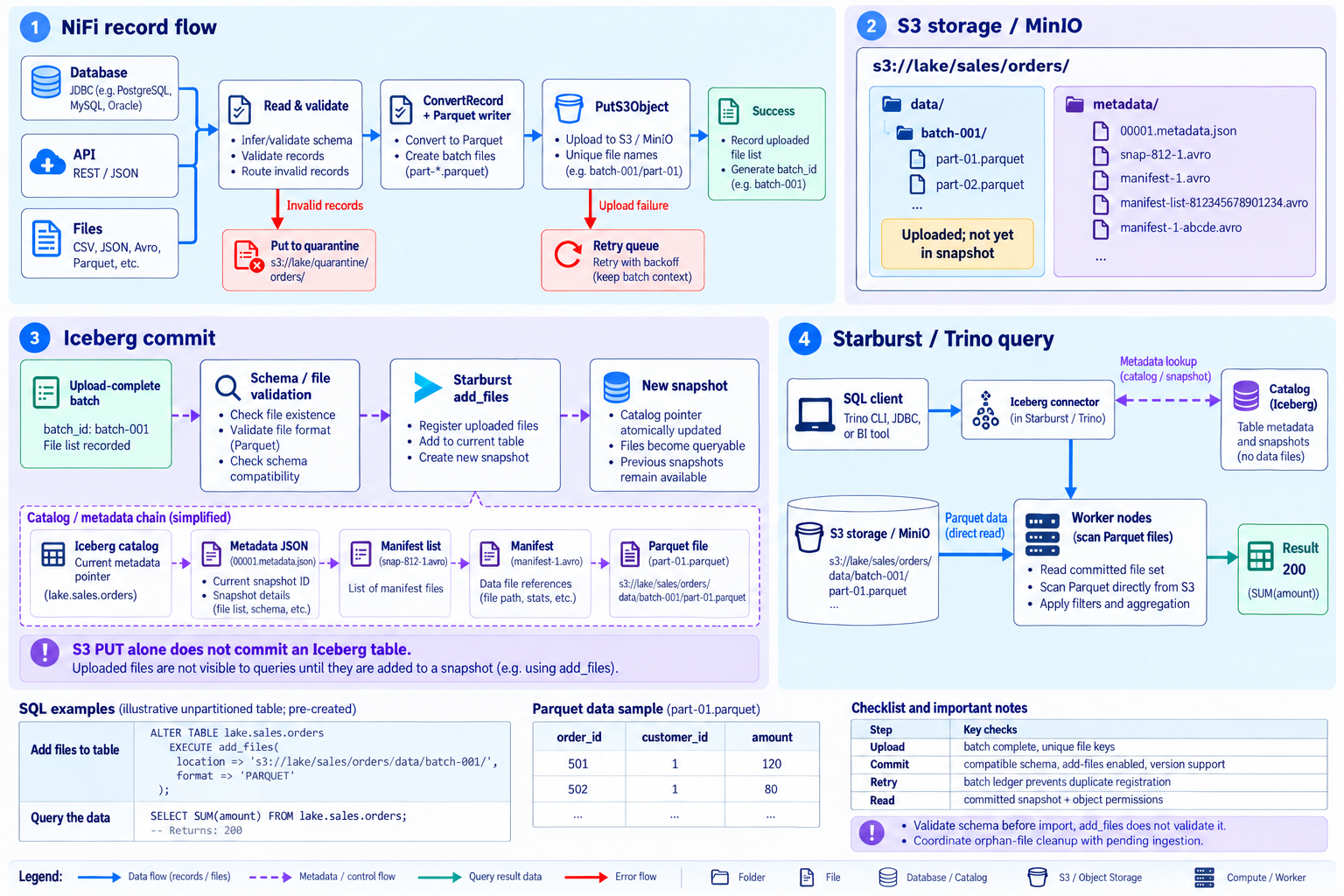
Official documentationFrom NiFi and S3 to Iceberg queries
Separate Parquet uploads from Iceberg metadata commits before querying with Starburst.
Read diagram, product and service details
- 1.NiFi records
- Validate, convert to Parquet, upload with PutS3Object and record the successful batch file list.
- 2.S3 files
- Store files under the table data path on MinIO or S3 storage. Upload alone does not include a file in an Iceberg snapshot.
- 3.Iceberg commit
- Validate the completed batch schema before registering files with add_files or another supported procedure. add_files does not validate schema compatibility.
- 4.Starburst query
- Resolve the committed snapshot through the catalog; workers read referenced Parquet files directly from storage.
Example uses a pre-created unpartitioned table. Verify add_files support/configuration, schema and permissions; prevent duplicate imports and cleanup of pending files.
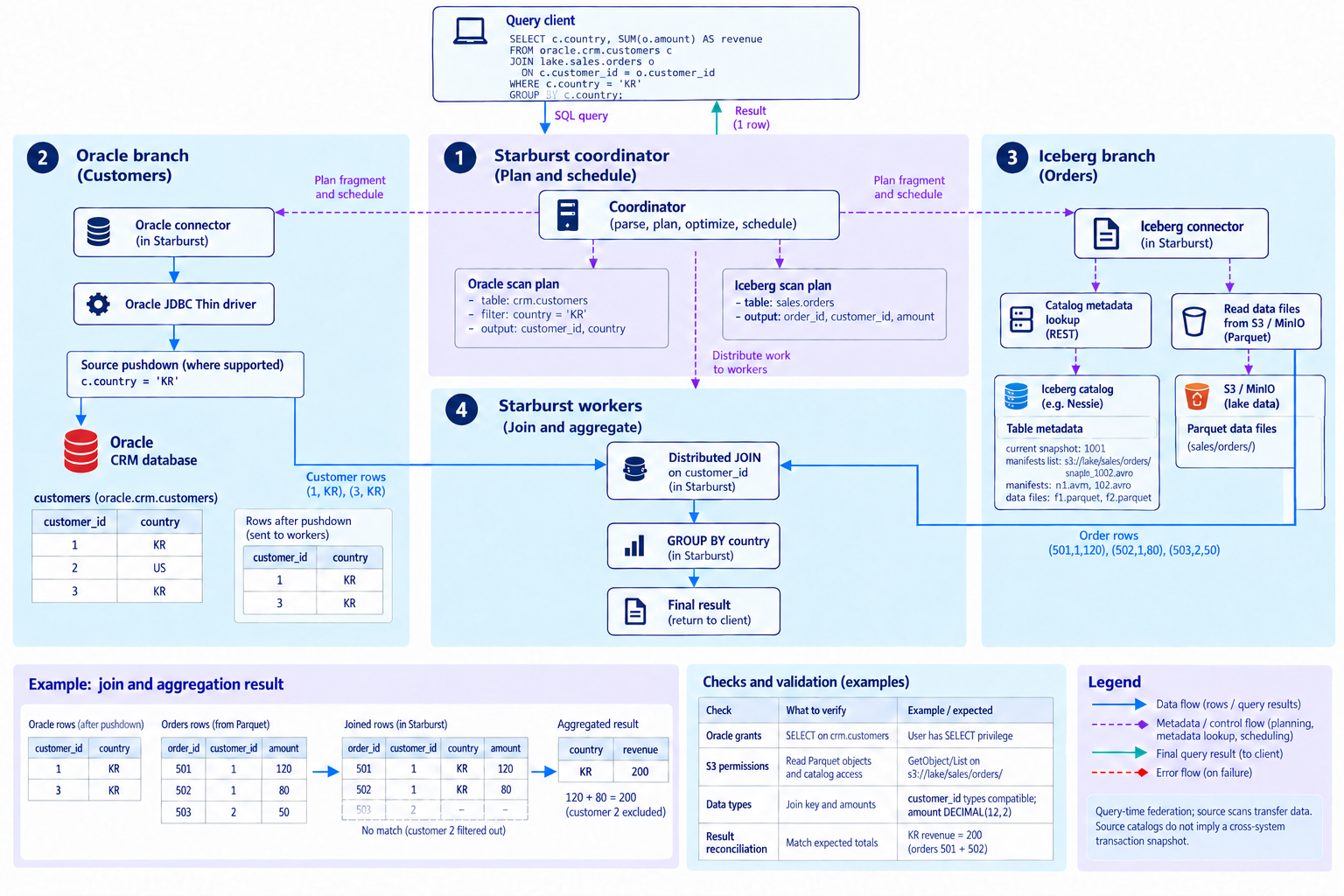
Official documentationJOIN Oracle and Iceberg in one SQL query
Combine Oracle customers and Iceberg orders on S3 inside Starburst workers.
Read diagram, product and service details
- 1.Business SQL
- Join customers and orders on customer_id, filter by country and aggregate revenue.
- 2.Oracle read
- Use the Oracle connector and Oracle JDBC Thin driver, pushing supported filters to the database.
- 3.Iceberg read
- Resolve committed file references from the catalog and read Parquet from MinIO or S3.
- 4.Distributed JOIN
- Combine both inputs in workers. The sample KR orders of 120 and 80 produce revenue of 200.
This cross-catalog JOIN runs in Starburst. It does not guarantee a common transactional snapshot across source systems. Validate keys, types and permissions.
Official documentationOracle pushdown and Iceberg scan optimization
Show where Oracle rows and columns are reduced and Iceberg files and columns are skipped.
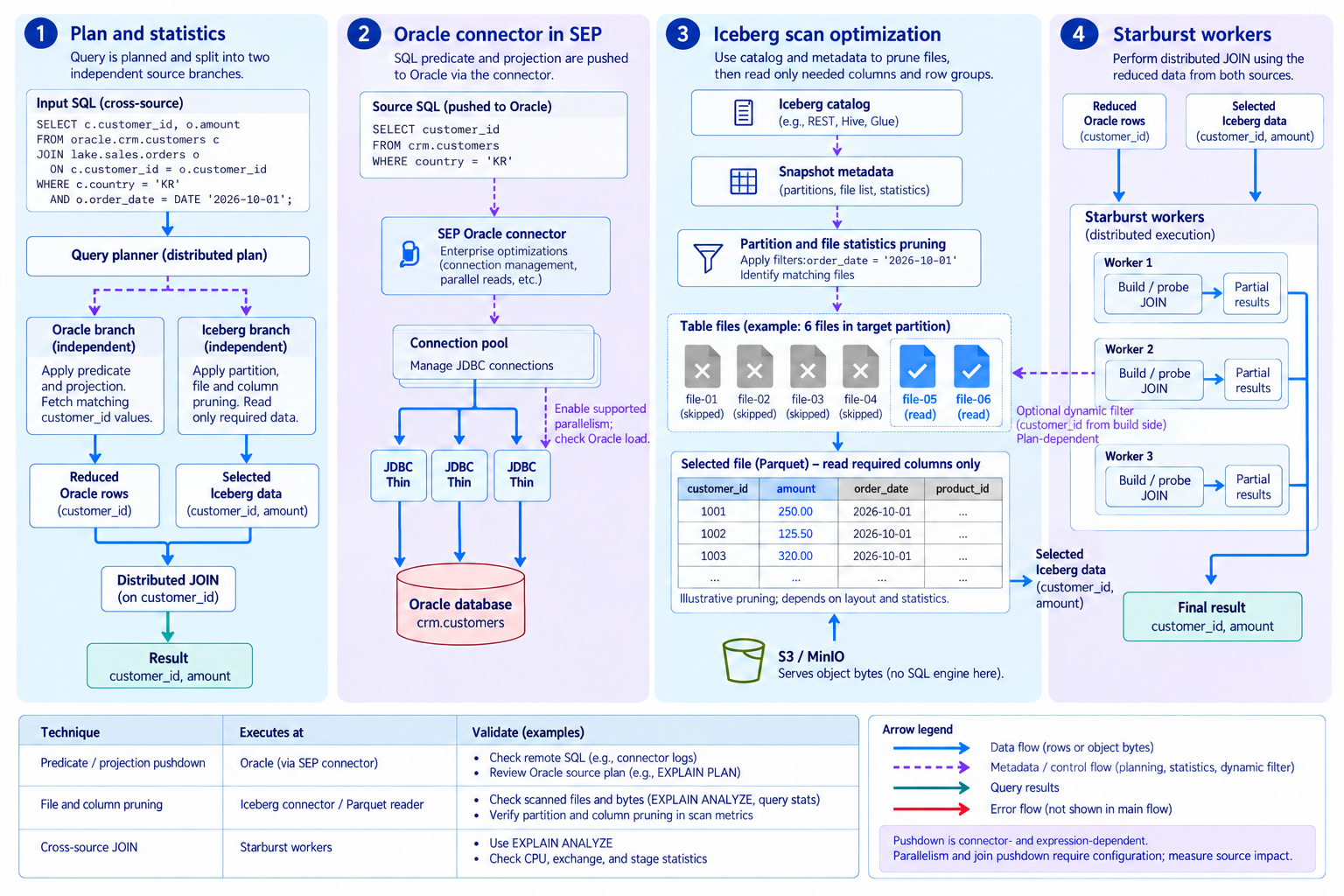
Read diagram, product and service details
- 1.Plan and statistics
- Build independent Oracle and Iceberg scan plans using predicates and available statistics.
- 2.Oracle optimization
- Push supported filters and projections into Oracle, with pooling and configured parallel reads.
- 3.Iceberg pruning
- Use partition/file statistics and Parquet column or row-group reads to reduce scanning. S3 serves object bytes.
- 4.Worker JOIN
- Join the reduced inputs in Starburst. Dynamic filtering is plan-dependent; inspect EXPLAIN ANALYZE and scanned bytes.
The Oracle connector uses the Oracle JDBC Thin driver. Distinguish SEP connector enhancements from the driver; verify configured parallelism, supported pushdowns and source load with plans and measurements.
Official documentationStarburst AI — connect enterprise data to AI agents
Build MCP access, conversational analytics, SQL AI functions and RAG on data federation. See both the data access paths and the context sent to models.
Documentation reviewed: Starburst Enterprise 483-e STS · 2026-10-18. These are reference workflows; confirm support for your deployed version, licenses and models.
Three paths from enterprise data to AI responses
AIDA, external agents and SQL applications use Starburst’s data access foundation.
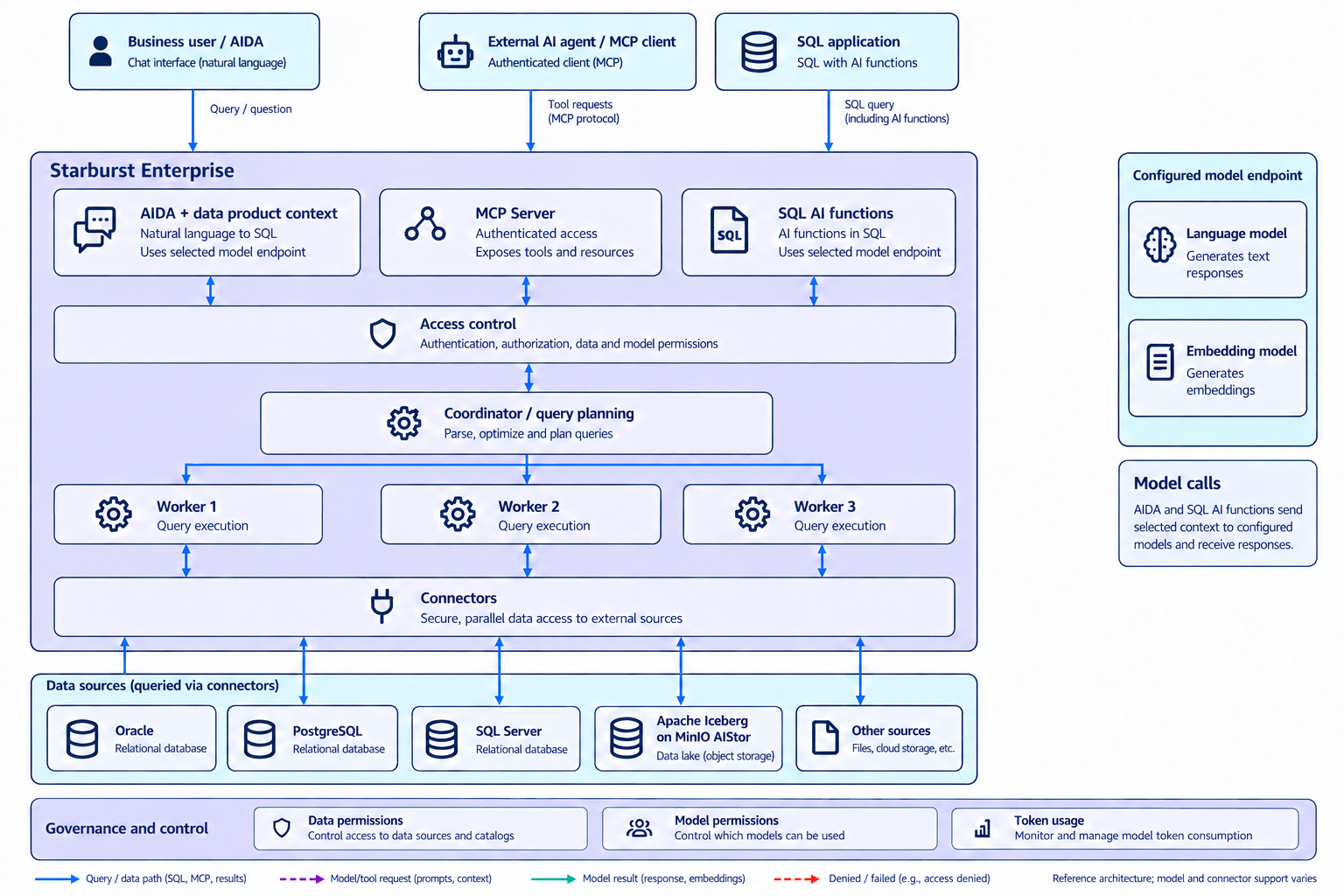
- 1.Choose an interface
- Business users use AIDA, external agents use MCP, and developers use SQL AI functions. An external MCP client’s model setup is separate from SEP’s configured models.
- 2.Query distributed data
- Query connected sources such as Oracle, PostgreSQL and SQL Server alongside Iceberg on MinIO AIStor. Federation reduces mandatory full preloading; query data still travels.
- 3.Connect model context
- AIDA and AI functions call configured model endpoints. Control model access and review which questions, metadata and selected query results are transmitted.
Starburst does not train or bundle every model. Validate supported integrations such as AWS Bedrock and OpenAI-compatible APIs and each model’s capabilities.
Official documentationGive AI agents data tools through MCP Server
Authenticated external agents discover data and retrieve read-only SQL results.
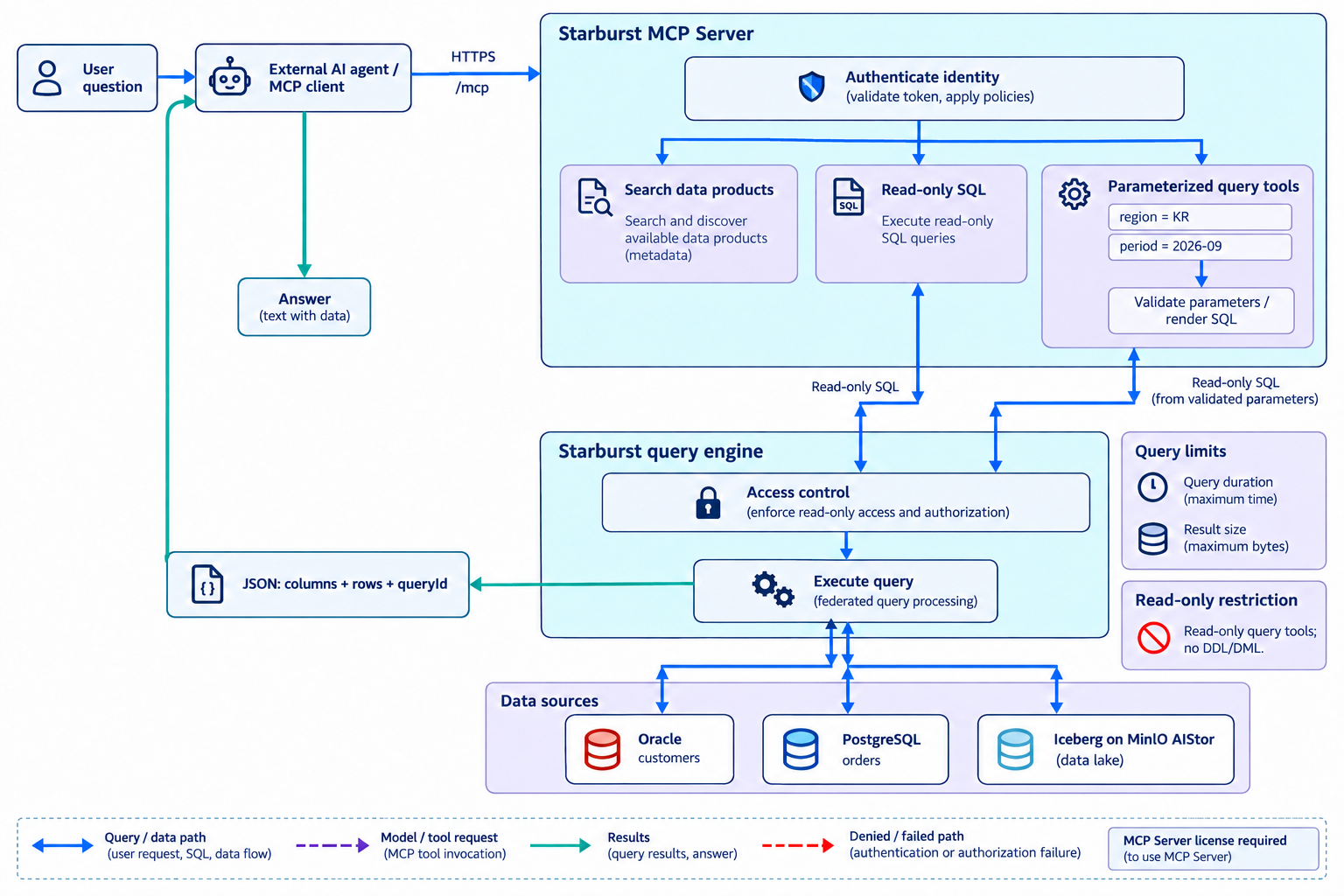
- 1.Authenticate and discover
- Connect to the coordinator’s HTTPS /mcp endpoint with credentials. When relevant, use tools such as searchDataProducts to identify suitable data products.
- 2.SQL or parameterized tools
- Submit a read-only query or supply region and period values to a predefined tool. Parameterized tools validate inputs and enforce a read-only final statement.
- 3.Execute and return
- Run distributed SQL under the connected identity’s permissions and return JSON with columns, rows and queryId. The external agent uses those results in its answer.
An MCP Server license is required. queryReadOnly runs synchronously with execution-time and result-size limits. These query tools are not general-purpose database mutation tools.
Official documentationAsk AIDA and inspect SQL, tables and charts
Data product descriptions and business rules provide context for natural-language analysis.
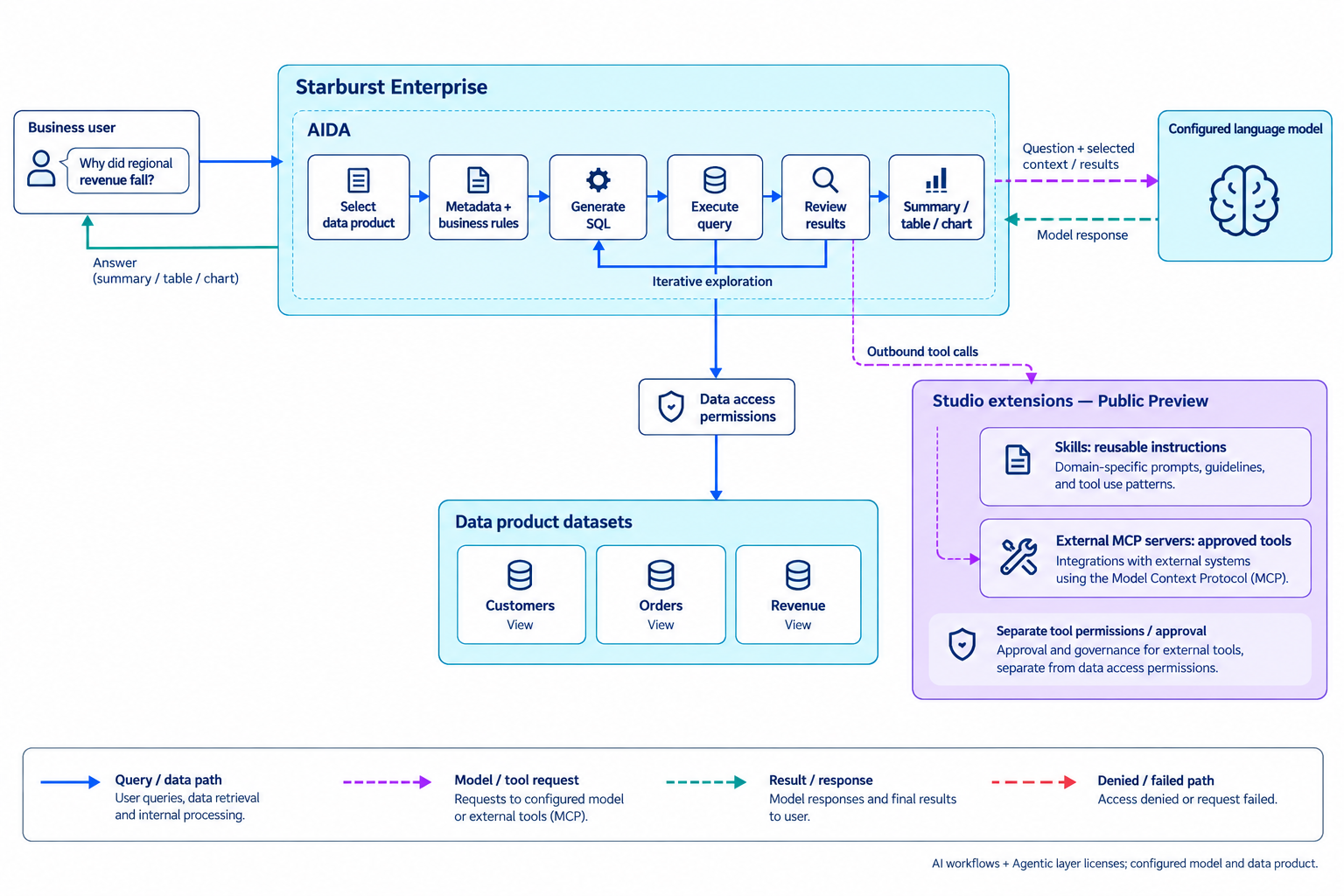
- 1.Select analysis context
- Choose a language model and data product, then review metric definitions, time conventions and business rules. The selected data product defines the default analysis scope.
- 2.Ask, execute and inspect
- AIDA generates and runs SQL, using exploratory queries and further analysis when needed. Inspect the SQL, summaries, tables or charts and refine the question.
- 3.Extend with external tools
- Optionally use Skills instructions and external MCP tools. This is AIDA → external server, distinct from external agent → Starburst MCP Server. Configure tool permissions and call approval separately.
AIDA requires AI workflows and Agentic layer licenses, a configured model and data products. Studio Skills and external MCP connections are public preview.
Official documentationCombine text processing and RAG with SQL AI functions
Connect embedding generation, similarity search and LLM calls to data workflows.
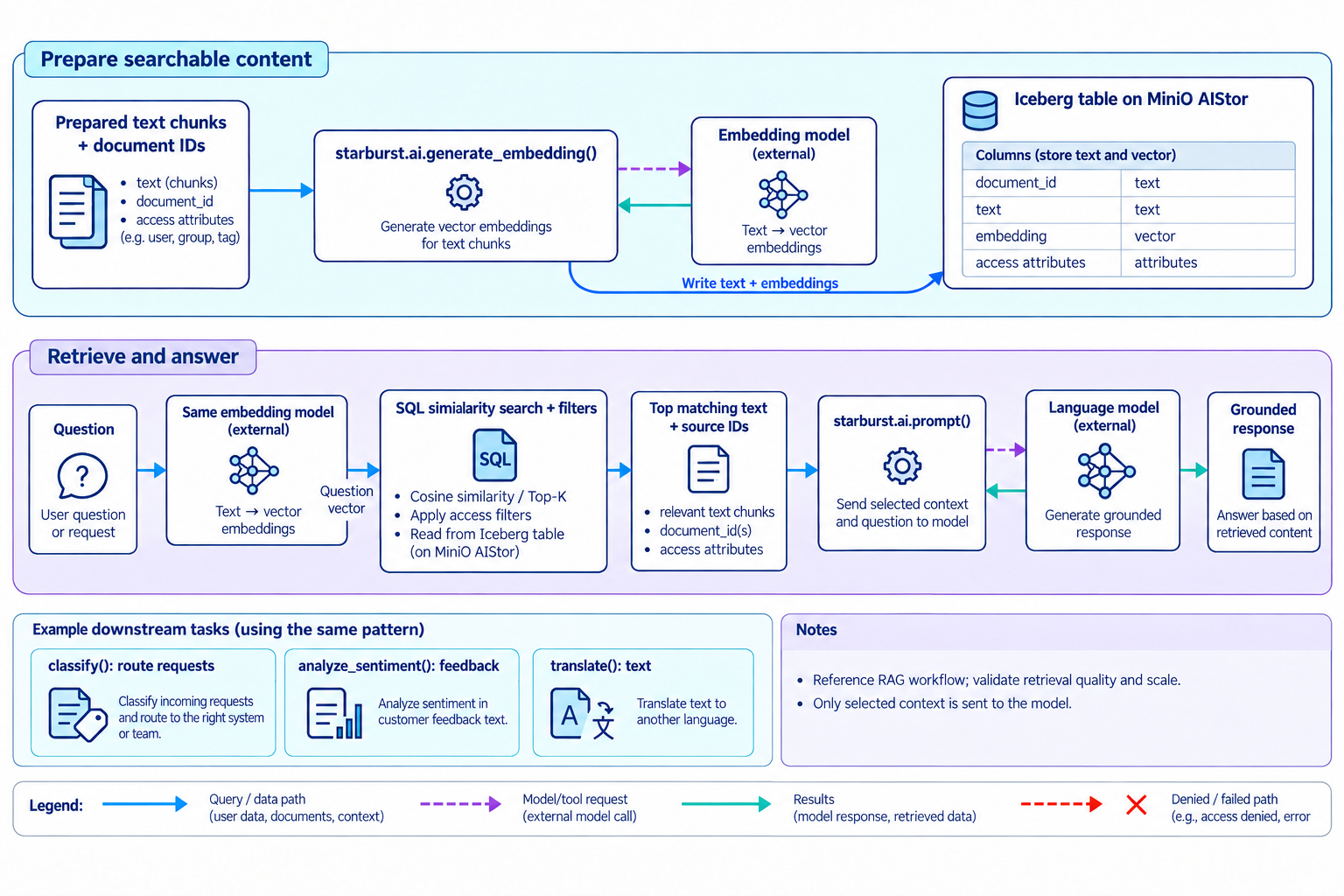
- 1.Prepare text and vectors
- Apply starburst.ai.generate_embedding() to prepared text. Store source IDs, text, embeddings and access attributes in a selected table such as Iceberg.
- 2.Retrieve context and answer
- Embed the question with the same embedding model, then use similarity calculations and filters to retrieve relevant data. Pass selected text and source IDs to starburst.ai.prompt().
- 3.Apply AI in business SQL
- Use starburst.ai.classify(), analyze_sentiment() and translate() for request routing, sentiment and translation. AI functions require an AI workflows license, a configured model and built-in access control.
This is a reference RAG workflow. PDF parsing and chunking are separate preparation steps. Validate retrieval quality, latency, scan volume and model costs; do not assume a dedicated vector database or ANN index is never needed.
Official documentationEnrich data product descriptions for AI analysis
AI proposes column and dataset meanings; a data owner reviews and saves them.
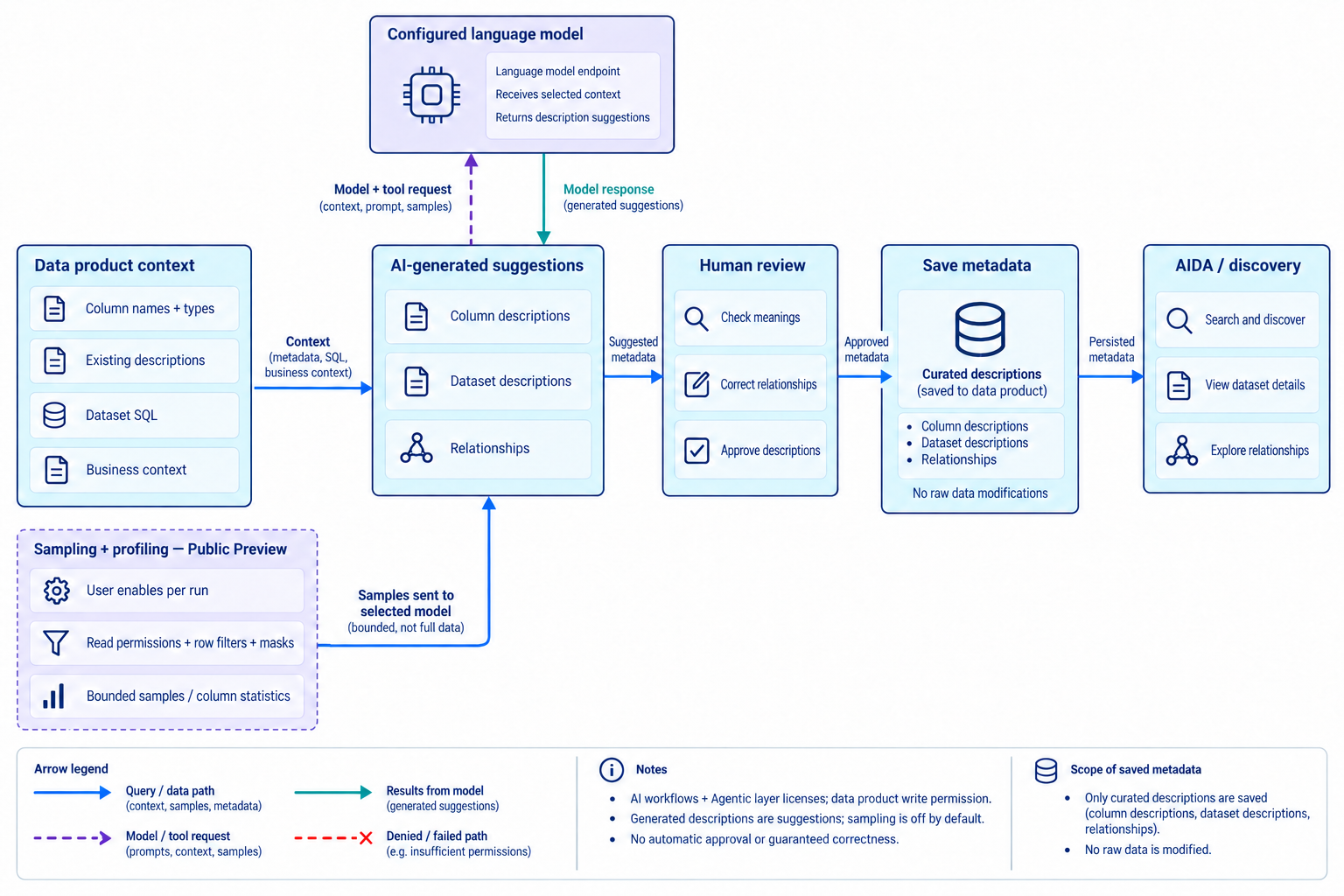
- 1.Use existing context
- Generate column, dataset and data product descriptions from names, types, existing descriptions, dataset SQL and business context.
- 2.Sample only when enabled
- For each run, the user can allow bounded samples and statistics under their own read permissions, row filters and column masks. These are sent to the selected model.
- 3.Review and save
- Review and correct inferred meanings and relationships, then save. This updates descriptions, not source data values, and supports AIDA analysis and discovery.
AI workflows and Agentic layer licenses and data product write permission are required. Sampling/profiling is public preview and off by default.
Official documentationManage data access, model access and AI behavior separately
Distinguish accessible data, permitted models and the assistant’s response policies.
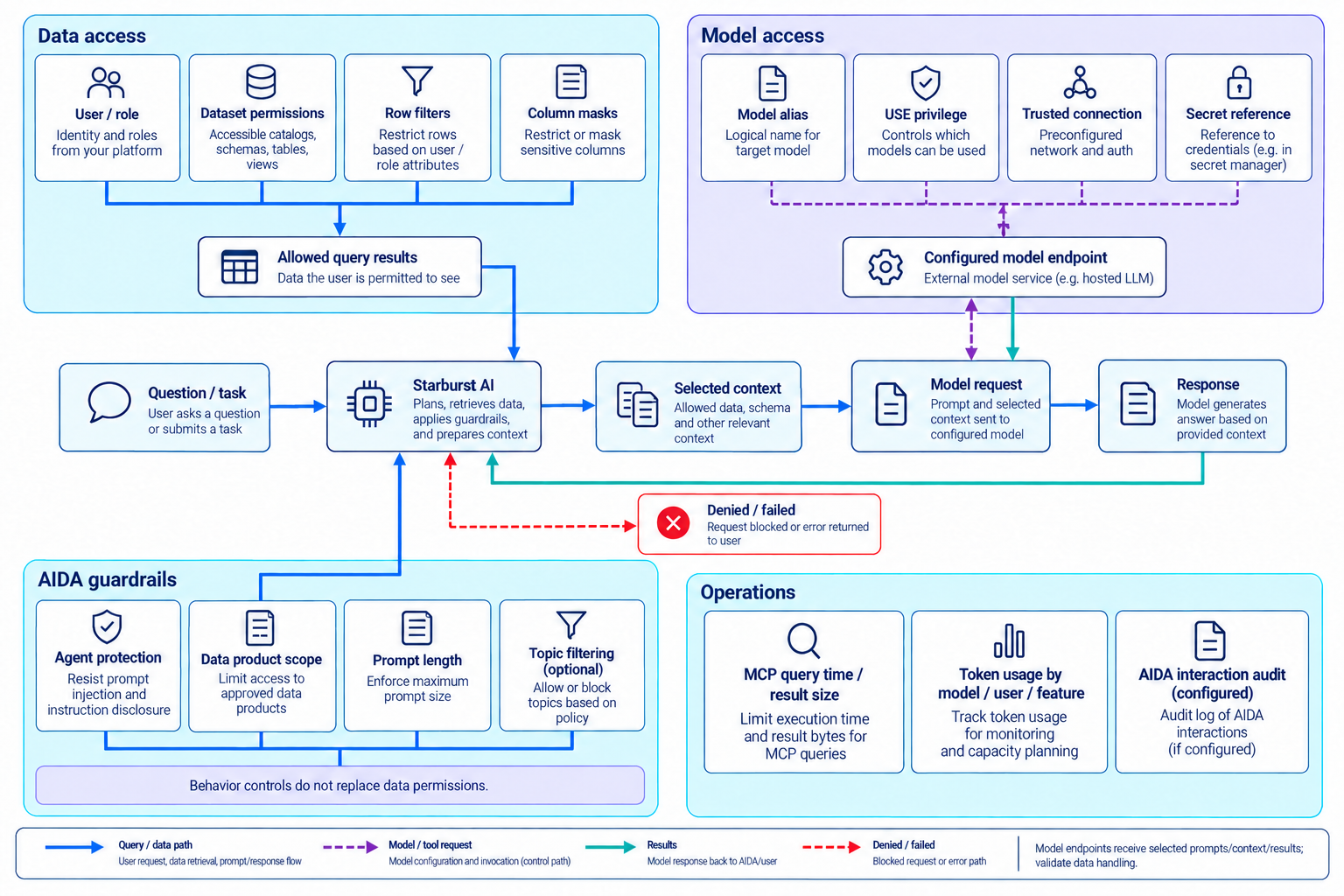
- 1.Data and model access
- Separate dataset permissions, row filters and column masks from model USE privileges. Manage Trusted connection endpoints and credentials through secret references.
- 2.AIDA guardrails
- Configure agent protection, data product scope, prompt length and optional topic filters. Some controls use model instructions, so retain database security enforcement.
- 3.Observe and constrain
- Inspect token usage by model, feature and user; limit MCP query duration and result size. Configure the AIDA interaction audit logs required by your operating procedures.
Review the questions, context and results transmitted to model endpoints. Do not assume all guardrail refusals are centrally audited in a dashboard. External MCP tools need their own permission controls.
Official documentationRequirements and feature availability
Scope the deployment by license, configuration and public-preview status.
| Feature | License and configuration | Scope to validate |
|---|---|---|
| MCP Server | MCP Server license, server enablement and authentication | Read-only queries and parameterized tools; execution-time and result-size limits. Agent tools also require their AI configuration. |
| SQL AI functions and models | AI workflows license, configured model and built-in access control | Language/embedding capabilities, provider API compatibility, invocation cost and output quality. |
| AIDA | AI workflows + Agentic layer licenses, language model and data products | Analysis uses the selected data product and business rules. Review generated SQL and answers. |
| Data product enrichment | AI workflows + Agentic layer licenses, model and data product write permission | Sampling also needs data read access. Sampling/profiling is public preview and must be enabled for each run. |
| AIDA extensions | AIDA configuration and feature-specific administrator/user privileges | Skills and external MCP connections are public preview. Configure external tool permissions and call approval separately. |
| Operations | Administrator privileges and feature-specific configuration | Guardrails, token usage and configured interaction audit logs. Usage reporting is distinct from enforced budgets. |
Data Dynamics helps validate the target SEP version and subscription, connect models, curate data products, design MCP tools, configure permissions, evaluate representative questions and train operators. Diagrams are reference architectures, not product screenshots or performance guarantees.
Official documentation: AI token usageServices from Data Dynamics
Connect product and workload choices to assessment, validation and operational handover.
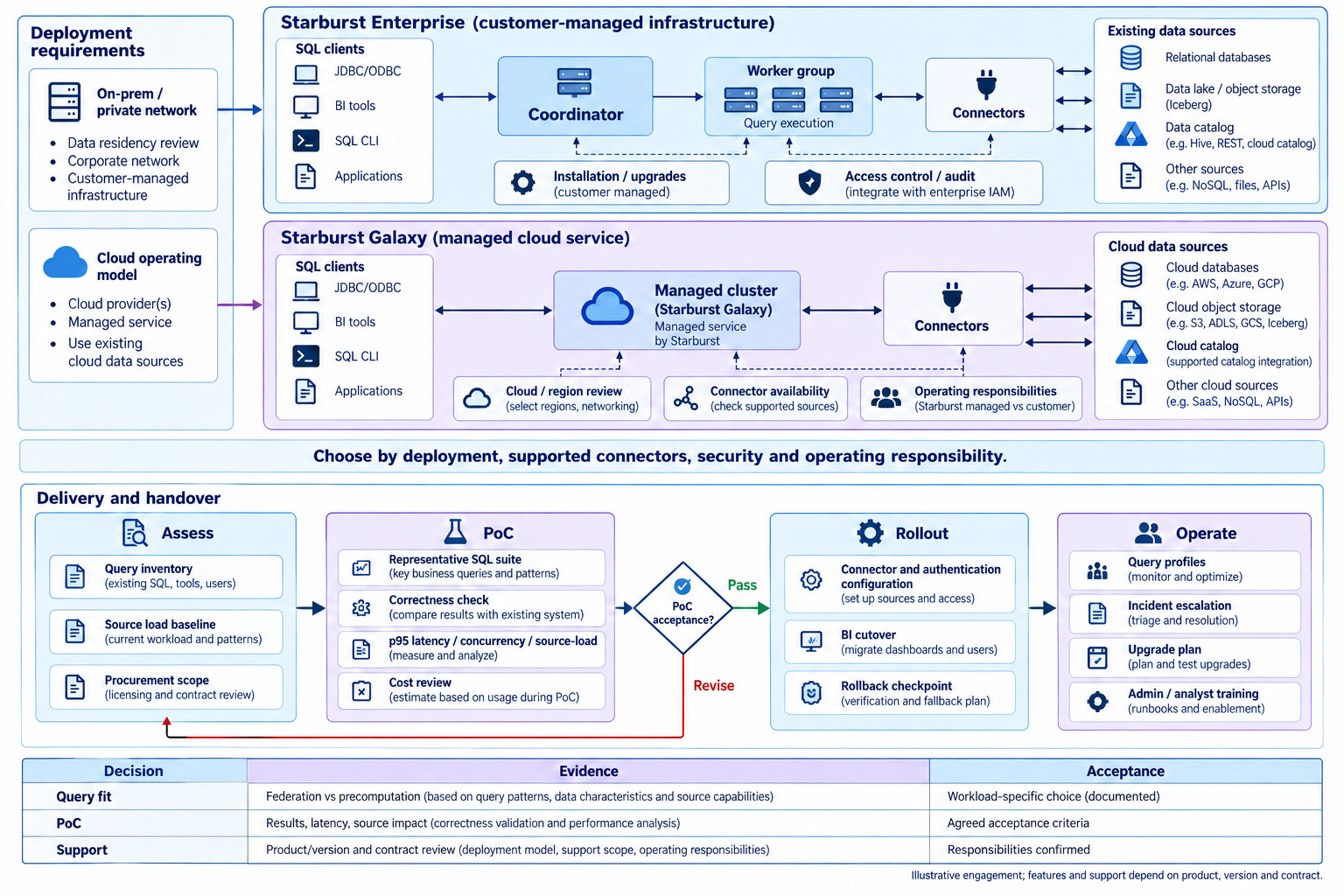
Read diagram, product and service details
- 1.Assess requirements
- Inventory existing systems, data, workloads and operating constraints to define scope.
- 2.Select products and configuration
- Review products, deployment, capacity, access and procurement scope for the intended workloads.
- 3.Validate and transition
- Check correctness, performance and integration with representative workloads, acceptance criteria and recovery procedures.
- 4.Operate and train
- Prepare monitoring, runbooks, upgrade plans and team training for operational handover.
The Starburst Product Family
- Starburst Enterprise
A self-managed commercial Trino distribution deployed on your own infrastructure (on-prem · private VPC). Retain full control of your data while using enterprise security and operations features — suited to data gravity, network isolation, and data-residency requirements.
Self-managed · K8s · OpenShift · Ansible · LTS / STS · Data sovereignty · air-gap
- Starburst Galaxy
A fully managed SaaS running on AWS, Azure, and GCP. Cluster autoscaling, pay-per-query pricing, and cross-cloud federation let you start analyzing immediately with near-zero operational burden.
Fully Managed · Auto-scaling · Multi-cloud · Pay-per-query
For on-premises and private-environment enterprises (especially regulated industries), SEP is the usual starting point; for cloud-first organizations, Galaxy.
Plan around your actual workload
Define scope using data requirements and operating conditions, not a feature checklist alone.
- Query strategy
Separate workloads suited to federation from those requiring precomputed or ingested data.
- PoC validation
Measure latency, concurrency, result correctness, source database load and execution cost.
- Deployment and support
Verify Enterprise and Galaxy connectors, features, operating responsibilities and contractual support.
Services from Data Dynamics
- License Sales
We assist with Starburst Enterprise and Galaxy license quotes and orders.
- Capacity/node-based sizing
- PoC license support
- Renewal & expansion consulting
- Technical Support
We provide end-to-end technical support for Starburst, from implementation to operations.
- Installation & upgrade support
- Query performance tuning
- Incident response & escalation
- Training · PoC
We deliver Trino/Starburst training and tailored PoC engagements.
- Administrator courses
- Data analyst training
- Custom PoC design & execution
We bring hands-on experience building Trino·Iceberg·object-storage lakehouses and migrating from Hive/Impala, and we continuously publish technical material on our blog.
Illustrative adoption workflow. Confirm product/version availability, acceptance criteria and service scope for your environment and contract.
Explore Starburst comparisons, performance and customer examples
How Trino and Starburst Enterprise Relate
Starburst Enterprise is a commercial Trino-based distribution with enterprise features and support.
Trino
An open-source distributed MPP SQL engine (formerly PrestoSQL). An always-on coordinator + worker architecture provides interactive response on petabyte-scale data, releasing a new version roughly every two weeks.
Starburst
Founded by the creators of Trino, Starburst is the largest Trino expert organization, contributing about 84% of Trino code commits in 2024.
Trino-based engine
Product-specific features, patches and optimizations build on upstream Trino. Validate behavior and performance for the chosen versions and settings.
Expanded surface
On top sit security (BIAC, Ranger), exclusive connectors, Warp Speed acceleration, management UI and Insights, supported deployment paths, and 24×7 support contracts.
SEP = Trino engine + enterprise layers
A shared Trino foundation does not guarantee identical functionality or performance across versions and configurations.
Why Starburst — Four Core Values
Data Federation
JOIN multiple sources in a single SQL without moving or copying data — the need to pre-consolidate via ETL disappears altogether.
Iceberg Native
Full support for hidden partitioning, partition evolution, time travel, and ACID, with automated table maintenance such as compaction and snapshot expiration.
Performance & Reliability
Warp Speed smart indexing and caching delivers up to 5× faster queries and 10× less CPU; fault-tolerant execution (FTE) is hardened for batches up to 60TB.
Fine-Grained Security
Row/column-level RBAC and ABAC, dynamic column masking, Apache Ranger integration, and query audit — meeting regulated-industry requirements at the platform level.
Connectors — Reaching the Long Tail of Enterprise Data
Typical enterprise data lives in places like Oracle, Teradata, SAP, and Salesforce. That is why SEP-exclusive connectors account for much of the license value.
SEP-Exclusive Connectors (not in upstream Trino)
Snowflake · Teradata · IBM Db2 · SAP HANA · Salesforce · Azure Synapse · Greenplum · Netezza · Cosmos DB · DynamoDB · Splunk · Neo4j · Generic JDBC · Stargate (cluster-to-cluster federation)
Enhanced Versions of Upstream Connectors
Stronger pushdown, Warp Speed integration, extra authentication — Hive · Iceberg · Delta Lake · Oracle · BigQuery · SQL Server · PostgreSQL · MySQL · MongoDB · Kafka · Elasticsearch · Redshift · ClickHouse and more
Identical to Upstream Trino
DuckDB · Druid · Pinot · Prometheus · Redis · OpenSearch · Google Sheets and the rest of the community connectors
Rule of thumb: if "Trino on S3 + PostgreSQL" covers your requirements, OSS is enough. The moment Snowflake, Oracle, Teradata, SAP, or Salesforce appears in your architecture, the scale tips toward SEP.
Apache Iceberg Lakehouse — Beyond the Partition Wall, With Operations Automated
Iceberg is an open table format that turns piles of files on object storage into database-like tables. Hidden partitioning and partition evolution are shared benefits of Trino + Iceberg; SEP automates the operational chores that remain — small files, snapshots, statistics.
Shared Benefits of Trino + Iceberg
- Hidden Partitioning — Partitions are defined as column transforms (day · bucket · truncate) rather than directories — filters on the original column prune automatically, eliminating accidental full scans.
- Partition Evolution — Change partition strategy without rewriting data — a single query transparently handles mixed old/new specs.
- ACID · Time Travel — Snapshot-based transactions, point-in-time reads (FOR VERSION/TIMESTAMP AS OF), schema evolution, and snapshot rollback to recover from bad writes.
- Manifest Pruning — File-level min/max statistics drive pruning — scaling to millions of files without an RDBMS metadata bottleneck.
What SEP Adds — Automated Table Maintenance
- Automatic Compaction — Runs optimize (small-file merging) automatically on a schedule.
- Snapshot & Orphan-File Cleanup — Automates expire_snapshots and remove_orphan_files to prevent metadata bloat.
- Automatic Statistics Collection — Keeps the table statistics used by the CBO up to date.
- Streaming Ingest · File Loader — Managed continuous ingestion from Kafka and more into Iceberg tables — no separate Spark/Flink pipeline required.
You can run the same commands manually or on a schedule in OSS Trino, but the operational responsibility falls on your platform team. SEP delivers this as managed automation — and combined with S3-compatible object storage such as MinIO, it completes the on-premises lakehouse.
Performance — Warp Speed and Benchmarks
Evaluate caching, indexing and data-layout optimizations for each workload. The figures below represent specific benchmark conditions.
Faster query execution — Warp Speed (TPC-DS SF1000)
CPU time saved — Warp Speed
Query performance vs Hive (TPC-DS · Iceberg)
Cost efficiency vs cloud DWs
Warp Speed Effect — vs Standard Execution
Standard execution = 100, lower is better (TPC-DS SF1000 · Iceberg)
A benchmark example normalized to a baseline of 100. Results vary with product, version, configuration and workload.
Query Execution Time vs Hive
Seconds, lower is better — 1TB source (S3 · Parquet), Starburst 476-e vs Hive 3.1.3
Source: Concurrency Labs benchmark report (2025-09) · TPC-H 9 nodes / TPC-DS 17 nodes (32 vCPU · 128GB each)
Warp Speed Smart Indexing & Caching
Automatically picks the optimal index type per block (bitmap · dictionary · tree) and caches hot data on worker NVMe SSDs — accelerating repetitive, selective workloads with no manual index design.
Up to 22× vs Hive
TPC-DS on Iceberg: 37,901s → 1,737s (10.5 hours → 29 minutes). Swapping the engine alone yields 6–8×; migrating to Iceberg raises it to 12–22× — gains grow step by step, no big bang required.
Price-Performance vs Cloud DWs
On SQL over open table formats, up to 6.3× faster queries and up to 12.7× lower cost — Starburst is the only engine near the bottom on both runtime and cost.
Fault-Tolerant Execution (FTE)
Long-running batch and ETL queries recover automatically instead of failing outright — enterprise-hardened up to 60TB scale.
Performance figures are from Starburst's published benchmarks and vary by workload — we recommend PoC validation before adoption.
Security and Access Control — Table Stakes for Regulated Industries
Authentication is fine in OSS Trino. Where they diverge is fine-grained authorization and audit — the decisive reason for SEP in finance, healthcare, and the public sector.
Built-in Access Control (BIAC)
SEP's native authorization model — role-based (RBAC) and attribute-based (ABAC) permissions at catalog/schema/table/column/row level, managed through a UI.
Column Masking · Row Filtering
Dynamic masking of sensitive columns and row-level filters out of the box — meeting personal-data and transaction-data protection requirements.
Apache Ranger Integration
Global/catalog/column/row level — reuse the same Ranger policies you already run on Hive/HDFS.
Credential Passthrough
Kerberos and password credential passthrough (with caching) — workers access sources under the user's identity without long-lived service accounts.
Authentication Integrations
LDAP · OAuth2 · JWT · Kerberos plus Okta integration, with user impersonation generalized.
Query Audit
A persistent record of who ran what query, when, against which catalog — instantly answering audit-trail requirements.
Practical effect: policies converge in one place (BIAC or Ranger) and apply uniformly across every connector SEP exposes.
Governance & Operations — Value That Shows at Scale
This is where a pure query engine (Trino) and a data platform (SEP) diverge most — in OSS, every item below must be assembled yourself with separate tools.
Data Products
Publish curated datasets with owners, docs, SLOs, and access policies on top of your catalogs — a self-service marketplace for data mesh architectures.
Starburst Insights
Dashboards for query patterns, resource usage, and slow queries plus data lineage and Apache Atlas integration — answering "what was the cluster doing at 3am yesterday?"
HA · Autoscaling
Coordinator high availability, graceful scaledown that drains workers without killing running queries, and cost automation via auto-suspend, idle shutdown, and cluster scheduling.
Quality · Auto-Classification
Data quality rules, schema change alerts, automatic data classification (sensitive-data detection), and unified search across sources.
Stargate
Cluster-to-cluster federation — route queries across regions, tenants, and borders without copying data, meeting data-sovereignty requirements such as GDPR.
Supported Deployment Paths
Kubernetes Helm charts · Red Hat OpenShift · Starburst Admin (Ansible) · AWS/Azure/GCP Marketplace, with CloudWatch/Stackdriver observability integration.
OSS gets you as far as JMX, logs, and the basic UI — the query history store, the query-respecting autoscaler, and the metrics pipeline above that are yours to build. Priced in engineering hours, "build it yourself" rarely wins.
OSS Trino vs Starburst Enterprise
Engine freshness, openness, and cost favor OSS Trino; security, governance, acceleration, operations, and support SLAs favor SEP — the more regulated and the larger the enterprise, the stronger the case for SEP.
| Category | OSS Trino | Starburst Enterprise (SEP) | Verdict |
|---|---|---|---|
| Core query engine | Full Trino engine — latest features first | Trino-based distribution + product-specific features, patches and optimizations | Tie |
| Security · authorization | Manual file/OPA config, no RBAC UI | BIAC (row/column RBAC·ABAC) · masking · Ranger · audit UI | SEP |
| Governance · catalog | Relies on external tools (OpenMetadata etc.) | Data Products · lineage · quality rules · discovery portal | SEP |
| Performance acceleration | CBO · dynamic filtering | + Warp Speed (auto indexing & caching) · workload management | SEP |
| Table maintenance | Schedule optimize etc. yourself | Automated compaction · snapshot expiry · stats collection | SEP |
| Connectors | 50+ community connectors (variable quality) | Certified connectors + exclusives (Snowflake · SAP · Salesforce…) | SEP |
| Deployment · operations | Self-managed Helm | HA/DR · autoscaling · OpenShift · Marketplace | SEP |
| Support | Community Slack · GitHub | 24×7 · 30-min SLA · dedicated TAM · 12-month LTS patches | SEP |
| Cost · license | Free under Apache 2.0 — no vendor lock-in | Commercial subscription (node/compute-based) | OSS |
If "Trino on S3 + PostgreSQL" covers your requirements, OSS is enough — the moment security, governance, or support-SLA requirements appear, evaluate SEP.
Version Policy — LTS / STS
Trino releases roughly every two weeks. SEP adds a predictable release cadence and an LTS patch lifecycle on top, turning it into a pace enterprises can follow. The leading integer always matches the upstream Trino version — a patch suffix (-e.x) means LTS, none means STS.
| Item | LTS | STS |
|---|---|---|
| Support window | 12 months from release | Until the next STS |
| Patch releases | Provided (-e.0 → -e.1 → …) | None (rolled into the next release) |
| Release cadence | Up to one per quarter (Feb·May·Aug·Nov) | Tracks Trino (frequent) |
| Security (CVE) fixes | Backported as patches | Next STS only |
| Production fit | The default for production | Feature-driven · close to upstream |
Recommended playbook
One controlled upgrade per year, LTS to next LTS — target a line with 9–12 months of support remaining and handle breaking changes line by line.
EOL is a hard deadline
No CVE patches after end of support — at any moment roughly four LTS lines overlap in support, giving you an upgrade runway.
Global Adoption — Led by Financial Services
Real-world migrations and federations from legacy platforms such as Hive/Hadoop, Teradata, and DB2 to Trino-based Starburst.
HDFC Bank
India's largest private bank — from legacy DB2 to an open architecture, running Azure AKS and on-prem OpenShift side by side.
Unified cloud/on-prem governance · lower DB2 spend
Crédit Mutuel Arkéa
France — built a federated query engine over Hadoop while staying on-premises.
10–20× faster Hadoop queries · 550+ users within a year
Bank Hapoalim
Israel — moved 20 years of Teradata to a data lake, choosing Starburst after benchmarking Hive and Spark.
Best performance for high-concurrency ad-hoc + BI
Banco Inter
Brazil — from Amazon Athena to Starburst, unifying discovery, governance, and self-service analytics on one platform.
Insights from days to seconds · $100K saved monthly
Global investment bank
An AML analytics case replacing Hive with Starburst for in-place queries across 100+ countries. It reduces central ingestion of source data; query processing still transfers data.
Data-sovereignty compliance · lower regulatory-fine risk
Global banking group (62 countries)
A cross-border analytics case using Stargate. Source storage locations are retained while regional processing and result transfers are designed explicitly.
20× query performance · data-sovereignty compliance