
Why Airflow 3.3 Celery Workers Silently Hang — The Missing Redis Sentinel Timeout
On Airflow 3.3.0 with CeleryExecutor and Redis Sentinel, workers stayed active but hung forever after a broker disconnect, and tasks failed or were skipped five minutes later. We trace the cause through logs and socket state, then make workers self-recover with sentinel_kwargs timeouts and operation_timeout.
You trigger an Airflow DAG, and tasks sit in queued until they end up failed or skipped about five minutes later. The airflow-worker service is active, and the worker log has nothing after a single Connection closed by server line. Restarting the worker fixes everything immediately.
This post covers that incident on Airflow 3.3.0 with CeleryExecutor and Redis Sentinel. The cause was not a bug in Airflow or Redis. It was a missing timeout on Sentinel queries. We walk through how logs and socket state narrowed down the cause, and how changing two configuration files made workers recover on their own, without a restart.
The environment was Airflow 3.3.0 (CeleryExecutor), a three-node Redis Sentinel (master_name=redis-ha), and three Airflow nodes run by systemd. We reproduced the same failure on a test cluster (10.0.1.112–114), applied the fix, and injected the failure again to confirm self-recovery.
1. Symptoms: the service is active but does no work
- When a DAG runs, tasks stay
queuedfor a long time and then becomefailed/skippedabout five minutes later, over and over. systemctl status airflow-workerreports active. It looks healthy.- After
Connection closed by serverin the worker log, nothing else is logged. There is no sign of a reconnect attempt. - Restarting the worker restores service immediately.
That last point makes it tempting to file this as "restart the worker now and then." But the fact that a restart fixes it is itself a clue to the cause.
2. Evidence: what the logs and sockets tell us
Worker — permanent silence after the disconnect
Oct 13 20:48:45 test2.lab.data-dynamics.local airflow[19583]: redis.exceptions.ConnectionError: Connection closed by server.Seven minutes later, this is still the last line. Normally a Connected to sentinel://... reconnect line should appear within seconds.
Worker sockets — waiting on a Sentinel that never answers
$ ss -tnp | grep celery
ESTAB      0  0  10.0.1.112:39334  10.0.1.112:26379  (celeryd)
CLOSE-WAIT 1 0 10.0.1.112:35478 10.0.1.112:6379 (celeryd)- The connection to
26379(Sentinel) is ESTABLISHED. TCP is connected but no response arrives, so the worker keeps waiting for one. - The connection to
6379(Redis master) is in CLOSE-WAIT. The server closed it, and the worker left it behind without cleaning up. - The worker never even tried the healthy Sentinels (113 and 114). It was stuck on the first Sentinel in the broker URL list.
Scheduler — publish timeouts, then a retry five minutes later
[error] Process timed out  [task] loc=timeout.py:38
[info ] [Try 3 of 3] Celery Task Timeout Error for Workload: (('ha_failover_test', 'probe_17', ...))
[info ] Marking task as UP_FOR_RETRY ...
The scheduler was timing out while publishing tasks to the broker. After three failed attempts, it moves the task to up_for_retry.
3. Root cause analysis
Root cause — Sentinel queries have no timeout
The failure unfolds like this:
- A Redis failover or a brief network blip drops the broker connection (
Connection closed by server). - To reconnect, the worker (kombu/redis-py) sends
SENTINEL get-master-addr-by-nameto the first Sentinel in the broker URL list. - But the existing
sentinel_kwargscontains only{"password": ...}and nosocket_timeout. - If that first Sentinel happens to accept TCP connections but not respond (a node mid-failover, a half-open connection, a stalled process), the worker has no way to count it as a failure and waits forever in a blocking read. The logic that moves on to the next Sentinel runs only on an error, and silence is not an error.
- This wait happens in the Celery consumer's main loop. So the process stays alive (active), but task consumption and heartbeats stop, and because there is no exception, nothing is logged.
- Even if the infrastructure recovers within seconds or minutes, the stuck connection never comes back, because there is no client-side keepalive either. A worker restart opens a new connection to whichever Sentinel is healthy at that moment, so service recovers immediately. That is why "a restart fixes it."
Secondary cause — a one-second publish timeout (the "skipped after five minutes")
- The scheduler's CeleryExecutor must finish publishing each task within
[celery] operation_timeout, which defaults to 1.0 second. - During the incident, every publish goes through Sentinel master discovery. With an unresponsive Sentinel in the path, it exceeds one second, and after three
[Try N of 3] Celery Task Timeout Errormessages the task becomesup_for_retry. - This DAG had retries configured, and Airflow's default retry interval (
retry_delay) is 300 seconds (five minutes). If the retry also fails, the task ends upfailed, and depending on trigger rules its downstream tasks areskipped.
Putting it together
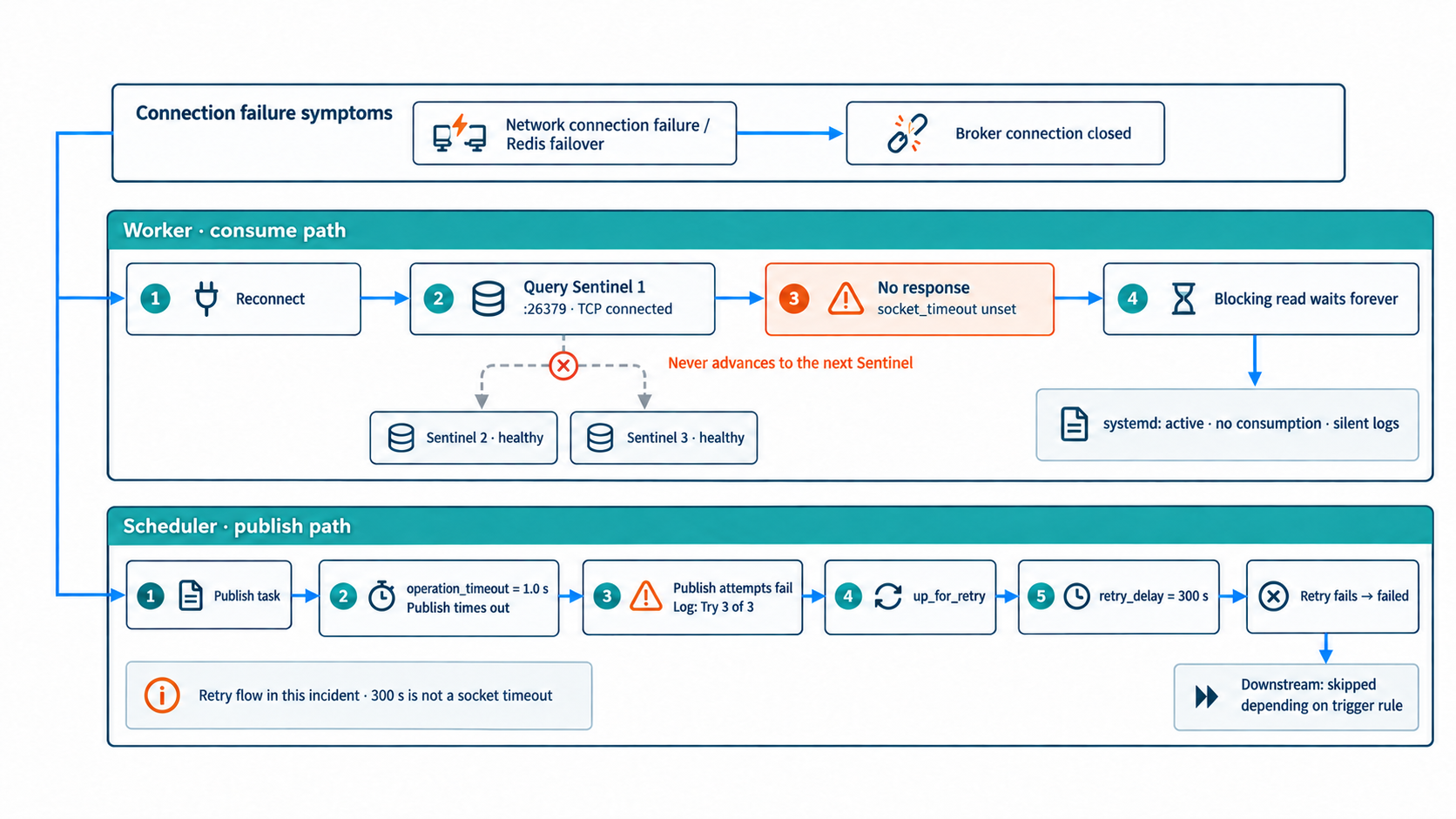
Figure 1. The same incident affects the worker's consume path and the scheduler's publish path separately. The worker never advances to another Sentinel; the scheduler reaches its own publish limit. The five-minute wait in this incident is the DAG retry interval, not a socket timeout.
Network connection failure / Redis failover
  → Redis closes the client connection ("Connection closed by server")
  → Worker tries to reconnect: the first Sentinel happens to be unresponsive (mid-failover / half-open)
  → No timeout, so it waits forever (service is active, logs are silent)
  → Tasks sit in queued + publish timeouts → failed/skipped after five minutes, repeatedly
  → Only a worker restart recovers
4. Fix: edit two config files and restart node by node
Each node has two files to change. Apply the change identically to every Airflow node (every node that runs a worker or scheduler). The paths are from this environment.
| File | Change |
|---|---|
/opt/airflow/airflow-secrets.env | Add socket timeouts to SENTINEL_KWARGS (the key fix) |
/opt/airflow/airflow.cfg | Add [celery] operation_timeout and timeouts/keepalive under [celery_broker_transport_options] |
4.1 Add timeouts to Sentinel queries (the key fix)
In airflow-secrets.env, find the AIRFLOW__CELERY_BROKER_TRANSPORT_OPTIONS__SENTINEL_KWARGS line and add two timeouts to the JSON. Keep the file mode (600) and the single quotes around the whole value.
# Before
AIRFLOW__CELERY_BROKER_TRANSPORT_OPTIONS__SENTINEL_KWARGS='{"password": "<sentinel password>"}'

# After
AIRFLOW__CELERY_BROKER_TRANSPORT_OPTIONS__SENTINEL_KWARGS='{"socket_timeout": 2, "socket_connect_timeout": 2, "password": "<sentinel password>"}'
socket_timeout: 2— gives up on an unresponsive Sentinel after two seconds and moves to the next one. This directly prevents the permanent hang.socket_connect_timeout: 2— keeps the TCP connect to a Sentinel from blocking for long.- If you don't use Sentinel authentication, add just the two timeouts without
password. Add this line even if your environment doesn't have it at all.
Environment variables take precedence over airflow.cfg. If the same key is set in both places, the environment variable's JSON is used as a whole and the two values are not merged, so put the credentials and the timeouts together in one place.
4.2 Publish timeout and broker connection options
In the [celery] section of airflow.cfg, add or change:
[celery]
# Default is 1.0 second. Make it larger than the sum of Sentinel timeouts
# (2 s × N) so a publish succeeds even when one Sentinel is unresponsive.
# This is not a task execution time limit.
operation_timeout = 10.0
Add the following to [celery_broker_transport_options], keeping existing values such as master_name:
[celery_broker_transport_options]
# Must exactly match the Sentinel monitor name.
master_name = redis-ha

# Socket read/write wait limit for Redis data connections.
socket_timeout = 3

# Wait limit for opening a TCP connection to the Redis data server.
socket_connect_timeout = 2

# Helps detect dead connections. Actual detection time follows OS keepalive settings.
socket_keepalive = True

# Retry on command timeout. If only the response is lost, a message may be
# published twice, so tasks must be idempotent.
retry_on_timeout = True

# PING a connection that has been idle for a while before reusing it.
# This does not check every connection in the background every 25 seconds.
health_check_interval = 25

# Options for Sentinel query connections. The environment variable in 4.1 wins if set.
sentinel_kwargs = {"socket_timeout": 2, "socket_connect_timeout": 2}

# When a message received but not ACKed by a worker is redelivered.
# Set it longer than "longest task runtime + queueing slack", not the average.
# This value assumes the longest task finishes within an hour.
visibility_timeout = 7200
What each value is for:
operation_timeout = 10.0: enough time to skip one unresponsive Sentinel in two seconds and find the master through the next one. At one second, a single stalled Sentinel makes publishes fail.socket_timeout = 3: limits only the wait for synchronous command responses. kombu's consume loop is epoll-based, so it does not affect idle waiting when there are no tasks, or long-running tasks.visibility_timeout: too short and running tasks get redelivered and run twice; too long and message recovery is slow after a worker is killed. Base it on the longest task runtime (for example, 3600 seconds for a longest task of 10–20 minutes, 7200 for 30–60 minutes, 14400 for 2–3 hours).
The Airflow Celery provider converts values in this section to int and bool, and parses SENTINEL_KWARGS as JSON, so there were no type issues.
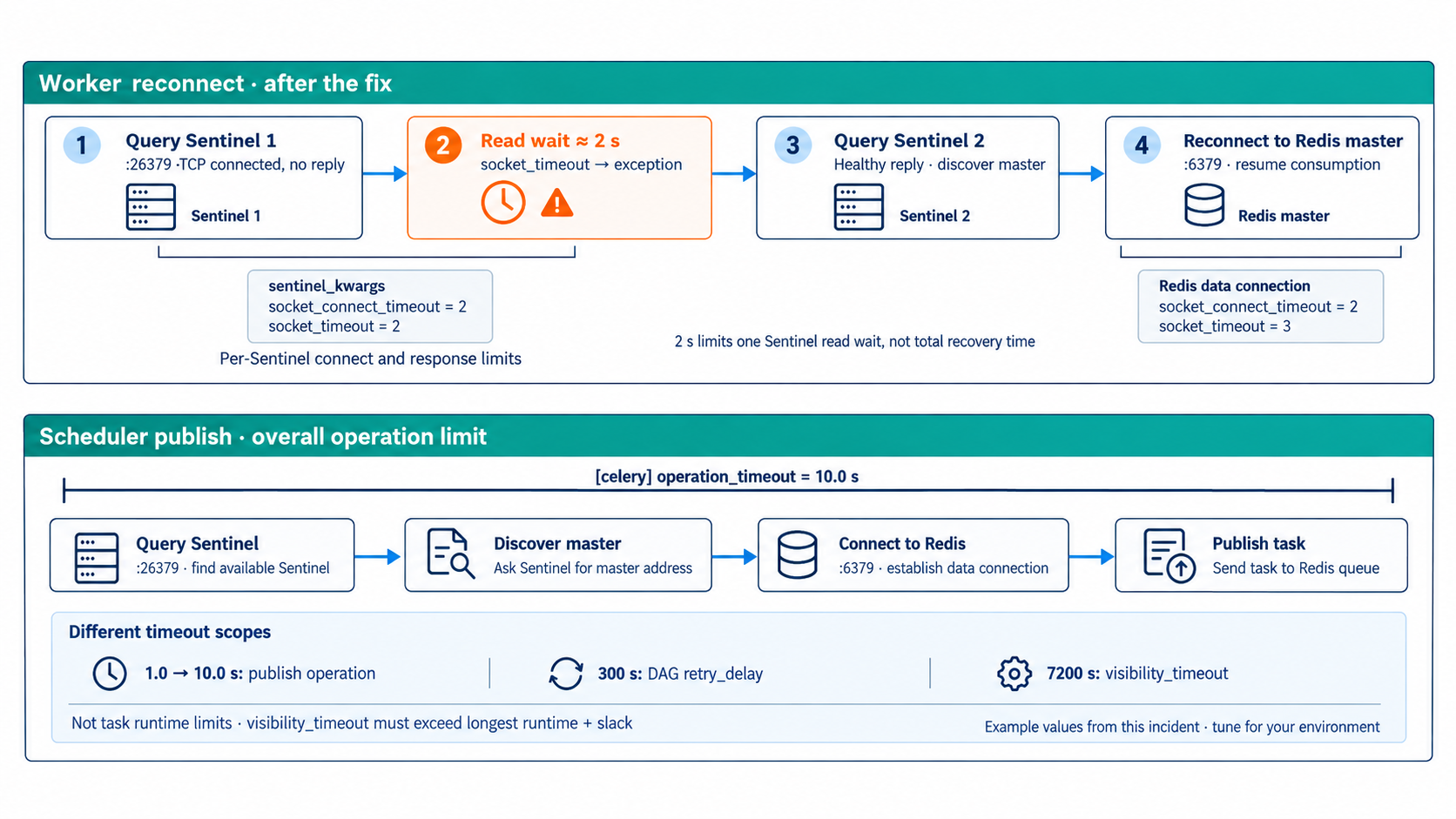
Figure 2. The upper panel follows worker reconnection; the lower panel shows the scheduler's publish operation. sentinel_kwargs applies to Sentinel query connections, while the outer socket options apply to Redis data connections. operation_timeout limits the overall publish operation. Two seconds limits one Sentinel read wait; it does not guarantee total recovery time.
4.3 Restart node by node
The configuration is read only when a service starts, so a restart is required. To avoid downtime, apply it one node at a time.
# On each node, one at a time
# 1) Edit the two files from 4.1 and 4.2
vi /opt/airflow/airflow-secrets.env
vi /opt/airflow/airflow.cfg

# 2) Restart the services that use the broker (no unit file change, so no daemon-reload)
systemctl restart airflow-worker airflow-scheduler

# 3) Check health before moving to the next node
systemctl is-active airflow-worker airflow-scheduler
journalctl -u airflow-worker --since "2 min ago" | grep -E "ready|Connected to sentinel"
# → look for "celery@<host> ready." and "Connected to sentinel://..."- Only the two services that connect to the broker need a restart: worker (consume) and scheduler (publish). The api-server, dag-processor, and triggerer do not use the broker.
- When a worker restarts, Celery's warm shutdown lets running tasks finish before it exits. Rolling the change node by node has no service impact.
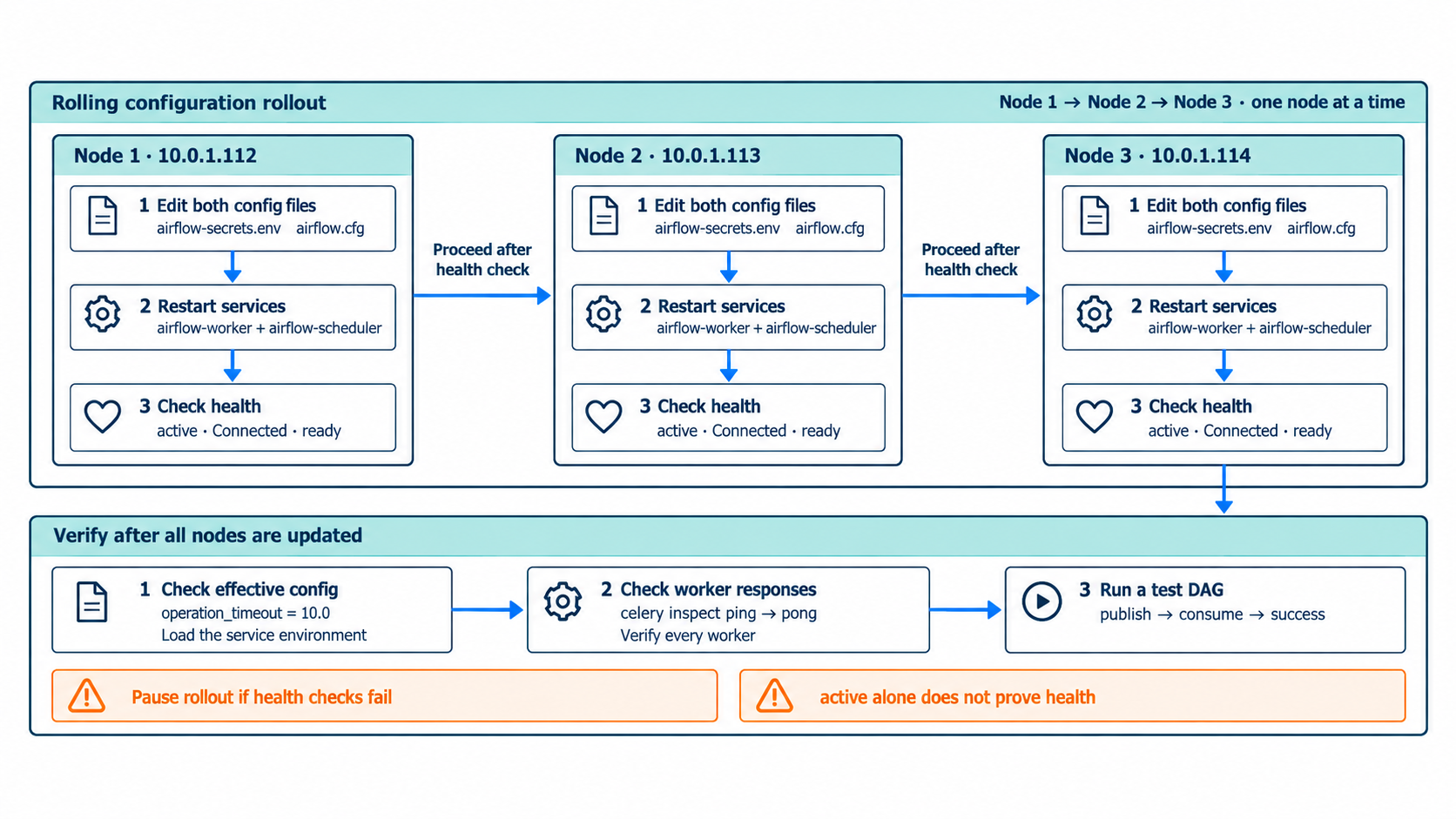
Figure 3. Complete steps 1→2→3 inside each node before proceeding to the next. Check the active state and reconnect/ready logs, and pause the rollout if checks fail. After all nodes are updated, use the commands in section 4.4 to verify effective settings, a pong from every worker, and a successful test DAG.
4.4 Verify the change
# Is the setting actually applied?
airflow config get-value celery operation_timeout
# → 10.0

# Do workers actually respond? (systemd "active" can't tell you)
celery -A airflow.providers.celery.executors.celery_executor inspect ping
# → celery@<host>: pong for each worker

# End-to-end check with a test DAG
airflow dags trigger <test DAG>
Run airflow config get-value in a shell that has loaded the same environment files as the service, or you won't see the values the service actually uses.
5. Verification after the fix
We deliberately triggered failures on the test cluster to compare before and after.
| # | Scenario | Result after the fix |
|---|---|---|
| 1 | CLIENT KILL all connections while one Sentinel is kept unresponsive | All workers reconnect on their own (they give up on the dead Sentinel after two seconds and switch to the next) |
| 2 | Trigger a DAG under the same condition | 24/24 success, spread over 3 nodes — publishing and consuming both work |
| 3 | Replay the incident from a healthy state (CLIENT KILL TYPE normal) | Reconnects within seconds, 24/24 success, evenly spread over 3 nodes — no worker restart needed |
Before the fix, workers hung permanently in all three scenarios. After the fix, they recovered on their own in every scenario. The logs changed too when we injected the same failure:
Oct 13 21:13:02 redis.exceptions.ConnectionError: Connection closed by server.
Oct 13 21:14:33 [info] Connected to sentinel://:**@10.0.1.112:26379//
A worker that used to go silent after a disconnect now reconnects to Sentinel by itself.
6. Further recommendations
- Monitor worker responsiveness. This kind of failure doesn't show up in systemd's
activestate. We recommend wiring Flower (:5555) or a periodiccelery inspect ping -d celery@<host>into your alerts. Monitoring setup is covered in Airflow 3 Monitoring & Operations. - (Optional) Lower the kernel TCP keepalive. To detect half-open connections faster, reduce
net.ipv4.tcp_keepalive_time(default 7200 seconds) to 300–600 seconds. It only helps together withsocket_keepalive = True.
Wrapping up
The heart of this incident is that "no response" is not treated as "an error." The client moves on to the next Sentinel only on an error, and without a timeout, silence never becomes one. The result is a process that is alive, logs that are quiet, and no work getting done.
In a high-availability setup, failover only works if every path that opens a connection has a timeout. If you run Redis Sentinel, check that your Sentinel queries (sentinel_kwargs) have a socket_timeout, not just your data connections.