
Inside IBM Bob (Part 1) — What Makes an Agentic Development Platform Different
An analysis of IBM Bob, the development agent platform IBM has begun offering for on-premises and air-gapped deployment, based on public documentation: architecture, modes, rules and approval policies, modernization packages, self-hosted model options, and limitations. It is the starting point for Part 2, which designs the same platform with open source.
On October 1, IBM announced self-hosted deployment of IBM Bob, its development agent platform. Bob can now run on-premises, in private and sovereign clouds, and even in air-gapped environments cut off from external networks. For financial, public-sector, and manufacturing organizations that cannot send source code to external AI services, this signals a shift in the question from "Can we use coding agents at all?" to "How do we bring them in?"
This series has two parts.
- Part 1 (this post): What Bob is, how it is structured, what controls it offers, and where its limits are — based on public documentation.
- Part 2: Mapping Bob's components to open-source equivalents to design a development agent platform that can run in an air-gapped environment.
This post is based on IBM's official announcements, product documentation (bob.ibm.com/docs), and press coverage as of October 4, 2026. It is not a hands-on evaluation, and features and supported scope may change.
1. What Bob is — an SDLC platform, not code completion
IBM calls Bob an "AI development partner." The core claim is that Bob is not a tool that suggests code but a system that orchestrates the entire software development lifecycle (SDLC) — planning, coding, testing, deployment, and modernization.
Its position becomes clear when you place it in the evolution of AI development tools.
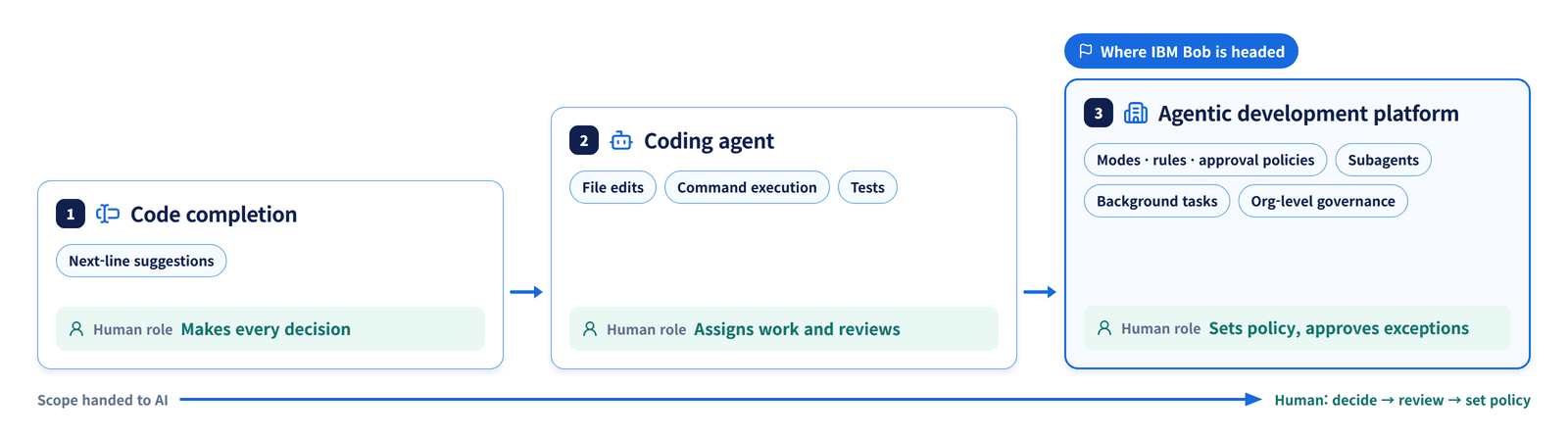
| Stage | Form | Representative capabilities | Human role |
|---|---|---|---|
| 1 | Code completion | Next-line suggestions | All decisions |
| 2 | Coding agent | File edits, command execution, testing | Assigning and reviewing tasks |
| 3 | Agentic development platform | Modes, rules, and approval policies; subagents; background tasks; organization-level governance | Setting policy and approving exceptions |
Bob aims for stage 3. It is less a productivity tool for individual developers and more a platform on which an organization defines and supervises the scope of what AI is allowed to do.
Release history
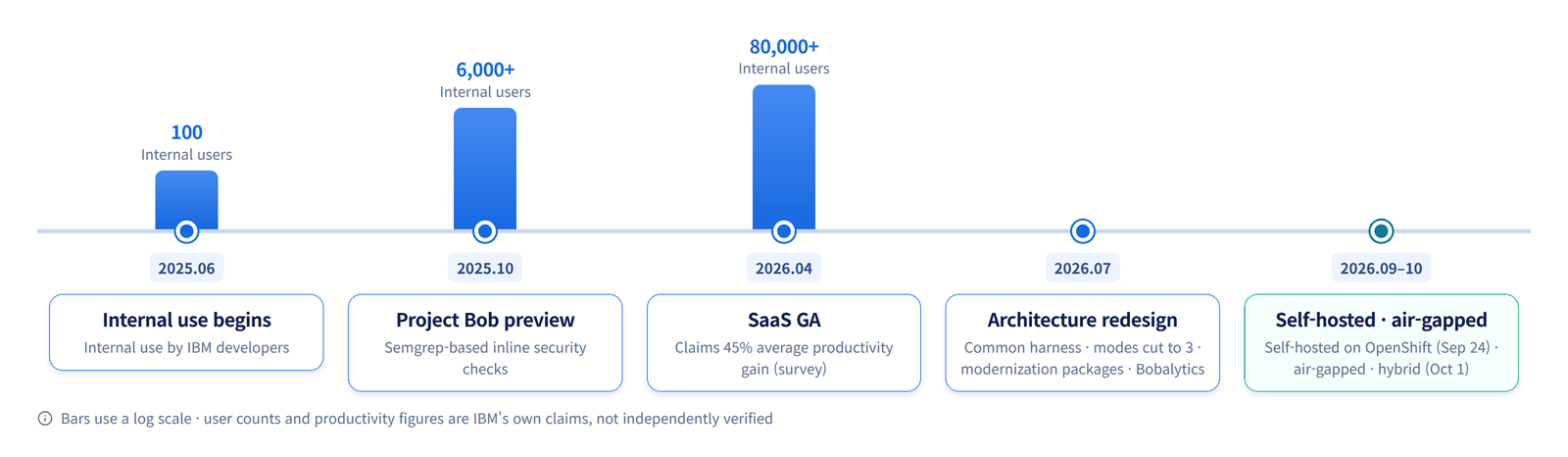
| Date | Milestone |
|---|---|
| June 2025 | Internal use begins with 100 IBM developers |
| October 2025 | Project Bob preview released. 6,000+ internal users, Semgrep-based inline security checks |
| April 2026 | SaaS general availability. 80,000+ internal users; claims an average 45% productivity gain based on surveys |
| July 2026 | Architecture rebuilt on a common agent harness, modes consolidated to three, modernization premium packages and Bobalytics launched |
| September–October 2026 | Self-hosted deployment for Red Hat OpenShift generally available (September 24, per press reports); air-gapped and hybrid model options announced (October 1) |
The productivity figures come from IBM's internal surveys and customer cases (e.g., a Java upgrade cut from 30 days to 3 days) and have not been independently verified.
2. Architecture — one harness, two surfaces
Since the July 2026 overhaul, Bob has been structured as user-facing surfaces sitting on top of a common agent harness. The harness is the agent's execution foundation, handling model calls, tool execution, and task management.
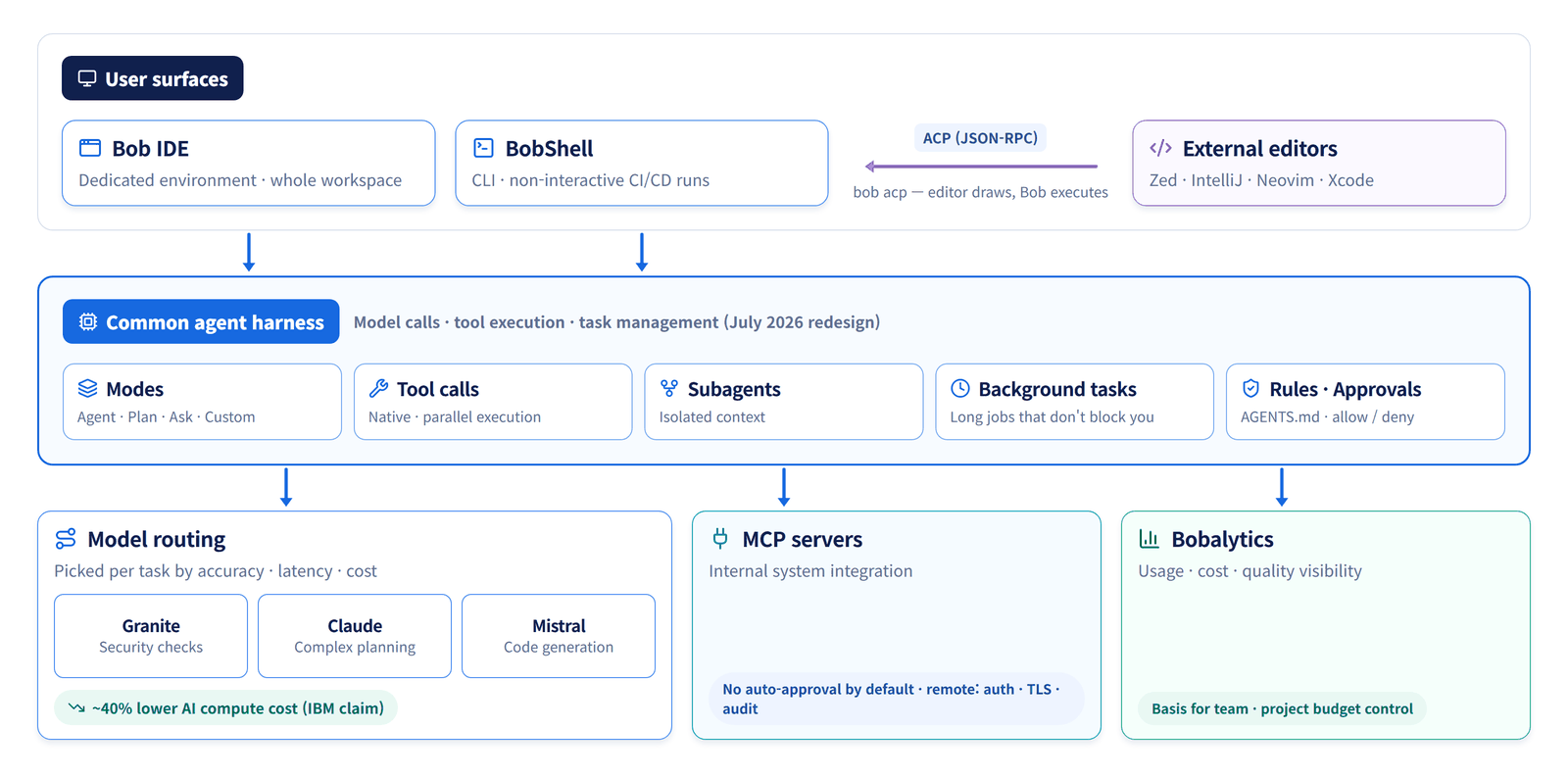
Here is a look at each component.
Harness capabilities. IBM highlights native tool calling, parallel execution, subagents (specialized work performed in a separate context), and background task orchestration (long-running work that does not block the developer) as features of the revamped harness. The structure is designed to break up context-heavy work such as large repository analysis or upgrades spanning multiple modules.
Two surfaces. Bob IDE is a dedicated development environment that works across the whole workspace. BobShell is a CLI that supports both interactive use and non-interactive execution in CI/CD pipelines. With the bob acp command, BobShell can act as an ACP (Agent Client Protocol) server. ACP is a JSON-RPC standard connecting editors to coding agents — it does for agents what LSP does for language servers. As a result, in Zed, IntelliJ, Neovim, and Xcode, each editor renders the UI while Bob handles execution.
Model routing. Bob selects a model for each task based on accuracy, latency, and cost. IBM's examples: a fine-tuned small Granite model for security checks, Anthropic Claude for complex planning, and open Mistral models for the code generation stage. IBM claims this routing cut AI compute costs by about 40%.
MCP integration. Internal systems are connected via MCP servers. By default, MCP tool calls are not auto-approved, and remote MCP servers require authentication, transport encryption, access control, and auditing.
3. Controls — modes, rules, approvals, and trust
What sets Bob apart from a simple coding agent is its set of mechanisms for declaratively defining the scope of agent behavior. The summary below follows the formats published in the official documentation.
Modes: tool permissions by role
There are three built-in modes (consolidated from five in July 2026).
| Mode | Purpose | Change permissions |
|---|---|---|
| Ask | Code analysis and Q&A | None |
| Plan | System-level analysis and change planning | Mainly plan documents |
| Agent | Implementation and execution | Within policy limits |
On top of these, teams can define custom modes. Global settings live in ~/.bob/settings/custom_modes.yaml, and project settings in .bob/custom_modes.yaml.
# .bob/custom_modes.yaml — a reviewer mode that can only edit docs (format example)
customModes:
  - slug: docs-reviewer
    name: Docs Reviewer
    roleDefinition: >-
      You review and improve technical documentation.
      You never modify application code.
    whenToUse: Use for documentation review and editing.
    groups:
      - read
      - - edit
        - fileRegex: ".*\\.(md|mdx)$"
          description: Markdown files only
groups lists the tool groups a mode can use; the groups listed in the documentation are read, edit, execute, mcp, skill, workflow, todo, subtask, subagent, and mode. The edit group can be restricted with fileRegex to file patterns the mode may modify. By creating modes such as the "Markdown-only" mode above or a "read-only reviewer" mode and committing them to the repository, the whole team shares the same permission boundaries.
Notably, this definition format (slug, roleDefinition, groups, fileRegex, whenToUse) is nearly identical to the custom mode format of Roo Code, an open-source VS Code extension. This is an important observation for Part 2, where we design an open-source equivalent.
Rules: injecting organizational coding standards
Rules are instructions that set the agent's response style and decision criteria. BobShell recursively reads the rules/ (shared), rules-code/, rules-plan/, and rules-{mode}/ directories, and also reads AGENTS.md at the workspace root by default. Because AGENTS.md is a de facto standard file read by many coding agents, it makes sharing rules with other tools easy.
Approval policies: what to allow automatically
Approval policies are managed under the approval key in ~/.bob/settings/settings.json. The structure published in the documentation is as follows.
| Key | Meaning |
|---|---|
allowed_permissions | Permission groups to auto-approve (read, edit, execute, mcp, skill, todo, subtask, subagent, mode) |
permissionOptions | Detailed options per group |
allowedExecutors | Allow/deny lists for command execution tools (approvedCommands auto-approves by prefix match; deniedCommands takes precedence over approvals and always blocks) |
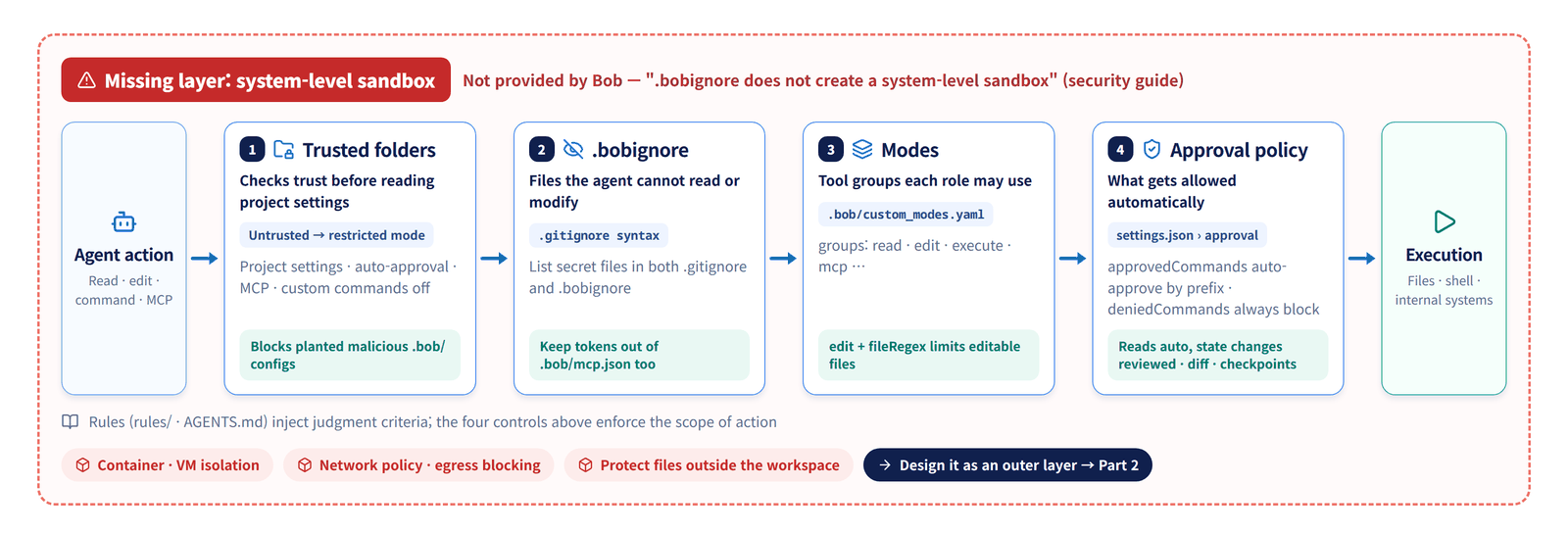
The principle recommended in IBM community documentation is simple: reads can be auto-approved; state-changing actions go through review. For untrusted tasks, command execution is off by default, and task-level approval can be used for a batch of work you want to trust just once. Changes are shown as diffs and can be rolled back via checkpoints.
Trusted folders and .bobignore
Before reading project settings, Bob asks whether to trust the folder. Untrusted folders open in restricted mode, with project settings, auto-approval, MCP servers, and custom commands disabled. This guards against attacks that plant malicious .bob/ configuration in a repository.
.bobignore uses .gitignore syntax to specify files the agent cannot read or modify. The official recommendation is to list secret files in both .gitignore and .bobignore, and to keep tokens out of configuration files such as .bob/mcp.json as well.
4. Modernization packages — domain workflows on top of a general-purpose agent
In July 2026, IBM released three premium packages.
| Package | Key capabilities |
|---|---|
| Java Modernization | JDK upgrades, Liberty modernization, UI migration, unit test generation, security vulnerability fixes |
| IBM i | RPG modernization, DDS → DDL database conversion, direct QSYS connectivity |
| IBM Z | Mainframe application understanding, Z-specific Architect and Code modes, documentation that reflects business context |
What stands out here is the structure of layering domain workflows on top of a general-purpose agent. One user review describes the Java modernization mode's flow as "build → analyze failures → group errors by root cause → fix incrementally." Rather than asking the model to "upgrade this to Java 21," the work is broken down using build tools and analysis results, and the agent operates within that structure.
This is also IBM's business moat. Java, IBM i, and mainframes are core assets for IBM customers — and the areas where general-purpose coding agents are weakest. In Part 2, when we build the same pattern with open source, we will return to the point that the key is not the model but deterministic transformation tools and workflows.
5. Self-hosting and air-gapped configurations
The heart of the October 1 announcement is three configurations for bringing Bob inside the customer's environment.
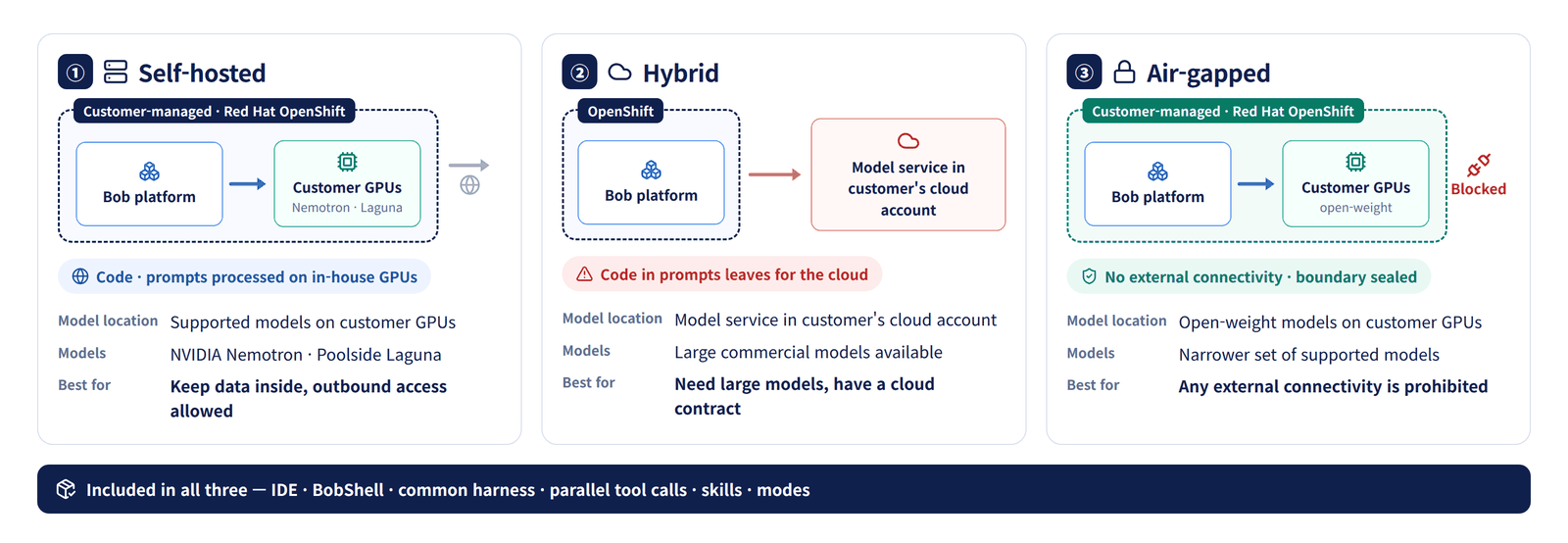
| Configuration | Model location | Best fit |
|---|---|---|
| ① Self-hosted | Supported models on customer GPUs | Data stays internal, but external connectivity is allowed |
| ② Hybrid | Model services in the customer's cloud account | Large commercial models are needed and a cloud contract exists |
| ③ Air-gapped | Open-weight models on customer GPUs | External connectivity is prohibited altogether |
According to press reports, the models supported for self-hosting at general availability are NVIDIA Nemotron and Poolside Laguna. Using models the customer already licenses was also mentioned. Self-hosting includes core capabilities such as the IDE, BobShell, parallel tool calling, the harness, and skills and modes.
In an IBM Institute for Business Value survey cited by IBM, 68% of executives said they find it difficult to meet country-specific data residency and sovereignty requirements. Bob's self-hosted deployment targets this demand.
6. Limitations and what to verify
Reading through the public documentation and announcements, here are the points to check before adoption.
① There is no system-level sandbox. Bob's security guidance states explicitly that .bobignore "does not create a system-level sandbox." Files outside the workspace and some write operations can bypass this restriction. As long as the agent runs shell commands, isolation must be designed separately in an outer layer such as containers, VMs, and network policies. This is where Part 2 puts the most effort.
② Models available in air-gapped environments are limited. The hybrid configuration allows large commercial models, but a fully air-gapped setup narrows the choice to supported open-weight models. Even with the same Bob, you should not assume the quality you experienced on SaaS will carry over to an air-gapped environment. Compare quality across configurations yourself using an evaluation set built from your internal repositories.
③ Check the data boundary of the hybrid configuration. If the model service lives in an external cloud, the code contained in prompts goes there. The key questions are which tasks are routed to which models, and whether those routes can be pinned by policy.
④ Cost predictability. SaaS is usage-based billing in Bobcoin units (e.g., Pro at $20/month, Ultra at $200/month). Self-hosting adds GPU and operating costs on top of licensing. As background tasks and subagents grow, actual usage diverges from what people perceive, so usage visibility such as Bobalytics and budget controls should be set up from the start.
⑤ Details of prompt injection defenses are not public. The GA announcement mentions prompt normalization, sensitive data checks, real-time policy enforcement, and in-workflow red teaming, but the specifics of how these work are hard to find in the public documentation. Development agents that read external issue trackers, documents, and dependency code are exposed to indirect prompt injection, so this is an item to verify before adoption.
7. Adoption criteria
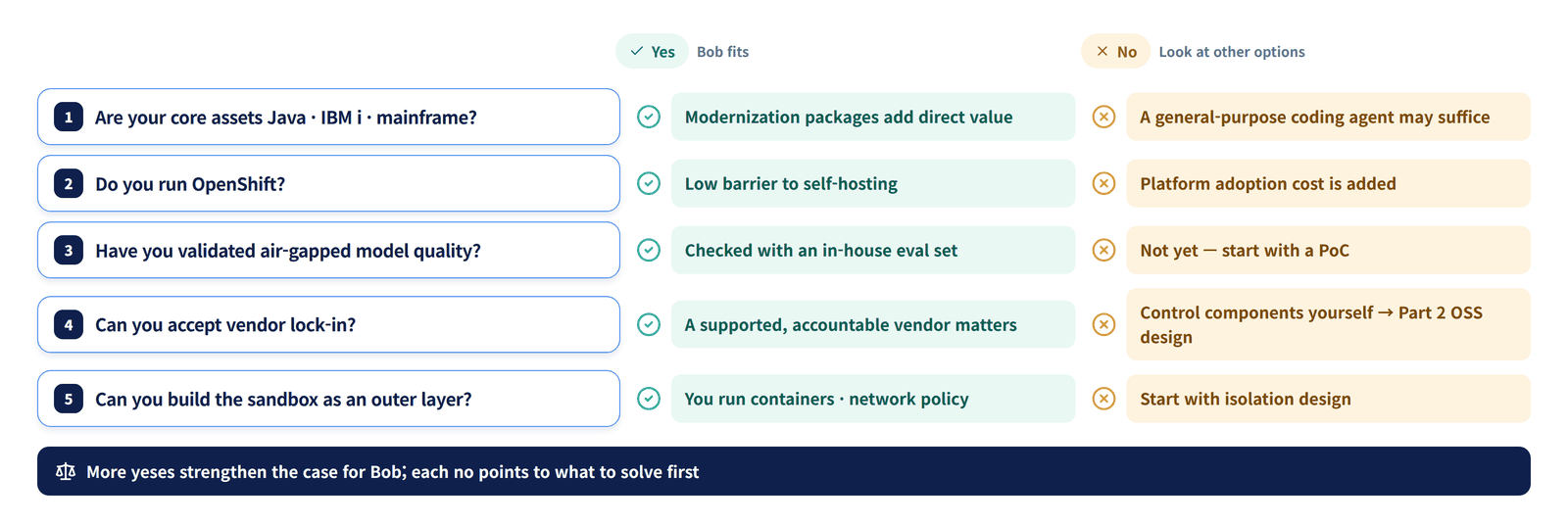
| Question | When Bob fits | When to look at alternatives |
|---|---|---|
| Are your core assets Java, IBM i, or mainframe? | Yes — the modernization packages deliver direct value | No — a general-purpose coding agent may be enough |
| Do you run OpenShift? | Yes — low barrier to self-hosting | No — platform adoption costs are added |
| Have you validated air-gapped model quality? | Verified with an internal evaluation set | Not yet — start with a PoC |
| Can you accept vendor lock-in? | Having a support and accountable party matters | You want direct control over components → Part 2 |
| Can you build the sandbox in an outer layer? | You have the capability to operate containers and network policies | No — isolation design comes first |
The direction Bob points to is clear. The competitive edge of development agents is shifting from model performance to platforms equipped with modes, rules, approval policies, auditing, and modernization workflows — and the next step is bringing that platform inside the customer's air-gapped network.
So can you build this platform yourself with open source? In Designing an Open-Source Coding Agent Platform for Air-Gapped Environments (Part 2), we map Bob's components to open-source equivalents one by one and design the platform.
References
- IBM — Self-Hosted Deployment for IBM Bob (2026-10-01)
- IBM — Bob Premium Packages and new architecture (2026-07-09)
- IBM — Introducing IBM Bob (2026-04-28) · Project Bob preview (2025-10-07)
- IBM Bob product page
- Bob documentation: Custom modes · Approval settings · Security guidance · ACP · MCP
- IBM Community — Secure and govern IBM Bob
- SiliconANGLE — IBM allows on-prem deployment of Bob
- The Main Thread — IBM Bob for Enterprise Java