
Loading Oracle Timestamps as Strings in NiFi — Aligning Session NLS with a Logon Trigger
When copying an Oracle table with ExecuteSQL + PutDatabaseRecord, you can pass timestamps as strings and let the Oracle session NLS convert them. The Oracle JDBC thin driver cannot set NLS formats, so we used a logon trigger and v$session.program to apply NLS only to this flow's sessions.
When you copy one Oracle table to another with NiFi, you can turn timestamp columns into strings in the query SQL and let Oracle convert them back to timestamps on load. If you build the flow this way and run it, though, the load ends up in failure with conversion errors. The cause is not a NiFi setting. It is the NLS of the Oracle session.
This post is based on the Oracle→Oracle copy test flow (ExecuteSQL + PutDatabaseRecord) built for a project that replaces Sqoop with NiFi (DataDynamics/nifi-sqoop-removal). It explains why string timestamps fail to load, and how we aligned NLS for this flow's sessions only, using a logon trigger, so that all 50,000 rows matched the source exactly.
The test environment was Cloudera CFM 4.12 (NiFi 2.6) and Oracle 23 Free (FREEPDB1), run on 2026-10-07. All example values come from that environment.
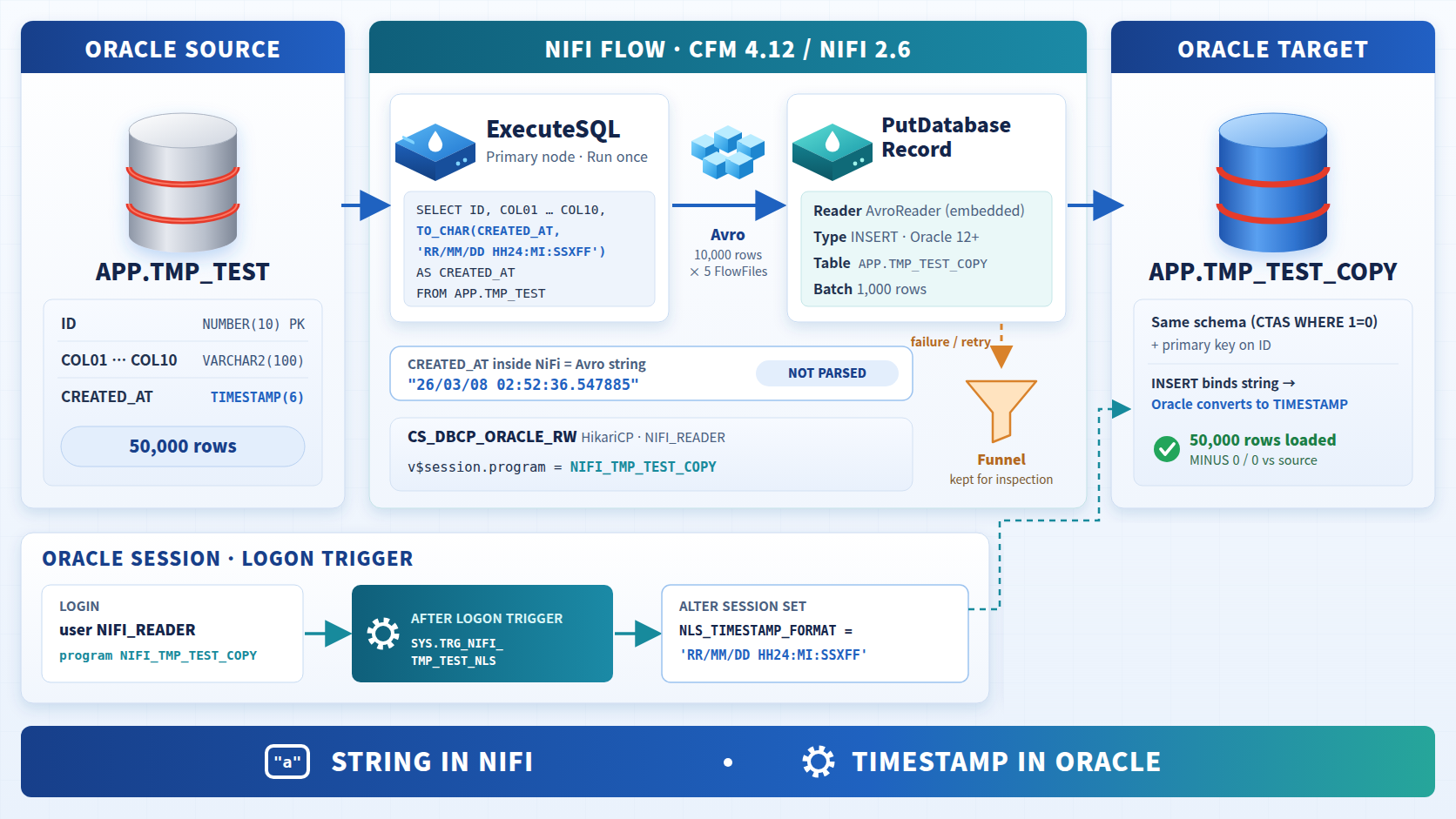
1. Principle: NiFi only carries strings, Oracle does the conversion
This flow keeps the timestamp conversion in one place: Oracle.
- Query: The SQL turns
CREATED_ATinto a string withTO_CHAR.ExecuteSQLwrites the result (VARCHAR2) as an Avrostring, andAvroReaderuses the schema embedded in the Avro file as is. Inside NiFi,CREATED_ATstays the string"26/03/08 02:52:36.547885"from start to finish, and NiFi never interprets it. - Load: When
PutDatabaseRecordbinds a string to a TIMESTAMP column, Oracle implicitly converts it using the session'sNLS_TIMESTAMP_FORMAT.
The format is set directly by TO_CHAR in the query SQL, so you don't need to align NiFi's Reader schema or Timestamp Format properties. One condition remains: the load session's NLS_TIMESTAMP_FORMAT must match the TO_CHAR format in the query SQL.
2. The catch: the JDBC thin driver cannot set NLS formats
The Oracle JDBC thin driver derives the session NLS from the JVM locale. If the NiFi JVM locale is en_US, the session's default format is:
NLS_TIMESTAMP_FORMAT = DD-MON-RR HH.MI.SSXFF AMThis format cannot parse 26/03/08 02:52:36.547885, so the load fails with a conversion error. There is no way to set NLS formats through the JDBC URL or connection properties. NiFi's connection pools have no property like "SQL to run right after a session is created" either.
You could change the JVM locale, but that affects the whole NiFi cluster and requires a restart. So we decided to apply NLS on the database side, only to this flow's sessions, using a logon trigger.
3. Picking out this flow's sessions with a logon trigger + v$session.program
Other NiFi flows were using the same login account (NIFI_READER). Changing NLS per account would affect those flows too, so we needed one more marker to tell sessions apart.
When the Oracle JDBC driver receives the connection property v$session.program, it sends that value with the login information, and Oracle records it in v$session.program. Dynamic properties on NiFi's HikariCPConnectionPool are passed through as JDBC connection properties, so you only need to add one property to the pool.
| Dynamic property | Value |
|---|---|
v$session.program | NIFI_TMP_TEST_COPY |
The logon trigger then runs ALTER SESSION only for sessions whose account is NIFI_READER and whose program is NIFI_TMP_TEST_COPY.
create or replace trigger SYS.TRG_NIFI_TMP_TEST_NLS after logon on database
declare
  v_prog varchar2(100);
begin
  if sys_context('USERENV','SESSION_USER') = 'NIFI_READER' then
    select program into v_prog from v$session where sid = sys_context('USERENV','SID');
    if v_prog = 'NIFI_TMP_TEST_COPY' then
      execute immediate q'[alter session set nls_timestamp_format = 'RR/MM/DD HH24:MI:SSXFF']';
    end if;
  end if;
exception when others then null;
end;
/- Replace
NIFI_READERwith the account NiFi uses to connect to Oracle. NIFI_TMP_TEST_COPYmust match the pool'sv$session.programvalue. It is a test name, so in production we recommend a self-describing name such asAPPLY_NLS_TIMESTAMP_FORMAT.exception when others then nullprevents a trigger error from blocking every login to the database. The trade-off is that NLS is not applied if the trigger fails. In that case the load fails with conversion errors, so the problem shows up right away.
Sessions from other flows using the same NIFI_READER account keep the default program JDBC Thin Client, so the trigger skips them.
4. Connection pool and logon trigger lifecycle
A natural question follows: the pool reuses connections, so does the trigger run every time?
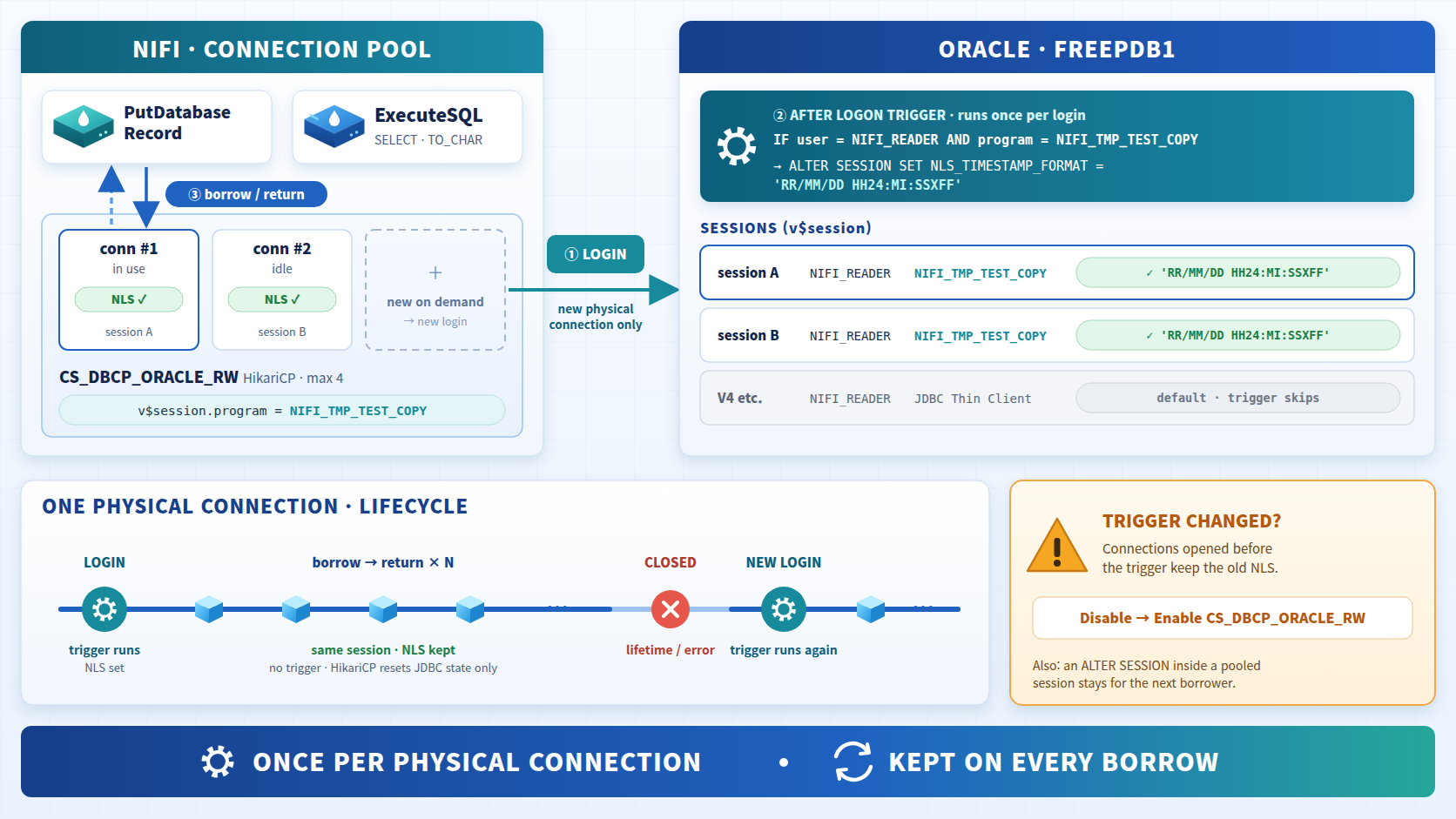
The logon trigger runs not on every borrow, but once, when the pool opens a new physical connection to Oracle and a session is created. The NLS it sets lasts until the session ends.
- When HikariCP opens a physical connection, the driver sends
v$session.program = NIFI_TMP_TEST_COPYwith the login information. The program value is therefore already set when the trigger runs. - Once login completes, the trigger runs
ALTER SESSION SET NLS_TIMESTAMP_FORMATonly for matching sessions. - When a processor borrows and returns a connection, the physical connection stays open and the same session is reused. On return, HikariCP resets only JDBC state such as autoCommit, transaction isolation and readOnly. It does not touch NLS changed by
ALTER SESSION. - When a connection is retired by lifetime expiry or an error and the pool opens a new one, the trigger runs again in the new session.
As a result, every session in the pool always has the same NLS. Operational notes:
- After creating or changing the trigger, Disable→Enable the controller service. Connections that were already open do not pick up the new trigger.
ExecuteSQLsessions sharing the pool also get the NLS. The query SQL specifies the format directly inTO_CHAR, so they are unaffected.- If anyone changes NLS again with
ALTER SESSIONon the same session, that value stays in the pool and carries over to the next borrower. This flow has no such SQL.
5. Preparing Oracle
Run every statement in FREEPDB1 with administrator privileges.
Source table and test data
Create a table with 10 string columns, one timestamp column and an ID to identify rows, and fill it with 50,000 rows. CREATED_AT is a random time (with microseconds) over roughly 280 days starting 2026-01-01.
create table APP.TMP_TEST (
  ID      number(10) primary key,
  COL01   varchar2(100), COL02 varchar2(100), COL03 varchar2(100), COL04 varchar2(100), COL05 varchar2(100),
  COL06   varchar2(100), COL07 varchar2(100), COL08 varchar2(100), COL09 varchar2(100), COL10 varchar2(100),
  CREATED_AT timestamp
);

insert /*+ append */ into APP.TMP_TEST
select level,
  'A-'||level, dbms_random.string('U',10), dbms_random.string('L',20), dbms_random.string('A',15), dbms_random.string('X',12),
  'CODE'||lpad(mod(level,100),3,'0'), dbms_random.string('U',30), '홍길동'||mod(level,1000), dbms_random.string('A',50), to_char(level,'FM00000000'),
  timestamp '2026-01-01 00:00:00' + numtodsinterval(dbms_random.value(0, 280*86400), 'SECOND')
from dual connect by level <= 50000;
commit;

grant select on APP.TMP_TEST to NIFI_READER;
Use a regular table. A GLOBAL TEMPORARY TABLE's data is not visible to other sessions, so NiFi could not read it.
Target table and privileges
Clone the source schema without data and add a primary key. Instead of creating a separate load account, grant NIFI_READER write privileges on this table only.
create table APP.TMP_TEST_COPY as select * from APP.TMP_TEST where 1=0;
alter table APP.TMP_TEST_COPY add primary key (ID);
grant select, insert, delete on APP.TMP_TEST_COPY to NIFI_READER;
Then create the logon trigger from section 3.
6. NiFi configuration
Create a TEST_TMP_TEST_COPY process group under the root, and use the ORACLE.* parameters from the shared parameter context for connection details. The flow is just two processors and a funnel that holds failures.
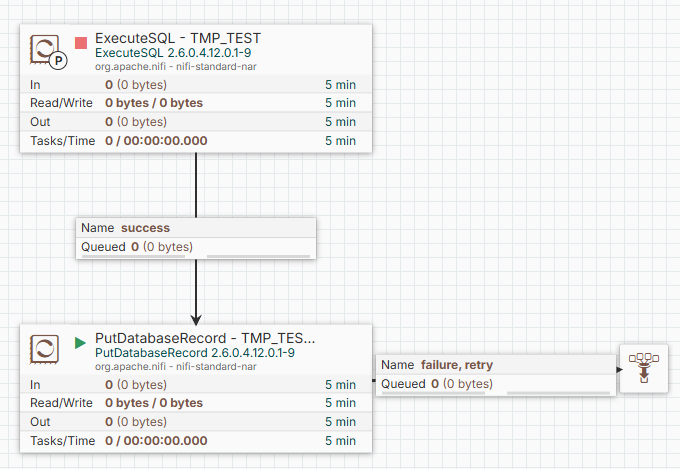
Controller services
| Name | Type | Key properties |
|---|---|---|
CS_DBCP_ORACLE_RW | HikariCPConnectionPool | URL #{ORACLE.JDBC.URL}, Driver oracle.jdbc.OracleDriver, Driver Location #{ORACLE.JDBC.DRIVER.PATH}, User/Password #{ORACLE.JDBC.USER}/#{ORACLE.JDBC.PASSWORD}, Max Total Connections 4, Minimum Idle 0, Validation Query SELECT 1 FROM DUAL |
Dynamic property v$session.program = NIFI_TMP_TEST_COPY | ||
CS_AVRO_READER | AvroReader | Schema Access Strategy Use Embedded Avro Schema (default) |
ExecuteSQL writes results as Avro without a Record Writer and embeds the schema in the Avro file, so the Reader needs no separate schema. ExecuteSQL derives column types from JDBC metadata, so the TO_CHAR result naturally becomes a string.
ExecuteSQL - TMP_TEST
| Property | Value |
|---|---|
| Database Connection Pooling Service | CS_DBCP_ORACLE_RW |
| Max Rows Per Flow File | 10000 |
| Fetch Size | 1000 |
| Use Avro Logical Types | false (default) |
| Scheduling | Timer driven 1 day, Execution Primary node |
| Auto-terminated relationships | failure |
SELECT ID, COL01, COL02, COL03, COL04, COL05, COL06, COL07, COL08, COL09, COL10,
       TO_CHAR(CREATED_AT, 'RR/MM/DD HH24:MI:SSXFF') AS CREATED_AT
FROM APP.TMP_TEST- The
TO_CHARformat must match the trigger'sNLS_TIMESTAMP_FORMATcharacter for character. CREATED_ATcomes out like26/03/21 03:58:04.706016. The column isTIMESTAMP(6), so the fraction has 6 digits.- The processor has no incoming connection, so run it on the
Primary nodeto keep it from running on every node in the cluster.
PutDatabaseRecord - TMP_TEST_COPY
| Property | Value |
|---|---|
| Record Reader | CS_AVRO_READER |
| Database Type | Oracle 12+ |
| Statement Type | INSERT |
| Database Connection Pooling Service | CS_DBCP_ORACLE_RW |
| Schema Name / Table Name | APP / TMP_TEST_COPY |
| Unmatched Column Behavior | Fail on Unmatched Columns |
| Maximum Batch Size | 1000 |
| Auto-terminated relationships | success |
Connections
| From | Relationship | To |
|---|---|---|
| ExecuteSQL | success | PutDatabaseRecord |
| PutDatabaseRecord | failure, retry | Funnel (holds failed FlowFiles for inspection) |
7. Running the flow
- Enable both controller services (after creating the trigger).
- Start
PutDatabaseRecord. - Run
ExecuteSQLwith Run Once. - The run is complete when the PG queue is 0 and the queue in front of the funnel is empty. In the test environment, 5 FlowFiles (10,000 rows each) were processed within a few seconds.
Before running again, run truncate table APP.TMP_TEST_COPY. ID is the primary key, so without truncating, rows fail with duplicate key errors.
8. Verification
select count(*) from APP.TMP_TEST_COPY;                                                   -- 50000
select count(*) from (select * from APP.TMP_TEST      minus select * from APP.TMP_TEST_COPY); -- 0
select count(*) from (select * from APP.TMP_TEST_COPY minus select * from APP.TMP_TEST);      -- 0

-- Check that the trigger applies only to this flow's sessions
select program, count(*) from v$session where username = 'NIFI_READER' group by program;| Check | Result |
|---|---|
| Rows loaded | 50,000 |
Two-way MINUS difference | 0 / 0 |
NIFI_READER sessions | JDBC Thin Client 16, NIFI_TMP_TEST_COPY 1 |
Both MINUS queries return 0, so every column value matches the source, including the microseconds of CREATED_AT. In v$session, the 16 other sessions on the same account keep the default program, and only this flow's one session was targeted by the trigger.
9. Caveats
- The load depends on the Oracle session NLS. If the trigger is missing or the pool lacks
v$session.program, strings cannot be converted with the session default format (DD-MON-RR HH.MI.SSXFF AM) and rows go to failure. It is a plus that the problem surfaces as a failure rather than silently wrong values. RRinterprets two-digit years as 00–49 → 20xx and 50–99 → 19xx. If you have values before 1950 or after 2049, use aYYYYformat in bothTO_CHARand NLS.- When testing is done, revoke the write privileges on
APP.TMP_TEST_COPYgranted toNIFI_READER.
10. Cleanup
drop trigger SYS.TRG_NIFI_TMP_TEST_NLS;
drop table APP.TMP_TEST_COPY purge;
drop table APP.TMP_TEST purge;
In NiFi, stop the processors in the TEST_TMP_TEST_COPY PG, empty the queues, disable the controller services and delete the PG.
Wrapping up
When you load timestamps as strings, the session NLS is the contract between the query SQL and the load session. As long as the TO_CHAR format and NLS_TIMESTAMP_FORMAT match, NiFi only has to carry strings without interpreting them, and the conversion happens entirely inside Oracle.
We worked around the JDBC thin driver's inability to set NLS with a logon trigger combined with v$session.program. This approach applies NLS only to the sessions of one specific connection pool, without affecting other flows that use the same account. The full flow definition and detailed documentation are in docs/appendix-b-oracle-copy-putdatabaserecord.md in the nifi-sqoop-removal repository.