
Designing Always-On Agents, Through the Lens of OpenAI dots — Permissions, Approvals, Audit and Cost
Using dots, the always-on agent OpenAI unveiled at DevDay 2026, as a case study, this post lays out the permission, approval, memory, audit and cost design — plus an adoption checklist — that enterprises need when they use or build agents that keep working after you log off.
On September 29, at DevDay 2026, OpenAI unveiled dots: agents that keep working on their own cloud computer after the user logs off, take assignments through Slack and Teams, and, when appropriate, proactively suggest what to do next.
What matters more than the features is the shift in operating model that dots represents. Most of the AI that enterprises have dealt with so far follows a "a person asks, gets an answer, and the session ends" pattern. An always-on agent keeps its state after the session ends and acts even when nobody is watching. That difference means permissions, approvals, audit and cost have to be redesigned from the ground up.
Using dots as a case study, this post covers:
- What dots is and what makes "always-on" possible
- The four design axes an always-on agent needs — permissions, approvals and idempotency, memory and data governance, and audit and cost
- Criteria for deciding whether to use dots or build your own, plus an adoption checklist
This analysis is based on public reporting and announcements as of October 4, 2026. dots is rolling out in stages, so features, pricing and regional policies may change. Check the official OpenAI announcement and support documentation before adopting it.
1. What is dots?
AI work tools have evolved through three stages.
| Stage | Form | Human role | State retention |
|---|---|---|---|
| 1 | Conversational chatbot | Asks each time and reads the answer | Within the conversation only |
| 2 | Task agent | Hands off a task and checks it when done | Until the task finishes |
| 3 | Always-on agent | Assigns a role and manages only rules and exceptions | Continuously |
dots belongs to stage 3. Here is a summary of what has been reported.
| Item | Details |
|---|---|
| Runtime environment | Each dot has its own dedicated cloud computer and browser, and keeps working even when the user's device is off. |
| Model | GPT‑6 Astra. Its successor, GPT‑6.1 Astra, was pulled from release after failing internal safety evaluations. |
| Work channels | ChatGPT, Slack, Microsoft Teams. It can also take assignments over voice calls. |
| Integrations | Connects to more than 4,000 apps through the plugin ecosystem. |
| Memory | Carries notes on preferences and ongoing work across conversations, and learns from user corrections. |
| Proactive research | Looks through connected apps (e.g., Gmail) in read-only mode and suggests what to do next. |
| Action rules | For each action type, you choose one of "just do it / only when asked / ask first / human only." Risky actions go through automated review, and things like password changes always stay with a human. |
| Availability | One dot included with Pro and Business Premium plans. The Pro plan excludes the EEA, the UK and Switzerland. Enterprise workspaces are in beta and disabled by default, so an admin must turn them on. |
The examples OpenAI showcased include investigating a bug mentioned in Slack, building an app from a design document, creating an invoice and requesting approval, preparing a budget, and migrating an application off a deprecated API. What they have in common is that they are work that spans several days, moves across multiple systems, and needs human judgment along the way.
2. Architecture: what makes "always-on" possible
Based on the announcement, dots works roughly like this.
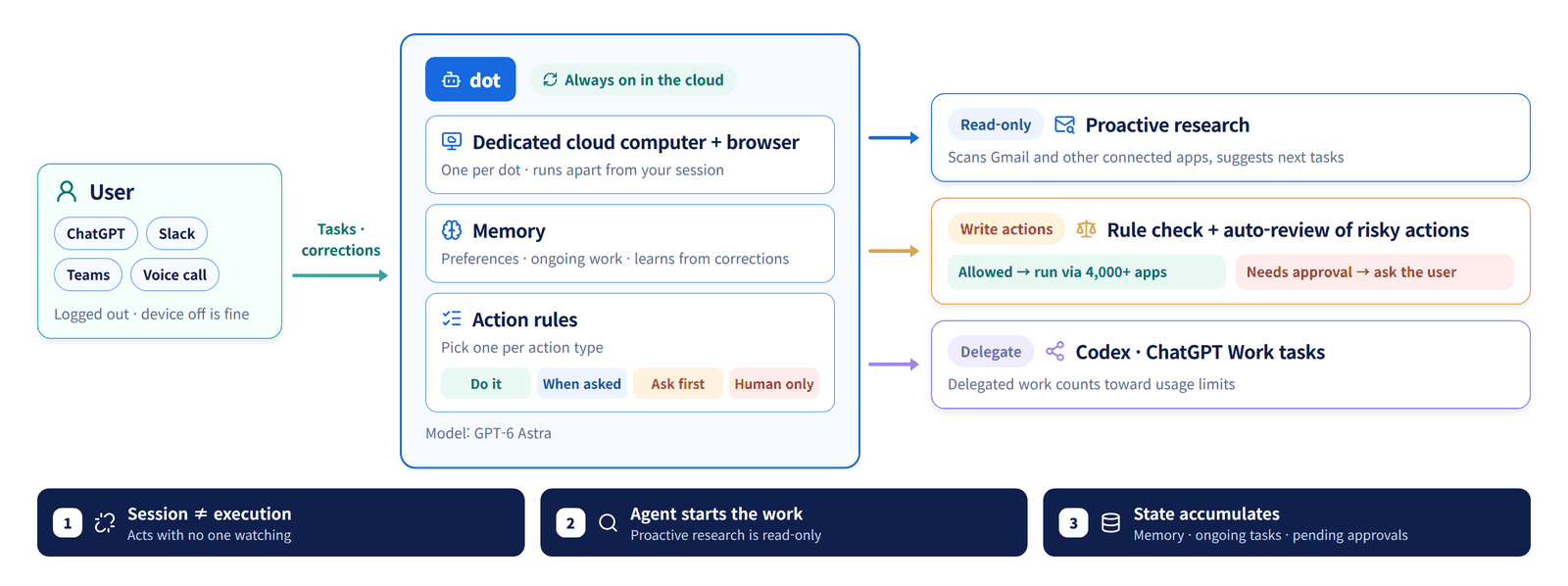
It differs structurally from conventional conversational agents in three ways.
① Session and execution are decoupled. Even after the user closes the window, the dot keeps working on its own computer. Controls that assume "someone is watching right now" no longer hold.
② The agent starts work on its own. Proactive research is the agent discovering work the user never asked about. The reason OpenAI restricted this step to read-only is clear: if an agent that finds its own work also has write access, the blast radius of an incident becomes unpredictable.
③ State accumulates. Memory, in-progress tasks and actions awaiting approval all persist. That state is data that must be managed, and it must stay consistent across failures and restarts.
These three points lead to the four design axes below. They apply equally whether you use dots or build your own.
3. Design axis ①: Permissions — don't lend out human accounts
The most common mistake when adopting an always-on agent is handing the agent a human's account and permissions as-is. With conversational AI this wasn't a big problem because a person was watching alongside it, but an always-on agent acts with those permissions when nobody is around.
There are four principles.
- Dedicated identity: Give each agent its own service account. The audit log should say "Jane Doe's agent did it," not "Jane Doe did it."
- Separate read and write: Just as dots restricts proactive research to read-only, grant research and monitoring permissions separately from permissions to change or send things.
- Least privilege and narrow scope: Narrow the scope — a specific label rather than the whole mailbox, a specific path rather than the whole repository.
- Expiring credentials: Use short-lived tokens instead of long-lived ones, and make sure they are revoked immediately when the agent is deactivated.
dots' four-level action rules are effectively a per-action permission policy. If you build your own, it is best to manage this declaratively, like so:
# agent-policy.yaml — execution policy per action type (example)
agent: finance-assistant
identity: svc-agent-finance-01        # dedicated service account, not a human account
credentials:
  ttl: 1h                             # short-lived token
actions:
  read.mail:          { mode: auto,     scope: "label:invoices" }
  read.erp.invoice:   { mode: auto }
  draft.invoice:      { mode: auto }
  send.invoice:       { mode: ask,      approvers: ["finance-lead"] }
  send.external_mail: { mode: ask }
  share.file.external: { mode: deny }    # humans only
  change.credentials: { mode: deny }
limits:
  max_actions_per_hour: 60
  max_cost_per_day_usd: 20
4. Design axis ②: Approvals and idempotency — design for "while waiting"
One of OpenAI's examples is invoicing: the agent creates an invoice and gets human approval before sending it. It looks simple, but in an always-on environment the problem is the time between request and approval.
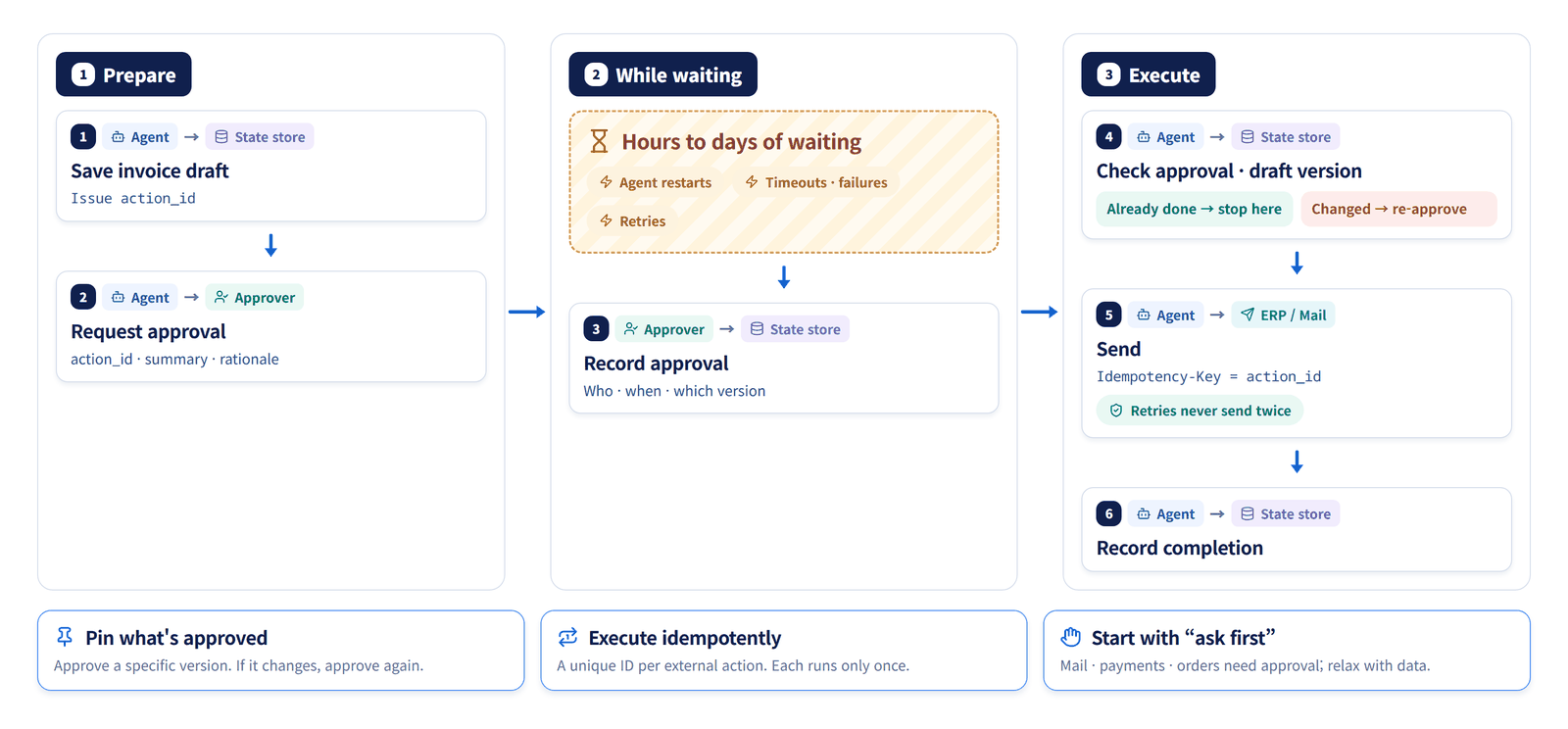
There are three things to get right in this flow.
Pin what is being approved. If the agent edits the draft after requesting approval, what the approver saw and what actually goes out will differ. Approval must apply to a specific version, and any change in content requires re-approval.
Make execution idempotent. An always-on agent will inevitably go through restarts, timeouts and retries. External actions such as sending, paying or creating tickets should carry a unique ID per action so the same action never runs twice.
def execute_approved(action_id: str) -> None:
    action = store.get(action_id)
    if action.status == "done":
        return                                  # already executed — safe to retry
    if action.approved_version != action.current_version:
        raise NeedsReapproval(action_id)        # content changed after approval
    erp.send_invoice(action.payload, idempotency_key=action_id)
    store.mark_done(action_id)
Decide what starts as "ask first." Rather than opening up many actions to automation from day one, it is safer to start the following types behind approval and relax them gradually as operational data accumulates.
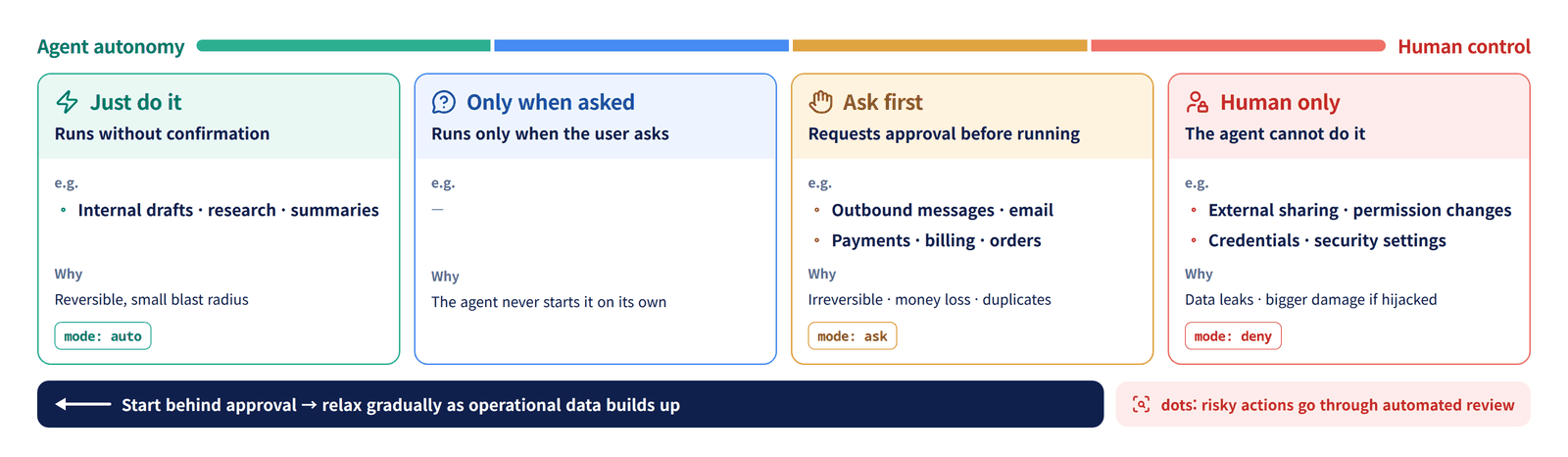
| Action type | Starting policy | Reason |
|---|---|---|
| Outbound messages and email | Ask first | Irreversible, reputational risk |
| Payments, billing, orders | Ask first | Financial loss, risk of duplicate execution |
| External sharing, permission changes | Human only | Data exfiltration path |
| Credentials, security settings | Human only | Amplifies damage if the agent is compromised |
| Internal drafts, research, summaries | Just do it | Reversible, small blast radius |
5. Design axis ③: Memory and data governance
dots remembers preferences and ongoing work across conversations and learns from user corrections. From a usability standpoint this is a core feature, but from a governance standpoint it means you now have a store where personal data and business secrets keep piling up.
Questions to review:
- What gets remembered: Customer names, contract values and internal matters can end up in memory. Humans must be able to view, edit and delete that memory.
- How long it is retained: Memory needs retention periods and deletion policies too. You also need to decide what happens to an agent's memory when someone leaves the company or changes roles.
- How far it reads: Proactive research is read-only, but what it reads flows into the model context and into memory. Data from connected apps should be handled under the same level of data classification as a RAG index. Consider masking or tokenizing sensitive data before the agent reads it.
On top of that, an agent that reads email and documents is itself an attack surface. The classic example is indirect prompt injection, where instructions hidden in an external email change the agent's behavior. In late September, OpenAI disclosed that its internal evaluations had confirmed "self-replicating prompt injections," in which malicious instructions ride on an agent's output and spread to subsequent tasks (see AI & IT Briefing #1 (Korean)). An always-on agent needs:
- A boundary that treats external content (email, web, attachments) as data, not instructions
- Inspection of the agent's own notes, memories and follow-up tasks before they are reused
- Escalation to the approval step for any write action taken right after reading external content
Prompt injection defenses in general are covered in detail in LLM Security: Prompt Injection and Agent Security, and memory and context management in Agent Memory and Compaction.
6. Design axis ④: Audit and cost
Audit: you must be able to reconstruct "who asked for this"
With always-on agents, the origin of an action gets blurry. If you cannot tell whether something was instructed by a user, initiated by the agent through proactive research, or delegated by another agent, you cannot assign responsibility when an incident occurs.
At a minimum, record the following for every action.
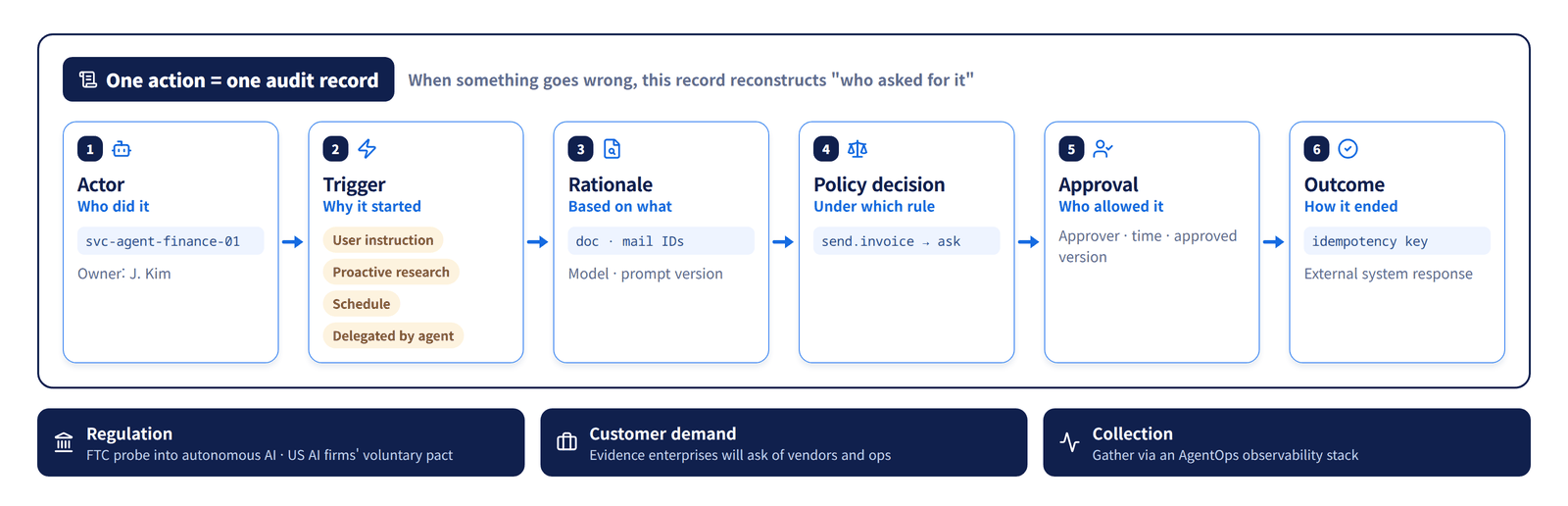
| Field | Example |
|---|---|
| Actor | svc-agent-finance-01 (owner: j.doe) |
| Trigger | User instruction / proactive research / schedule / delegation from another agent |
| Rationale | Referenced document and email IDs, model and prompt versions |
| Policy decision | send.invoice → ask |
| Approval record | Approver, time, approved version |
| Outcome | External system response, idempotency key |
Regulation is moving in the same direction. On September 30, the US FTC opened an inquiry into the risks of autonomous AI targeting OpenAI, Anthropic and others, and major US AI companies signed a voluntary pact covering internal controls and external review (AI & IT Briefing #1 (Korean), #2 (Korean)). The evidence enterprise customers will demand from agent vendors and from their own operations ultimately comes down to the fields in the table above. Collection and observability are covered in AgentOps Observability.
Cost: chatting may be free, but delegation isn't
According to reports, conversations with a dot do not count toward ChatGPT usage limits, but tasks a dot starts in Codex or ChatGPT Work do. Usage limits are reportedly generous for the first month after launch, with specific usage terms to be published later.
What sets always-on agent costs apart is that they accumulate while nobody is watching. We recommend the following safeguards:
- Per-task caps: Cap the tokens, time and tool calls a single task can use.
- Daily and monthly budgets with alerts: Alert when a set percentage of the budget is reached, and switch to "ask first" at the cap.
- Model routing: Send repetitive agent work to cheaper models. GPT‑6.1 Sol, announced at the same DevDay, was introduced at $2 input and $10 output per million tokens — roughly one-fifth the price of Astra.
- Avoid long-context abuse: Even as context limits grow, don't stuff in entire documents every time; use selective retrieval and prompt caching.
7. Use dots, or build your own?
dots is a turnkey service you can adopt quickly. For core enterprise workloads, however, it has limits around data location, integration with internal systems and the level of control. At the same DevDay, OpenAI also reportedly announced a public beta of an Agents API offering managed sessions, orchestration, context compaction and recovery. Building your own means combining APIs like this, other vendors' agent platforms, or open-source frameworks.
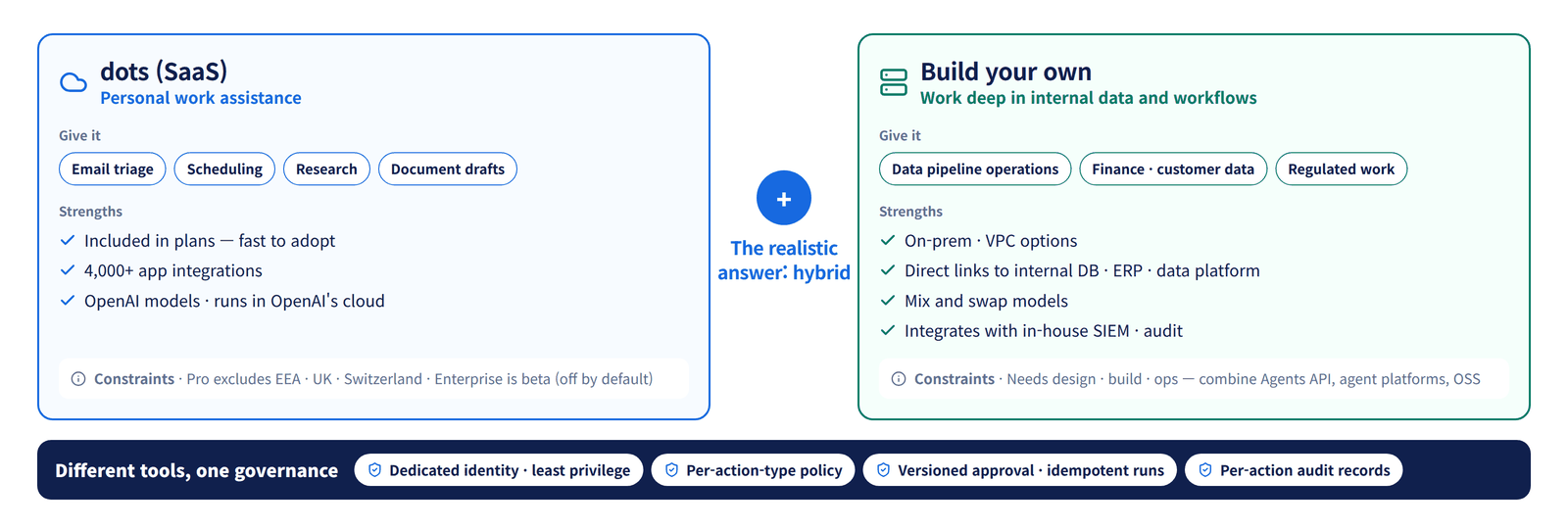
| Criterion | dots (SaaS) | Build your own |
|---|---|---|
| Time to adopt | Fast (included in the plan) | Slow (requires design, development, operations) |
| Data location / air-gapped networks | Runs in OpenAI's cloud | On-premises or VPC possible |
| Internal system integration | 4,000+ apps, limited for in-house legacy | Direct integration with internal DBs, ERP, data platforms |
| Permission and approval policy | Within the four-level rules provided | Fine-grained, per-action design |
| Audit logs | Within what is provided | Integrated with in-house SIEM and audit systems |
| Model choice | OpenAI models | Can combine and swap multiple models |
| Regional and contractual constraints | Subject to plan and regional policy (Pro excludes the EEA, UK and Switzerland; enterprise is in beta) | Your own decision |
In most cases the realistic answer is hybrid.
- Personal productivity (email triage, scheduling, research, document drafts) gets quick wins from a SaaS like dots.
- Work that reaches deep into internal data and workflows (running data pipelines, handling financial and customer data, regulated work) is built in-house to retain control.
- Apply the same permission, approval and audit principles to both, so governance stays unified even when the tools differ.
Agent architecture for building your own is covered in the AI Agent Guide and Argus Agent Architecture, and governance and telemetry in Argus Agent Governance and Telemetry.
8. Always-on agent adoption checklist
Whether you use dots or build your own, confirm the following before putting an agent into production.
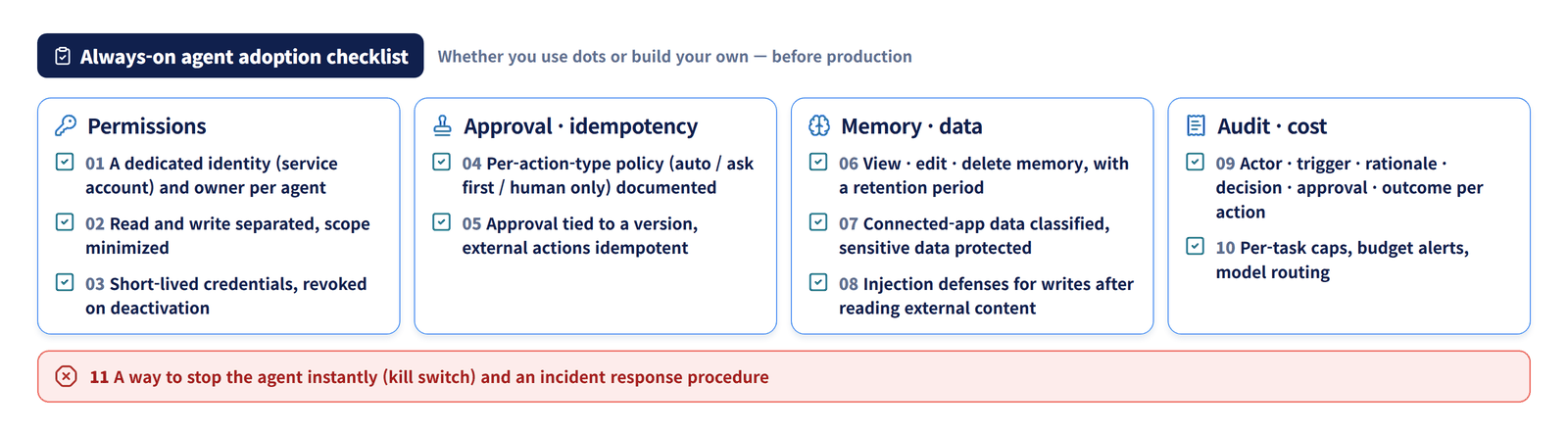
- Each agent has a dedicated identity (service account) and a designated owner
- Read and write permissions are separated, and scope is minimized
- Credentials are short-lived and revoked immediately when the agent is deactivated
- Per-action-type policies (auto / ask first / human only) are documented
- Approvals apply to a specific version, and external actions execute idempotently
- There is a defined way to view, edit and delete memory, along with a retention period
- Data from connected apps is covered by the data classification scheme, with protections for sensitive data
- There are injection defenses for write actions taken after reading external content
- Every action records its actor, trigger, rationale, policy decision, approval and outcome
- Per-task caps, budget alerts and model routing are configured
- There is a way to stop the agent immediately (a kill switch) and an incident response procedure
Closing thoughts
dots signals the move from "asking AI a question" to "assigning AI a role." Assigning a role means taking responsibility even for what happens while nobody is watching, which is why the competitiveness of always-on agents depends as much on how well permissions, approvals, audit and cost are designed as on model performance.
It is no coincidence that in the same week OpenAI pulled its next model for failing safety evaluations and regulators began investigating autonomous AI. If your organization is planning to adopt always-on agents, we recommend working through the checklist above before choosing a tool.