
Oracle-to-Hive Loading Without Sqoop (1) — NiFi and Load Control API Architecture
We replaced Oracle→Hive loading done with Kylo ImportSqoop with standard Cloudera CFM (NiFi 2.6) processors and a small Python service (Load Control API). This post covers the Data Plane / Control Plane split, where NiFi handles the data and the API handles state and completion, the PG-00 to PG-90 layout, and the test results.
We removed Sqoop (Kylo ImportSqoop), which we used to load Oracle data into Hive, and replaced it with standard processors in Cloudera CFM 4.12 (NiFi 2.6) and a small Python service. This series covers the design and implementation in three parts. The code and the full manual are in the DataDynamics/nifi-sqoop-removal repository.
| Part | Topic |
|---|---|
| Part 1 (this post) | Overall architecture: what we replaced with what, and why we split the data plane and control plane |
| Part 2 | Keeping parallel extraction consistent with Oracle SCN |
| Part 3 | Load Control API: guaranteeing "exactly once" in a distributed flow |
| Bonus | Loading Oracle timestamps as strings in NiFi (aligning session NLS with a logon trigger) |
1. AS-IS: Kylo + Sqoop
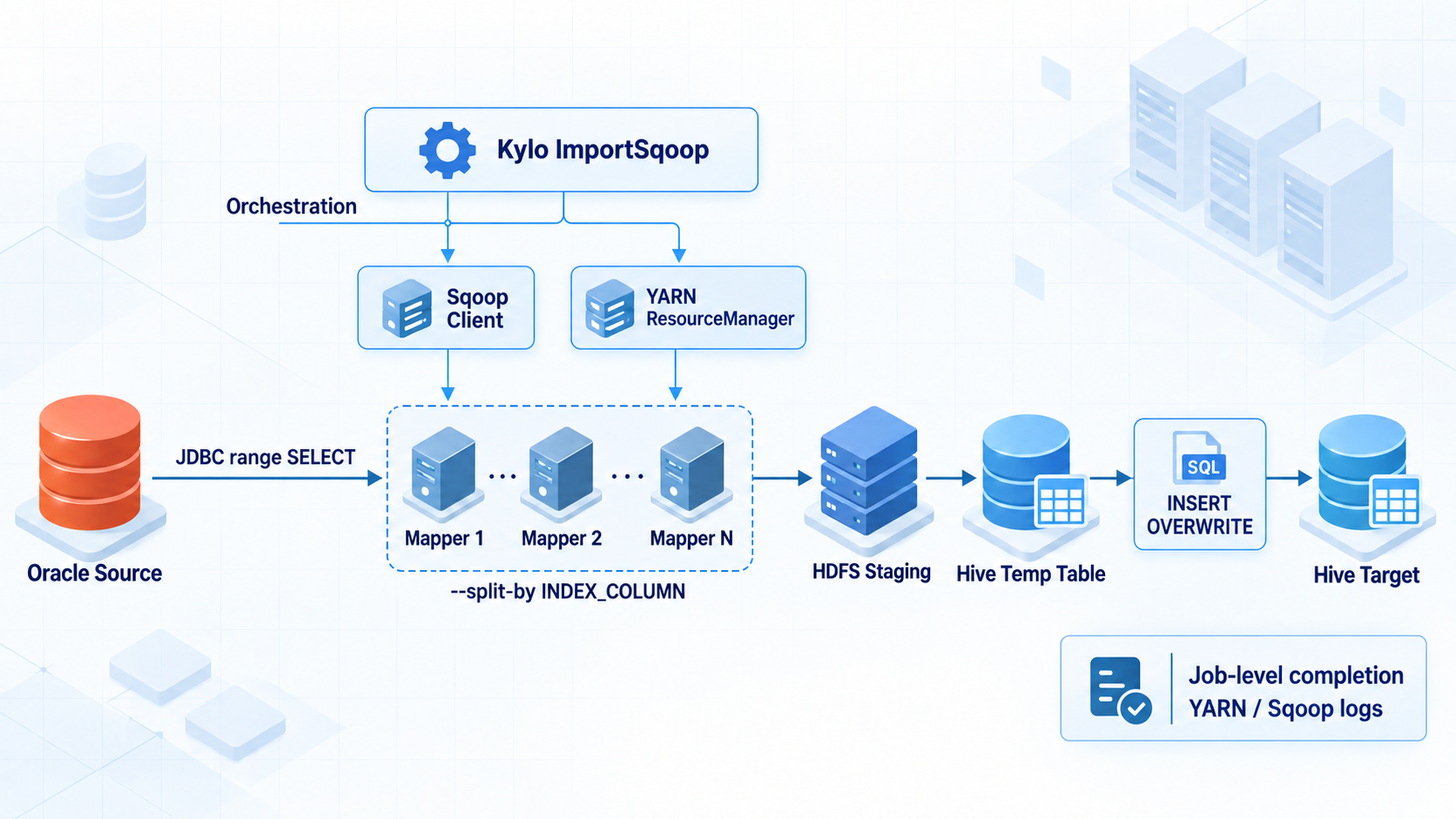
The old setup worked like this.
- Kylo
ImportSqoopstarts the Sqoop client and a YARN job. - Mappers 1 to N query the ranges split by
--split-by INDEX_COLUMNfrom Oracle over JDBC in parallel. - Mapper output is stored in HDFS staging, then goes through a Hive temporary table and is written to the target with
INSERT OVERWRITE. - Completion and failure decisions depend on Sqoop/YARN job status and logs.
Range splitting, parallel extraction and the completion decision are all bundled into a single Sqoop run. When you move this to NiFi, the first question comes up: who decides that "all Mappers have finished"?
2. What we replaced with what
We broke down what Sqoop did by role and gave each role to a different component.
| Old role | Replacement |
|---|---|
| Split range calculation | PG-10 computes boundaries and expected row counts at the same SCN |
| Parallel Mapper execution | PG-20 distributes work across NiFi cluster nodes with Round Robin |
| Whole-job completion decision | The API aggregates all partition states and chunk row counts |
| Mapper failure aggregation | PG-90 reports failures to the API, and the API moves the run to a failed state |
| HDFS file creation | PG-20 writes Parquet chunks to a run-specific path |
| Downstream Hive processing | PG-40, 50 and 60 validate, publish and re-validate |
| Temporary output cleanup | PG-70 deletes only the targets selected by the API |
NiFi is enough for moving the data. The problem is the third and fourth rows of the table. NiFi processors run independently per FlowFile, so it is hard to decide atomically, with the flow alone, whether all partitions that ran in parallel on several nodes succeeded, and to start the next step exactly once. So we moved this decision into a separate API that uses PostgreSQL transactions and CAS (conditional UPDATE).
3. TO-BE: Data Plane and Control Plane
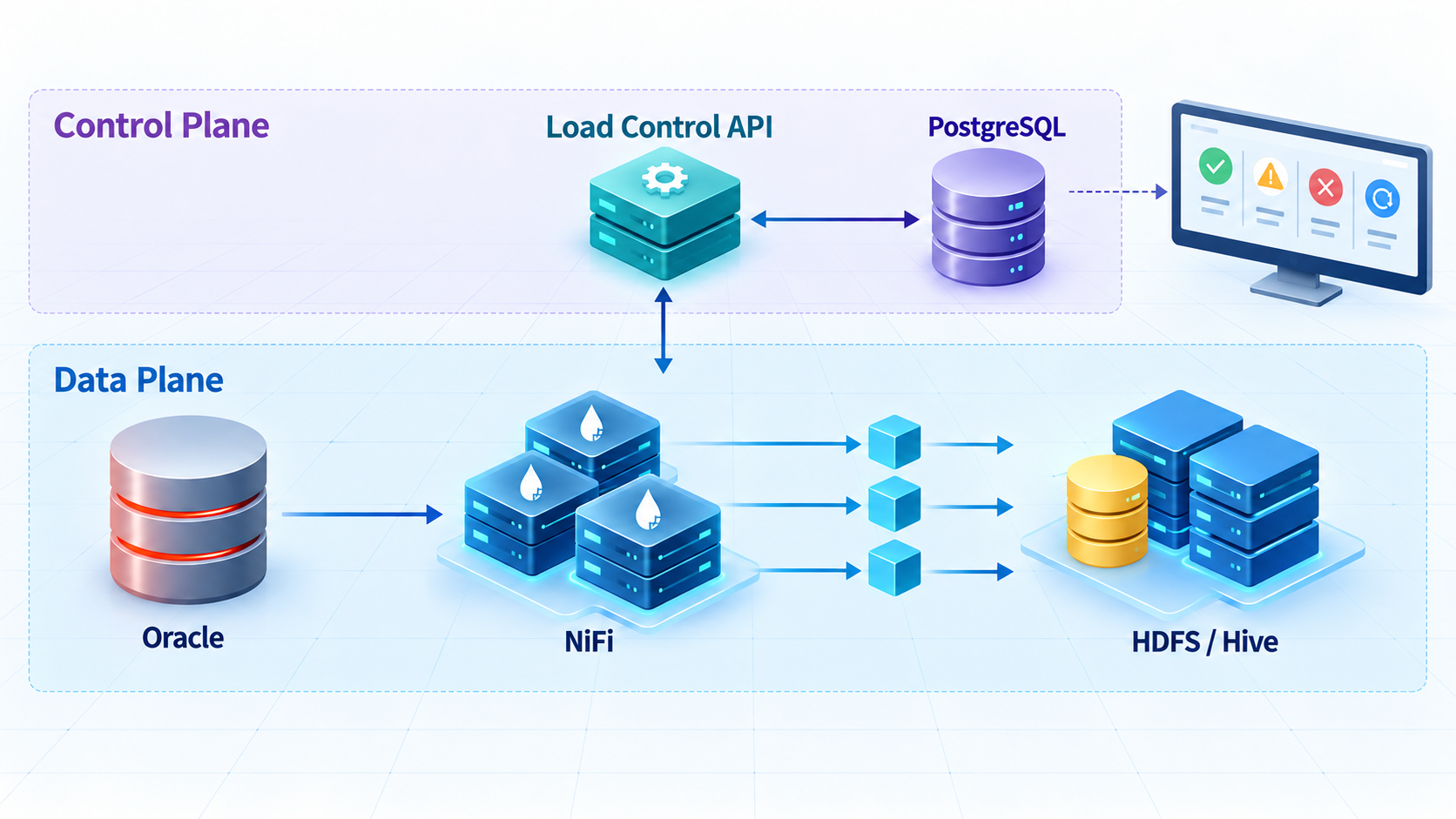
TO-BE separates the Data Plane, which handles the actual data, from the Control Plane, which decides state and completion.
- NiFi handles only data. Oracle queries, Parquet conversion, HDFS writes, Hive SQL execution.
- The Load Control API handles only state. It decides whether all partitions are done, starts the next step only once, and records failures. The API does not move data itself.
- PostgreSQL (
nifi_opsschema) is the ledger of execution state. Only the API writes to the ledger.
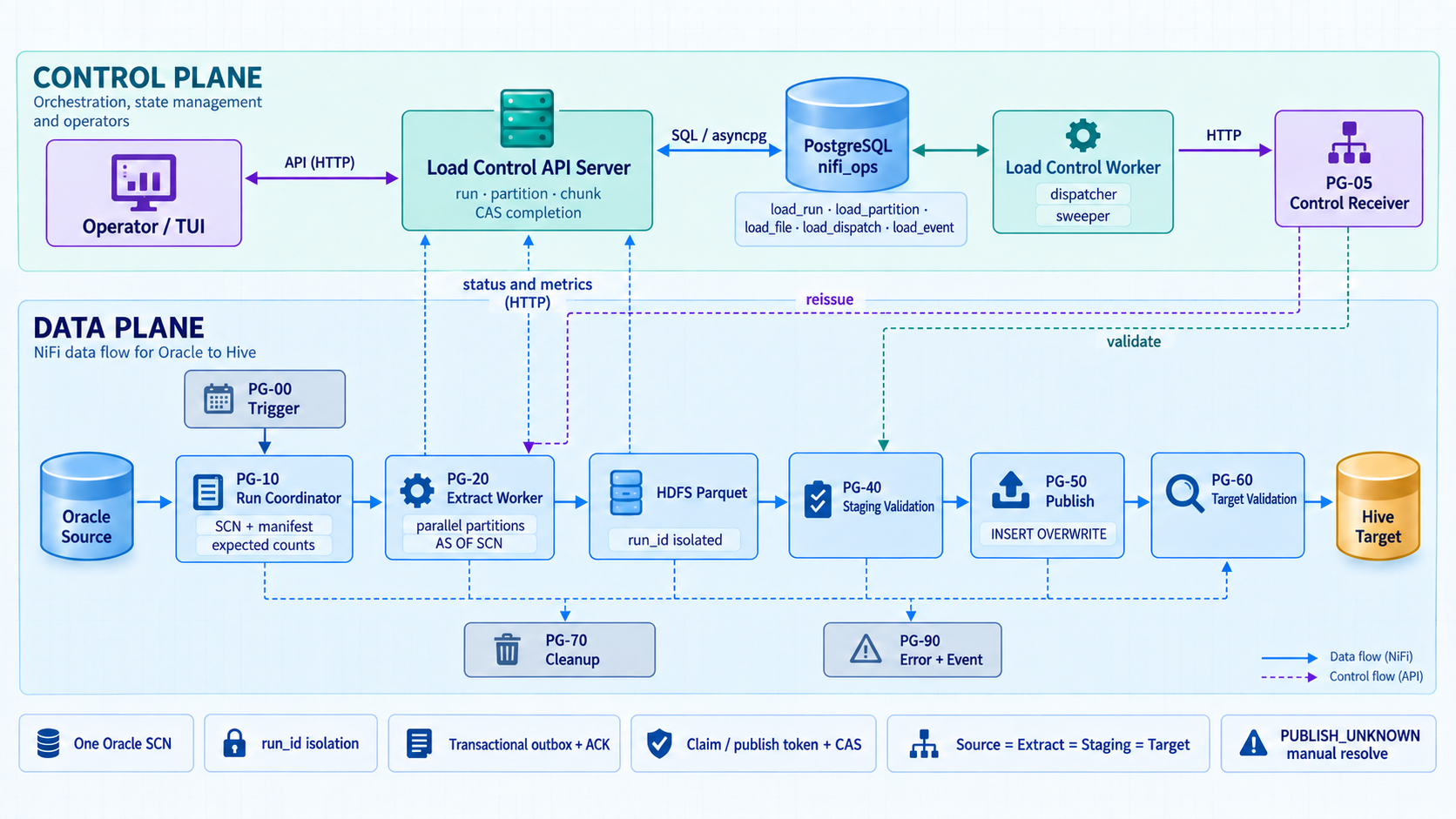
The Load Control API is split into two processes.
| Process | Role |
|---|---|
| API server | Receives HTTP requests from NiFi and makes decisions inside a transaction |
| API worker | Runs continuously without requests. The dispatcher delivers NiFi calls queued in the outbox to PG-05, and the sweeper finds stalled partitions, run timeouts, ACK timeouts, stuck validations and unknown publish results |
The server and worker do not talk to each other directly. They share only PostgreSQL. So you can run several of each and control contention with DB locks.
4. Processing order: PG-00 through PG-90
The NiFi canvas is laid out as follows.
NiFi root
├── PG-05 Control Receiver        # shared by all jobs
└── JOB_<JOB.KEY>                 # one per source table
    ├── PG-00 Trigger
    ├── PG-10 Run Coordinator
    ├── PG-20 Extract Worker
    ├── PG-40 Staging Validation
    ├── PG-50 Publish
    ├── PG-60 Target Validation
    ├── PG-70 Cleanup
└── PG-90 Error and Event| Step | What it does |
|---|---|
| PG-00 Trigger | Starts a run for a business date |
| PG-10 Run Coordinator | Creates a run in the API, pins the Oracle SCN, and computes and registers the source row count and partition ranges |
| PG-20 Extract Worker | Queries each partition in parallel, writes Parquet to HDFS, and reports to the API per chunk |
| API | On the last report, if all partitions match, calls the validation step (once per run) |
| PG-05 Control Receiver | Receives calls from the API worker and forwards them to the job's PG |
| PG-40 Staging Validation | Creates a Hive temporary table pointing at the run path and compares it with source metrics |
| PG-50 Publish | Replaces the target partition with INSERT OVERWRITE |
| PG-60 Target Validation | Compares the target with source metrics again and finishes with SUCCESS |
| PG-70 Cleanup | Deletes temporary tables and HDFS paths past their retention period |
| PG-90 Error and Event | Collects failures from all steps, reports them to the API and records events |
The connections between PGs look like this. The key point is that the path to PG-40 does not come straight from PG-20 but goes through the API worker and PG-05. That is because the API, not NiFi, decides whether extraction is finished.
Execution nodes and parallelism
- Only Trigger (PG-00) and Cleanup (PG-70) run on the Primary Node. All other processors run on All Nodes. In a cluster, Run Once runs on every node, so if Trigger is not set to Primary Node, you get as many runs as there are nodes.
- The effective maximum parallelism of PG-20 is
number of NiFi nodes × 34_Execute_Partition_Query Concurrent Tasks. This value must not exceed the Oracle connection pool and the approved number of sessions.
One set of job PGs per table
The flow is built without NiFi Registry, by the builder script in the repository (nifi-flow/deploy_job_flow.py) through the NiFi REST API. Each time you run it with a config JSON, it creates a full new PG-00 to PG-90 set under JOB_<JOB.KEY>. With 6 source tables, you get 6 job PGs with different JOB.KEY values, and only PG-05 is shared.
python3 nifi-flow/deploy_job_flow.py \
  http://<nifi-host>:<port>/nifi-api \
  /secure/path/job-insp-dtl.json
The config JSON holds per-job values: source table, extract columns, split column, business condition, partition count, Hive staging and target definitions, and so on.
"job_params": {
  "JOB.KEY": "ORACLE_INSP_DTL_DAILY",
  "SRC.OWNER": "APP",
  "SRC.TABLE": "INSP_DTL",
  "SRC.COLUMNS": "INSP_DTL_SEQ, BASE_DT, ITEM_CD, CAST(AMOUNT AS NUMBER(18,2)) AS AMOUNT, REG_TS, NOTE",
  "SRC.SPLIT.COLUMN": "INSP_DTL_SEQ",
  "SRC.BASE.WHERE": "BASE_DT = TO_DATE('${load.business.key}', 'YYYY-MM-DD')",
  "PARTITION.COUNT": "8",
  "HIVE.TARGET.DB": "dw",
  "HIVE.TARGET.TABLE": "insp_dtl",
  "TARGET.PARTITION.CLAUSE": "PARTITION (base_dt='${load.business.key}')"
}
The builder automates the repeated creation, so you don't need to copy processors in the NiFi UI. However, this is not a setup where several tables share one set of processors. If many jobs run at the same time, calculate the peak Oracle load as number of concurrent jobs × number of NiFi nodes × PG-20 Concurrent Tasks per job.
5. Keeping runs from mixing: per-run isolation
For every run, the API issues a run_id (UUID), and all output is separated by run.
| Identifier | Meaning | Example |
|---|---|---|
job_key | Fixed identifier of the load definition | ORACLE_INSP_DTL_DAILY |
business_key | Business range handled by one run | 2026-09-28 |
run_id | Run UUID issued by the API | ca803dd4-... |
snapshot_scn | Oracle point in time read by the whole run | 2388556 |
partition_id | Range partition within a run | 0000 |
<HDFS.STAGE.ROOT>/<JOB.KEY>/run_id=<run_id>/part-<partition_id>-<6-digit chunk>.parquet
<HDFS.STAGE.ROOT>/<JOB.KEY>/run_id=<run_id>/_SUCCESS
<HIVE.STAGE.DB>.<HIVE.STAGE.TABLE.PREFIX><run_id with hyphens removed>
HDFS paths and staging tables differ per run, so files from a failed run do not mix into the next run. A rerun does not fix the failed run. It runs everything again with a new run_id and a new SCN. Output from the failed run is kept as evidence for investigation during the retention period, and then PG-70 cleans it up.
6. Core guarantees
The table below summarizes what this design guarantees. Parts 2 and 3 explain how each row of this table was implemented.
| Guarantee | How | Covered in |
|---|---|---|
| All partitions read data from the same point in time | Pin one Oracle SCN at the start and use AS OF SCN in every query | Part 2 |
| Runs do not mix | Issue a run_id per run and separate HDFS paths and staging tables by run | Part 1 |
| Nothing is published if only some partitions succeed | The API starts the next step only when the sum of partition row counts = source row count | Part 3 |
| Validation and publish run only once per run | The API allows only one request through a conditional UPDATE (CAS) | Part 3 |
| No automatic republish when the publish result is unclear | Leave it as PUBLISH_UNKNOWN and let an operator confirm it | Part 3 |
| Source = extract = staging = target | Compare row count, amount sum, time min/max, PK duplicates and NULLs at each step | Part 3 |
7. Test results
We checked a normal run and the main failure scenarios on a 2-node Cloudera CFM 4.12 (NiFi 2.6.0) cluster with Oracle Database 23ai Free, Apache Hadoop 3.4.1, Apache Hive 4.0.1 and PostgreSQL 16. The data was 105,000 rows of APP.INSP_DTL for business date 2026-09-28, split into 8 partitions (one of them intentionally empty).
| Scenario | Result |
|---|---|
| Normal run | SUCCESS. Source = extract = staging = target = 105,000 rows. All 12 STAGING and TARGET metrics (row count, NULL, PK duplicates, amount sum 71,853,075, time min/max) PASS |
| Cluster distribution | 7 partitions extracted across the two nodes. The empty partition did not go to the Worker and succeeded immediately. Trigger ran only on the Primary Node, so 1 run |
| Duplicate run for the same business date | 409 DUPLICATE_ACTIVE_RUN. No effect on the existing run |
| HDFS write failure in one partition | Partition FAILED, run FAILED_EXTRACT. No validation call |
ORA-01555 (undo exhausted) | Run FAILED_SNAPSHOT_EXPIRED without retry. A new run succeeded with a new SCN |
| Run while the API is down | NiFi waited with retries and continued after the API restarted |
| Run while HiveServer2 is down | Waited at the DDL step, then continued to SUCCESS after Hive restarted |
| Publish failure | PUBLISH_UNKNOWN. FAILED_PUBLISH after operator confirmation |
| 2 jobs running at the same time (shared PG-05) | Each SUCCESS |
| Load Control API tests | 139 of 140 passed. The remaining 1 was excluded in the test environment because of another worker on the same DB server |
Why each scenario behaves this way is covered in Part 2 (SCN, ORA-01555) and Part 3 (duplicate runs, partial failure, PUBLISH_UNKNOWN).
Not yet verified
These are test environment results, so the following must be checked again before production.
- CDP HiveServer2 (Hive 3) and ACID managed target tables. The test used Apache Hive 4.0.1.
- Processing time with production-scale data, load on Oracle, the API and the management DB, and NiFi node failure during partition processing
- Undo retention, indexes and session limits on the production Oracle
- Cutover validation by running in parallel with AS-IS Sqoop and comparing row counts, sums and sample rows
Wrapping up
The core of replacing Sqoop with NiFi was not choosing processors. It was deciding where to put the "whole-job completion decision" that used to be bundled into a single Sqoop run. This project moved that decision out of NiFi into a small API and a PostgreSQL ledger, and as a result the NiFi flow stayed simple, doing only data processing and API calls.
In Part 2, we explain how partition queries that run at different times on several nodes read data from the same point in time, focusing on Oracle SCN and undo.