
Inside herdr — an Agent Multiplexer for Running Many Coding Agents in One Terminal
How herdr, an open-source agent multiplexer, handles running many CLI coding agents: server/client model, status detection, session restore, remote machines, plugins, Herdr 2 and adoption caveats.
A task that started with one Claude Code session quietly grows into two Codex sessions, an OpenCode session, a test server and a log tail — seven terminal tabs. Sooner or later you keep asking the same question: "Which tab is waiting for my answer?" Your SSH connection drops and the work is gone; you close the laptop lid and the agents stop.
herdr is an open-source agent multiplexer aimed squarely at this problem. It describes itself as "the runtime your coding agents live on". Like tmux, it keeps terminal sessions alive in a background server; on top of that, it collects whether each agent inside is working, blocked waiting for a human, or finished (done/idle) into a sidebar. Since the repository was created on 27 March 2026 it has gathered 52,359 GitHub stars and 4,237 forks (GitHub API, as of 2026-11-23).
Data Dynamics is not affiliated with herdr; this is an analysis of an external open-source project. As of 2026-11-23 we cloned the herdrdev/herdr, herdrdev/herdr-core and herdrdev/herdr-app repositories and read their READMEs, versioned docs, CHANGELOGs, LICENSE files and Cargo.toml. We did not build or run the code.
TL;DR: herdr is not a new agent. It is a layer that owns the terminals your agents run in, reads their state, and tells both you and other agents about it. Think of it as the tmux + git worktree setup many teams already hand-roll, with status detection, notifications and an automation API added on top.
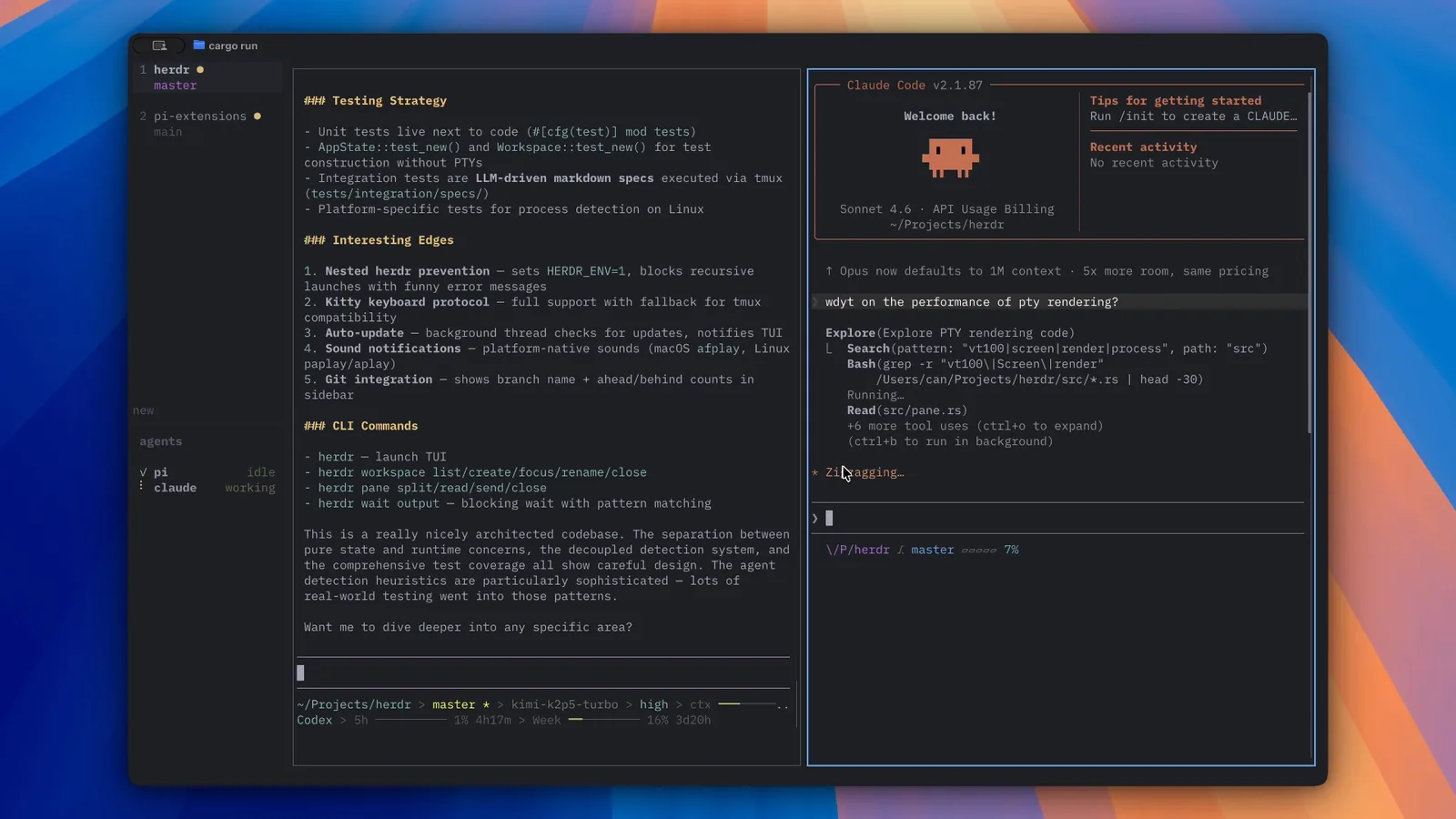
herdr in action. Source: herdrdev/herdr repository assets/screenshot.png (Apache-2.0)
| Screen area | What it shows |
|---|---|
| Sidebar, top | The workspace list: number, name and current Git branch. The marker next to a name rolls up the state of the agents inside (a blocked agent makes the workspace look blocked; a working one makes it look active) |
| Sidebar, bottom (agents) | Every agent across all workspaces with its state. Here pi is idle and claude is working |
| Middle and right panes | Real terminals (PTYs). Agent CLIs run in them as usual; the focused pane is marked by its border colour |
At a glance
| Item | Details |
|---|---|
| Repository | herdrdev/herdr (Apache-2.0), site herdr.dev |
| Current stable | v0.9.5 (released 2026-10-14, a hotfix for 0.9.4) |
| Language / stack | Single Rust binary. Terminal emulation via libghostty-vt, TUI built on ratatui |
| Size | 52,359 stars · 4,237 forks · 538 open issues · 98 GitHub releases (including previews) |
| Platforms | Linux, macOS, Windows (remote hosts: Linux/macOS on x86_64/aarch64, Windows on x86_64) |
| Supported agents | 20+ including Claude Code, Codex, GitHub Copilot CLI, Cursor Agent CLI, OpenCode, Gemini CLI, Grok CLI |
| Extension points | The whole CLI is the plugin API, a local socket API (newline-delimited JSON), an agent skill file |
| Successor | Herdr 2: herdr-core (hc, v0.1.22) and the herdr-app desktop app (v0.1.16), both Apache-2.0 |
All figures are from the GitHub API as of 2026-11-23. herdr-core and herdr-app ship through releases.herdr.dev rather than GitHub Releases, so their versions come from each repository's CHANGELOG and Cargo.toml.
What problem it solves
Running several CLI coding agents in parallel runs into four practical problems.
- You don't know who is waiting on you — agents stop at permission approvals and questions. With many tabs, finding the stuck one means checking each in turn.
- A lost connection kills the work — closing the terminal window or dropping SSH ends the agent processes inside it.
- Recovering after a reboot is tedious — after a server restart you have to rebuild which directory held which agent and which conversation it was continuing.
- Agents have no channel to work together — if one agent wants another to review something and wait for the result, a human ends up copy-pasting between them.
tmux solves problem 2, and git worktree separates working directories within one repository. herdr adds answers to problems 1, 3 and 4.
Architecture: the server owns the terminals, clients only draw
herdr (the newer repositories call it "Herdr 1" to distinguish it from what came next) follows a tmux-like background server plus multiple clients model. Summarising the official concept docs:
- The server owns panes and processes. A client is just a terminal UI attached to it. Detach with
ctrl+b qand the server and agents keep running. On Linux and macOS the server ignoresSIGHUP, so closing the shell that launched it does not kill the panes (changed in v0.9.4). - The hierarchy is workspace → tab → pane. A workspace is the top-level container for a repository or task, and the state of the agents inside rolls up to it.
- A session is a server-level namespace. A named session such as
herdr session attach workis a separate server with its own panes, sockets and runtime state. The config file is shared. - Several clients can attach at once. Each can view a different workspace or tab; when they view the same tab, the last client to interact with it controls the pane sizes.
- There is one control path. The TUI, the CLI, plugins and the agent skill all use the same local socket API (a Unix domain socket, or a named pipe on Windows). The default path is
~/.config/herdr/herdr.sock, andherdr api schema --jsonprints its JSON Schema.
As the README stresses, herdr does not wrap or replace your agents — "it owns their terminals". You still launch them as claude or codex.
Core feature 1 — status detection by reading the screen
herdr's main value is the status shown in the sidebar. There are five states.
| State | Meaning |
|---|---|
blocked | Needs input, approval or a decision |
working | Actively running |
done | Finished and not yet looked at |
idle | Finished or waiting, and already seen |
unknown | Cannot be classified confidently |
How the state is determined depends on the agent.
- Agents herdr supports (Claude Code, Codex and others): herdr finds the agent from the pane's foreground process and matches the live bottom of the screen against per-agent detection manifest rules. When an integration reports state directly — as with OpenCode, Pi, Kimi Code CLI and Kilo Code CLI — those reports take precedence.
- Agents that support herdr (Crush, Kiro CLI, Command Code and others): the agent sees the
HERDR_ENV,HERDR_PANE_IDandHERDR_BIN_PATHenvironment variables and reports its own state and resume command. No change to herdr is needed.
Manifests are bundled in the binary, and herdr fetches remote updates from herdr.dev and applies them without a restart. A local override under ~/.config/herdr/agent-detection/ always wins. When a pane shows the wrong state, herdr agent explain shows which rule matched and why.
The limitation the docs state themselves matters here. Blocked detection is deliberately strict: herdr marks blocked only when the screen matches a known approval or question UI. An unfamiliar prompt may show as idle, and the docs warn that "idle status is not authorization to approve an action". Automation that trusts idle alone could type into an approval dialog.
Notifications are configured under [ui.toast]: an in-app toast (herdr), an outer-terminal notification (terminal, which also works over SSH) or an OS notification (system), with separate sounds for "finished" and "needs input".
Core feature 2 — keeping and restoring sessions
herdr documents what survives in each situation.
| Situation | Processes keep running | Layout returns | Agent conversation resumes |
|---|---|---|---|
| Detach and reattach | Yes | Yes | Yes (the process never stopped) |
| Server restart | No | Yes | Only with native session restore |
herdr update --handoff | Best effort on supported servers | Yes | Yes, if the handoff succeeds |
- Snapshot restore: when the server starts again, workspaces, tabs, panes, working directories and layout come back from
session.json. Running shells and test processes do not; panes restart as fresh shells in their saved directories. Up to 48 layout snapshots are kept insession-snapshots/, at most one every 15 minutes. - Native agent session restore: with an integration installed, the agent reports its session ID, and after a server restart herdr reopens the same conversation with that agent's resume command, such as
claude --resumeorcodex resume. It is on by default. - Pane screen history replay: shows recent terminal contents after a restart, but because output can contain secrets, tokens and prompts it is off by default and only enabled through the
[experimental]config. - Live handoff: an experimental update path in which the old server transfers pane processes to the new one, so the server binary can be replaced without stopping them. Transient coordination such as in-flight waits and subscriptions may be interrupted.
Installing the Claude Code integration writes hooks/herdr-agent-state.sh under ~/.claude (or CLAUDE_CONFIG_DIR) and adds a SessionStart hook to settings.json. The Codex integration edits hooks.json and config.toml under ~/.codex. In other words, it modifies your agents' configuration files, which organisations that distribute standard agent settings should review first.
Core feature 3 — agents driving agents
herdr is designed for agents, not just humans, to operate it. The docs split automation into three primitives.
| Primitive | Responsibility |
|---|---|
| Layout (workspace, tab and pane topology) | Create and organise terminal locations |
| Pane | Raw terminal control: run commands, send input, read output, wait for output |
| Agent | Address a recognised agent by name or pane and control it by lifecycle state |
Slightly trimmed from the official example (the model argument is omitted), this opens a Codex reviewer next to the current pane, asks it to review the diff, and waits for it to settle:
split=$(herdr pane split --current --direction right --no-focus)
review_pane=$(printf '%s\n' "$split" | jq -r '.result.pane.pane_id')
herdr agent start reviewer --kind codex --pane "$review_pane"
herdr agent prompt reviewer "Review the current diff" --wait --timeout 120000
herdr agent read reviewer --source recent-unwrapped --lines 120
herdr --skill prints the agent skill file (Markdown) that matches the running binary. Installed into an agent such as Claude Code, it lets the agent — when HERDR_ENV=1 — read neighbouring panes, start helper agents, and wait for tests or other agents to finish, all through the herdr CLI.
If the target agent is already blocked, agent prompt --wait returns agent_blocked without sending input — a guard against typing a prompt into an approval dialog. A timeout, however, does not prove that nothing was sent, so the docs advise reading the agent before retrying.
Core feature 4 — worktrees, remote machines and plugins
git worktree integration. herdr worktree create creates a Git worktree, opens it as a workspace, and groups it with the parent repository's workspace. If the branch exists it is checked out; otherwise it is created from --base or HEAD. herdr worktree remove runs git worktree remove under the hood and never deletes the branch.
Several machines in one window. There are three paths.
- SSH into the server and run
herdrthere — the tmux-style path, which also works from a phone SSH client (the TUI adapts to narrow screens). herdr --remote workbox— the remote server owns the panes while your local herdr draws the UI, keeping your local keybindings and image clipboard paste.herdr machine add workbox— save SSH machines and merge the workspaces and agent lists of Local and several remotes into one sidebar. Losing one connection does not affect the others.
Remote connections use your normal OpenSSH authentication. If the remote host has no compatible binary, an interactive run asks before installing one; a non-interactive run fails rather than modifying the host.
Plugins. A plugin is a directory with a herdr-plugin.toml manifest and can be Bash, JavaScript, Lua, Rust or anything else your machine can run. There is no separate SDK: the entire herdr CLI is the plugin API. Actions, event hooks, panes and link handlers are declared in the manifest. herdr plugin install installs from GitHub, and the herdr.dev/plugins marketplace automatically lists public repositories tagged with the herdr-plugin topic.
Installation and usage, step by step
Following the official docs (Quick start, Keyboard, Integrations and Agent automation, as of v0.9.5), here is the path from installation to agents handing work to each other.
Step 1: Install
# Linux and macOS install script
curl -fsSL https://herdr.dev/install.sh | sh

# or, with a package manager you already use
brew install herdr
mise use -g herdr
Windows has a PowerShell installer (irm https://herdr.dev/install.ps1 | iex), and a Nix flake and direct release-binary downloads are also supported. The install script downloads the release binary for your platform and puts it on your PATH. If company policy rules out piping remote scripts, bring in a GitHub release binary instead.
Step 2: First launch
Run it from a project directory:
cd ~/projects/my-service
herdr
herdr launches the default background session, or attaches to it if it is already running; you never manage sockets yourself. If the session has no workspaces, it creates one. A workspace is a project-level container for tabs, panes and agents, so one workspace per active project keeps the sidebar readable.
herdr is mouse-native: click panes, tabs, workspaces and agents to focus them, drag split borders to resize, and use right-click menus to split panes or create tabs. Drag-selecting text copies it to the clipboard.
Step 3: Run an agent
Start your agent in a pane as usual:
claude # or codex, opencode, pi, ...herdr detects it automatically and shows its state in the sidebar.
| State | Meaning |
|---|---|
working | Working |
blocked | Waiting for your input or approval |
done | Finished, and you haven't looked at it yet |
idle | Finished or waiting, and already seen |
Both done and idle mean ready for input. The docs warn, however, that an unfamiliar approval screen may briefly show as idle, so never read idle as permission to approve.
To be notified when a background agent finishes or needs you, add this to the config file:
[ui.toast]
delivery = "herdr"
delay_seconds = 1
Step 4: Keyboard control
The keyboard is optional. As in tmux, press the prefix (default ctrl+b), release it, then press an action key. These are the five keys the docs suggest learning first:
| Action | Key |
|---|---|
| New tab | prefix+c |
| Split right / down | prefix+v / prefix+minus |
| Move between panes | prefix+h/j/k/l |
| Workspace navigation | prefix+w |
| Detach, leaving everything running | prefix+q |
Other frequently used keys:
| Action | Key |
|---|---|
| Zoom / close pane | prefix+z / prefix+x |
| Next / previous tab, tabs 1–9 | prefix+n / prefix+p, prefix+1..9 |
| New workspace | prefix+shift+n |
| Goto picker (search all agents and terminals) | prefix+g |
| Toggle sidebar | prefix+b |
| Copy mode | prefix+[ |
| Show all keybindings | prefix+? |
In the Goto picker (prefix+g), b, w, i and d filter blocked, working, idle and done agents — handy for finding the agent that is waiting on you. Every key, including the prefix, can be changed under [keys] in the TOML config.
Step 5: Detach, reattach and restore after a restart
Press prefix+q, or simply close the terminal window: the herdr server and every agent keep running. Run herdr again to reattach to the same session, and herdr server stop to end it.
To keep agent conversations across a server restart, install the agent's integration. It tells herdr which session the agent is in, so herdr can restore the conversation after a restart (for example with claude --resume). The settings screen inside herdr can also install integrations for every agent found on your PATH.
herdr integration install claude
herdr integration install codex
herdr integration status
Step 6: Worktrees and agent automation
To run several agents on one repository, create a worktree with herdr worktree create; it opens as its own workspace.
herdr worktree create --branch fix-login --base main --focus
herdr worktree list
herdr worktree remove --workspace <workspace ID>   # runs git worktree remove; keeps the branch
Agents can also hand work to other agents. The docs' example starts a reviewer agent, sends it a prompt, waits for it to settle and reads the result:
herdr agent start reviewer --kind codex --pane "$review_pane"
herdr agent prompt reviewer "Review the current diff" --wait --timeout 120000
herdr agent read reviewer --source recent-unwrapped --lines 120
Remote servers and your phone
| Approach | Command | Use |
|---|---|---|
| SSH in, then run it | ssh you@server, then herdr | Use it like tmux on a remote shell; phone SSH clients work the same way |
| Remote session, local UI | herdr --remote <host> | The remote owns the panes and the local client draws them; local keybindings and image paste work |
| Several machines in one window | herdr machine add <host> --label <label> | Agents on Local and several SSH machines in one sidebar |
herdr needs no dedicated mobile app: you connect to the same session from an SSH client on your phone, and the TUI adapts to narrow screens so you can check agents and switch workspaces. Phone screenshots are in the official docs: How to work with Herdr — Work from your phone.
herdr works without a config file; keybindings, themes, notifications and the sidebar are customised in TOML.
Herdr 2: herdr-core and herdr-app
On 16 October 2026 two new repositories appeared in the same organisation. Their AGENTS.md files call the existing herdrdev/herdr "Herdr 1" and the new desktop app "Herdr 2".
herdr-core(hc) — "terminals for coding agents". A terminal runtime that draws nothing. You start programs withhc run --bg --name web bun devand work with them throughhc attach,hc read,hc sendandhc wait. Agents started by an agent become its children; the parent can wait on them withhc wait --children alland is notified when they need attention.AGENTS.mdsets the rule "Core is a runtime, not a multiplexer" and asks contributors to write fresh code rather than copy from Herdr 1.herdr-app— a native desktop app built on GPUI and a client of herdr-core. "The window arranges terminals. The core runs them", so closing the window leaves terminals running. Panels and menus are extended with JavaScript mods.
The biggest design difference is how status is determined. Herdr 1 infers state from the screen, whereas herdr-core states that it "does not guess from screen text or recognize agent brands". It uses only what a program reports through OSC 7501 (the Program Status Protocol); a program that does not report has no status. That removes misclassification risk at the cost of requiring support on the agent side.
At herdr-core 0.1.22 (2026-11-22) and herdr-app 0.1.16 (2026-11-14), both are early. Stars also differ widely: 868 for herdr-core and 3,348 for herdr-app (GitHub API, as of 2026-11-23). For adoption today, Herdr 1 with its stable releases is the realistic choice; Herdr 2 is one to watch.
Compared with tmux + git worktree
Compared with the setup covered in Keeping Claude Code and Codex Sessions Alive with tmux — and Managing Tokens and Running Claude Code and Codex Side by Side in One Repo with git worktree:
| Aspect | tmux + git worktree | herdr |
|---|---|---|
| Session persistence | The tmux server keeps it | The herdr server keeps it |
| Agent status | Check manually (or write your own hooks and scripts) | working·blocked·done·idle rolled up in the sidebar, with notifications |
| After a reboot | Combine a plugin such as tmux-resurrect with each agent's --resume yourself | Layout restore, plus conversation resume when integrations are installed |
| Worktrees | Run git worktree and open a window yourself | herdr worktree create creates the checkout and the workspace together |
| Agent-to-agent automation | Build it yourself with tmux send-keys and friends | agent start, agent prompt --wait, agent wait, socket API |
| Remote | SSH in, then tmux | SSH in then herdr, --remote, or multiple saved machines |
| Maturity / ecosystem | Decades of use, installable on almost any server | Public since March 2026, 0.x versions, fast-moving |
| Learning curve | Many teams already know it | Same ctrl+b prefix as tmux, mouse-first UI |
One caveat: herdr can run inside tmux, but if you start tmux inside a herdr pane, herdr cannot see the agent running in it, because the pane process appears to be tmux. If your shell auto-attaches to tmux, the docs recommend adding a HERDR_ENV check.
In short, if you already run two or three agents comfortably with tmux scripts, there is little reason to switch. herdr earns its place when finding out who is waiting has become the bottleneck, or when you want to script hand-offs between agents.
Limitations and adoption caveats
1. herdr is not a sandbox. Agents run with the permissions of the user who started herdr. herdr-core's security doc says it is "not a sandbox or a permission broker for agents", that the socket API has no separate password or per-client permission check, and that other programs running as your account are part of the trust boundary. With the agent skill installed, one agent can send input to the agent in the next pane. If you run agents with permission prompts disabled, consider that a prompt injection in one agent now has a path to the others. Where isolation matters, use containers, VMs or sandbox wrappers separately and connect detection with the documented HERDR_AGENT hint.
2. Status is an inference. In Herdr 1, most state comes from screen-manifest matching. When an agent's UI changes, blocked can show as idle until a remote manifest update catches up. Do not use status values as grounds for unattended auto-approval.
3. Plugins and mods are unreviewed code. Plugins run as your user and can call the entire herdr CLI, and the docs state that herdr does not review or sandbox plugin code. The marketplace is explicitly "not a reviewed catalog". herdr-app mods are likewise "trusted code, not sandboxed extensions".
4. The licence is Apache-2.0 — now. The LICENSE files and Cargo.toml of all three repositories are Apache License 2.0. However, the herdr CHANGELOG records that v0.8.0 (2026-08-03) relicensed herdr from AGPL-3.0-or-later to Apache-2.0. If you see "herdr is AGPL" somewhere, it predates that change. If you pin 0.7.x or earlier, or modify and redistribute code from that period, the AGPL terms apply. Third-party notices are in each repository's THIRD-PARTY-NOTICES and licenses/.
5. Air-gapped environments need outbound calls turned off. By default herdr checks herdr.dev in the background for new versions (update.version_check) and detection manifests (update.manifest_check); both can be set to false. Remote machine setup downloads releases from https://herdr.dev/latest.json, but HERDR_REMOTE_BINARY can point to a local binary instead. Building from source (cargo build --release) or bringing in release binaries is an alternative to the install script. Note that herdr-app has usage telemetry on by default, sending a daily report to telemetry.herdr.dev (the docs say terminal text, prompts and paths are not included); turn it off in Settings or with "telemetry": false in settings.json. For designing a whole air-gapped development environment, see Inside IBM Bob (Part 2) — Designing an Open-Source Coding Agent Platform for Air-Gapped Environments.
6. Update integrity stops at checksums. The herdr-core and herdr-app docs say updates are checked against the SHA-256 in the release manifest, but the manifest itself is not verified with a separate signing key. For internal distribution, mirror the binaries into an internal repository with your own verification step.
7. The session directory is sensitive. session.json and snapshots store working directories and agent session references, and terminal output if screen history is enabled. herdr-core states that it does not encrypt its state directory. On shared servers, check home directory permissions and backup policies.
8. Pace of change and project structure. herdr went from v0.1.0 in March 2026 to v0.9.5 in eight months, with behaviour changes in minor releases (for example the SIGHUP change in v0.9.4 and the removal of Codex hooks in v0.9.5). Meanwhile Herdr 2 is being written as fresh code, so the long-term direction of Herdr 1 is hard to judge from the repositories alone. The AGENTS.md files of herdr-core and herdr-app name a single maintainer. If you make it a team standard, pin versions and plan upgrades.
Wrapping up
herdr focuses not on making agents smarter but on saving the attention of the person running many of them. The server owns the terminals, extracts state from the screen or from the agents' own reports, surfaces it in the sidebar and notifications, and exposes the same information to agents through the CLI and socket API. As a result, humans only need to follow the blocked markers, and agents can hand work to other agents and wait for it.
That convenience rests on the premise that everything is connected within the same user's permissions. It is worth trying right away in a personal development setup, but before bringing it to a team or an air-gapped network, decide on sandbox boundaries, outbound calls, plugin intake policy and version pinning. It will also be interesting to see how Herdr 1, which infers status from the screen, and Herdr 2, which trusts only explicit program reports via OSC 7501, converge.
References
- GitHub: herdrdev/herdr, herdrdev/herdr-core, herdrdev/herdr-app
- Official docs: herdr.dev/docs — Concepts, Agents, Session state, Connecting machines, Plugins, Socket API
- Changelog: herdr CHANGELOG
- Related posts: Keeping Claude Code and Codex Sessions Alive with tmux — and Managing Tokens, Running Claude Code and Codex Side by Side in One Repo with git worktree, Inside IBM Bob (Part 2) — Designing an Open-Source Coding Agent Platform for Air-Gapped Environments