
Keeping Claude Code and Codex Sessions Alive with tmux — and Managing Tokens
A tmux setup (macOS, Linux and Windows WSL2) that keeps Claude Code and Codex CLI sessions running when SSH drops, plus why long-lived sessions inflate token usage and how to keep it under control.
You hand a refactoring job to Claude Code or Codex CLI on a remote server, close your laptop, and when you come back the agent is gone along with the SSH session. Agent tasks run for tens of minutes or hours, so the first step is to decouple the agent process's lifetime from your terminal connection.
This post covers two things:
- Keeping sessions alive with tmux — including macOS and Linux pitfalls and surviving reboots
- Token management for long-lived sessions — keeping a session open is free, but resuming it can get expensive, and here is why and what to do about it
The mechanics of context compaction are covered in Agent Memory and Compaction and the compaction deep dive; this post focuses on day-to-day operations.
1. Why the agent dies when the connection drops
A process started over SSH is a child of the shell SSH created. When the connection drops, the shell receives SIGHUP, which propagates to its children — claude and codex included.
tmux changes that structure. The process's parent becomes a tmux server running in the background, and the terminal you look at is just a client attached to it. When the client goes away, the server and everything inside it keep running.
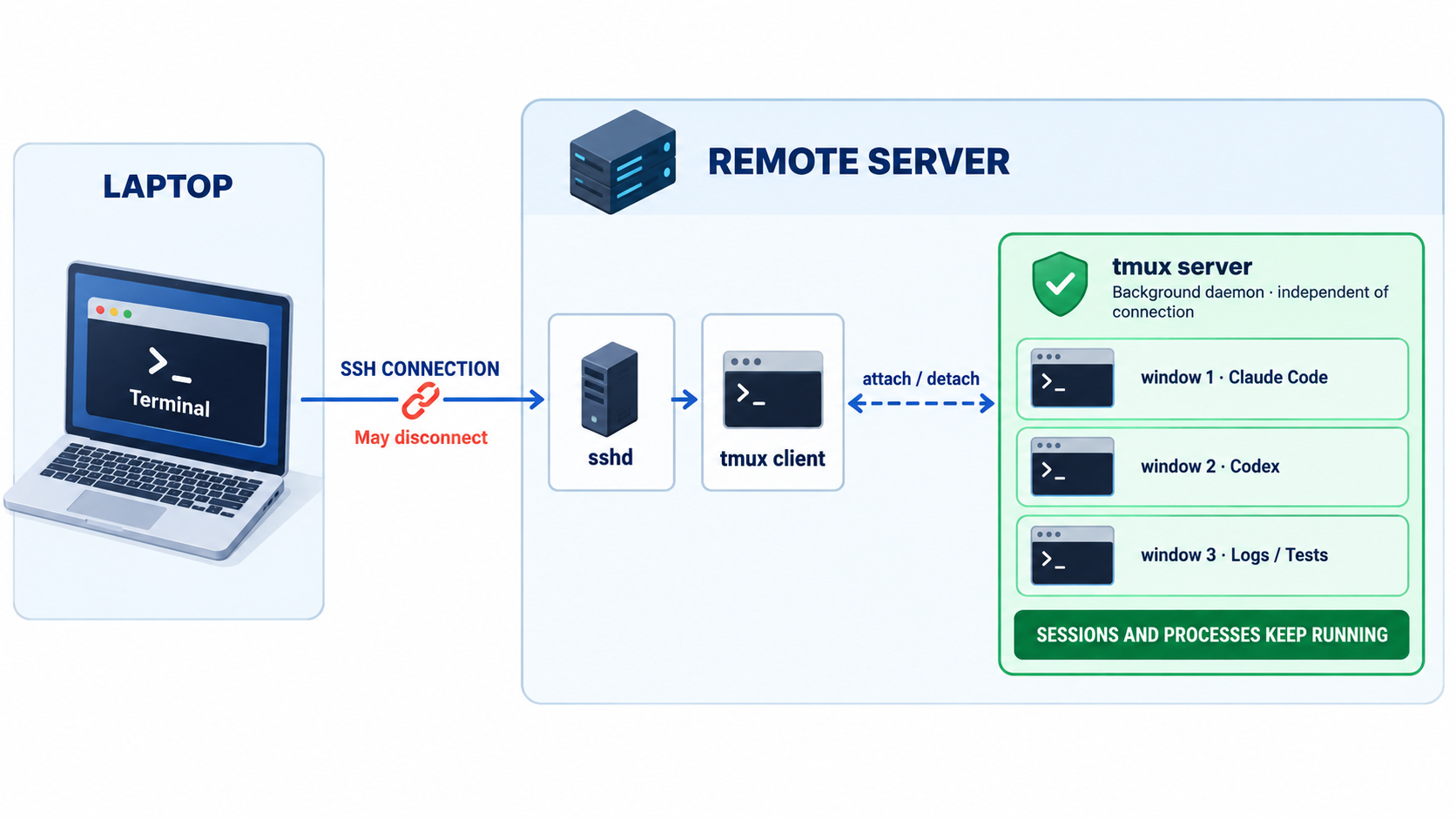
nohup or disown would also keep the process alive, but Claude Code and Codex are interactive TUIs — they are only useful if you can reattach, see the screen and type. That is why you want tmux (or screen).
2. Installation
# macOS (Homebrew)
brew install tmux

# Ubuntu / Debian
sudo apt-get install -y tmux

# RHEL / Rocky / Alma
sudo dnf install -y tmux

tmux -V   # 3.2+ recommended (extended-keys, OSC52 clipboard, etc.)
Windows has no native tmux. The de facto standard is to install tmux inside an Ubuntu distro on WSL2 and run the agents inside WSL too — see the Windows (WSL2) part of section 6.
Older distributions such as CentOS 7 ship tmux 1.8, where some of the settings below do not work. Build from source or use a third-party repository to get 3.x.
3. The basics you actually need
tmux new -s agent          # create a session named 'agent' and enter it
claude                     # run the agent inside the session

# Press Ctrl-b, then d  → detach (the session keeps running)

tmux ls                    # list live sessions
tmux attach -t agent       # reattach (short: tmux a -t agent)
tmux kill-session -t agent # end the session
Common keys (after the Ctrl-b prefix):
| Key | Action |
|---|---|
d | detach |
c | new window |
n / p | next / previous window |
0–9 | jump to window by number |
% / " | split vertically / horizontally |
[ | scroll (copy) mode, q to exit |
s | pick from session list |
To SSH in and attach in one step — creating the session if it does not exist:
ssh -t dev-server 'tmux new -A -s agent'4. A .tmux.conf for AI agents
The defaults work, but agent TUIs produce long output and rely on colors and key combos, so a few tweaks go a long way.
# ~/.tmux.conf

# 1) Scrollback: agent output is long (default is 2000 lines)
set -g history-limit 100000

# 2) No ESC delay: avoids sluggish Esc handling in TUIs
set -sg escape-time 0

# 3) Colors: 256 colors + true color
set -g default-terminal "tmux-256color"
set -as terminal-features ",xterm-256color:RGB"

# 4) Pass modified keys such as Shift+Enter to the app (tmux 3.2+)
set -g extended-keys on
set -as terminal-features ",xterm*:extkeys"

# 5) Mouse scroll and selection
set -g mouse on

# 6) Clipboard: copy from remote tmux into the local clipboard via OSC52
set -g set-clipboard on

# 7) Focus events, windows numbered from 1
set -g focus-events on
set -g base-index 1
setw -g pane-base-index 1

# 8) Activity: flag windows in the status bar when an agent prints or exits
setw -g monitor-activity on
set -g visual-activity off
tmux source-file ~/.tmux.conf # apply to the running serverNotes:
- Shift+Enter for newlines: Claude Code configures the newline key per terminal via
/terminal-setup. Inside tmux you need theextended-keyssetting above for key combos to get through. Typing\followed by Enter works everywhere as a fallback. - Clipboard: iTerm2, Ghostty and WezTerm on macOS and most modern Linux terminals support OSC52. In iTerm2, enable Settings → General → Selection → Applications in terminal may access clipboard.
- Mouse mode: with
mouse on, holdOption(macOS) orShift(Linux) while dragging to use the terminal's native selection.
5. Per-project session automation
Instead of building windows by hand every time, keep one "attach if it exists, create otherwise" script.
#!/usr/bin/env bash
# ~/bin/agent-session : usage agent-session <project path> [session name]
set -euo pipefail

DIR="$(cd "${1:-.}" && pwd)"
NAME="${2:-$(basename "$DIR" | tr '.:' '__')}"

if ! tmux has-session -t "$NAME" 2>/dev/null; then
  tmux new-session  -d -s "$NAME" -n claude -c "$DIR"
  tmux send-keys    -t "$NAME:claude" 'claude --continue || claude' C-m

  tmux new-window   -t "$NAME" -n codex -c "$DIR"
  tmux send-keys    -t "$NAME:codex" 'codex resume --last || codex' C-m

  tmux new-window   -t "$NAME" -n shell -c "$DIR"
  tmux select-window -t "$NAME:claude"
fi

# switch if already inside tmux, attach otherwise
if [ -n "${TMUX:-}" ]; then
  tmux switch-client -t "$NAME"
else
  tmux attach -t "$NAME"
fi
claude --continuereopens the most recent conversation in that directory;codex resume --lastdoes the same for Codex. If there is no previous conversation, the command after||starts a fresh one.- Naming sessions after projects means
tmux lstells you at a glance which agent is running where.
Resuming (
--continue) is not always the right call. Reopening a stale conversation can be expensive in tokens — see section 8.
6. OS pitfalls — "I used tmux and it still died"
tmux protects you from SSH drops, but not from the OS cleaning up or suspending processes.
Linux: systemd-logind killing tmux
If KillUserProcesses=yes is set in /etc/systemd/logind.conf, ending your last login session kills all your processes — including the tmux server. Most distributions default to no, but some servers enable it as a security policy.
# check current settings
grep -i KillUserProcesses /etc/systemd/logind.conf
loginctl show-user "$USER" -p Linger
Two fixes:
# Option 1) enable linger: keep the user manager and processes after logout
sudo loginctl enable-linger "$USER"

# Option 2) start tmux in its own scope outside the login session
systemd-run --user --scope --unit=tmux-agent tmux new -d -s agent
To have a tmux server running right after boot, register it as a user service (requires linger):
# ~/.config/systemd/user/tmux.service
[Unit]
Description=tmux default server

[Service]
Type=forking
ExecStart=/usr/bin/tmux new-session -d -s main
ExecStop=/usr/bin/tmux kill-server
Restart=on-failure

[Install]
WantedBy=default.target
systemctl --user daemon-reload
systemctl --user enable --now tmux.serviceAlso check:
- OOM killer: if an agent runs parallel builds and tests and memory runs out, the kernel kills processes. Check with
dmesg | grep -i oom. - Idle SSH drops: tmux makes firewall/NAT idle timeouts harmless, but
ServerAliveInterval 60in your client~/.ssh/configreduces reconnects.
macOS: sleep is the real enemy
When you SSH into a remote Linux server, the remote tmux and agent keep running while your laptop sleeps. The problem is running the agent on the Mac itself: close the lid or let the system sleep and the processes inside tmux freeze, the network drops and API calls fail.
# prevent sleep (display, idle, system) while this runs
caffeinate -dimsu

# stay awake only as long as the agent runs
caffeinate -i claude

# disable system sleep while on AC power (persistent)
sudo pmset -c sleep 0
pmset -g | grep -E 'sleep|displaysleep'- Running with the lid closed (clamshell mode) requires power and an external display. Otherwise enable "Prevent automatic sleeping when the display is off" under System Settings → Battery → Options.
- To use a Mac as a remote work server, turn on System Settings → General → Sharing → Remote Login, SSH in, and use tmux there.
Windows (WSL2): three layers of "going to sleep"
On Windows the answer depends on how you work.
| How you use Windows | How to keep sessions alive |
|---|---|
| Client only (SSH into a remote Linux box) | Connect with Windows Terminal and the built-in OpenSSH; everything in this post applies as is. tmux runs on the server, so agents keep going even if the PC sleeps |
| Run agents directly on the Windows PC | WSL2 + tmux, with the settings in this section |
| Native Windows (PowerShell) only | No tmux-style detach/attach. After a disconnect you can only recover the conversation with claude --resume / codex resume |
Claude Code supports both native Windows and WSL, but to pair it with tmux you install it inside WSL. Running Codex CLI under WSL is the recommended setup on Windows as well.
# PowerShell (admin) — install WSL2 + Ubuntu
wsl --install -d Ubuntu
wsl --update
# inside WSL Ubuntu
sudo apt-get update && sudo apt-get install -y tmuxOn WSL2, agents disappear for three layered reasons.
① WSL's own idle shutdown. When no WSL terminal is open, WSL shuts down the distro instance and then the VM after a while — taking the tmux server with it. Disable the idle timeouts in %UserProfile%\.wslconfig on the Windows side:
# %UserProfile%\.wslconfig
[wsl2]
vmIdleTimeout=-1

[general]
instanceIdleTimeout=-1
wsl --shutdown # apply (restarts all of WSL)Some WSL versions have been reported to idle out even with these settings. The most reliable approach is to start tmux inside WSL at logon. Register a Task Scheduler task with an "At log on" trigger:
# register as a Task Scheduler task (runs at logon)
$action  = New-ScheduledTaskAction -Execute "wsl.exe" -Argument "-d Ubuntu -- tmux new -A -d -s main"
$trigger = New-ScheduledTaskTrigger -AtLogOn
Register-ScheduledTask -TaskName "WSL tmux" -Action $action -Trigger $trigger
If you enable systemd in WSL (systemd=true under [boot] in /etc/wsl.conf), the systemd user service and loginctl enable-linger from the Linux section work as well.
② Windows sleep. When the PC sleeps, the WSL VM stops too. You need the equivalent of macOS's caffeinate:
# disable sleep while on AC power
powercfg /change standby-timeout-ac 0
If you'd rather not change the setting permanently, PowerToys Awake keeps the PC awake only for as long as you need.
③ Windows Update auto-restarts. The most common killer of agents left running overnight. Set Settings → Windows Update → Advanced options → Active hours to match your working hours. If a restart does happen, the tmux-resurrect + --resume combo from section 7 brings things back.
More WSL2 tips:
- Keep projects on the WSL filesystem. Working under
/mnt/c/...(the Windows drive) makes file I/O and file watching much slower, so every search, build and test the agent runs drags. Clone into your WSL home, e.g.~/projects. - Use Windows Terminal. It supports true color and OSC52 clipboard, so the
.tmux.conffrom section 4 works unchanged. - mosh: there is no official Windows mosh client. To reach a remote server from Windows, run
moshinside WSL, or fall back to SSH +ServerAliveInterval.
Both: mosh for flaky networks
If you hop between café Wi-Fi and tethering or put your laptop to sleep often, use mosh instead of SSH. mosh survives IP changes and echoes your typing locally while disconnected. Pairing it with tmux is the standard setup.
brew install mosh            # macOS client
sudo apt-get install mosh    # server (open UDP 60000-61000)

mosh dev-server -- tmux new -A -s agent
7. Surviving reboots — three layers
The most common confusion: restoring tmux and restoring the agent's conversation are separate things. Think of "session persistence" in three layers.
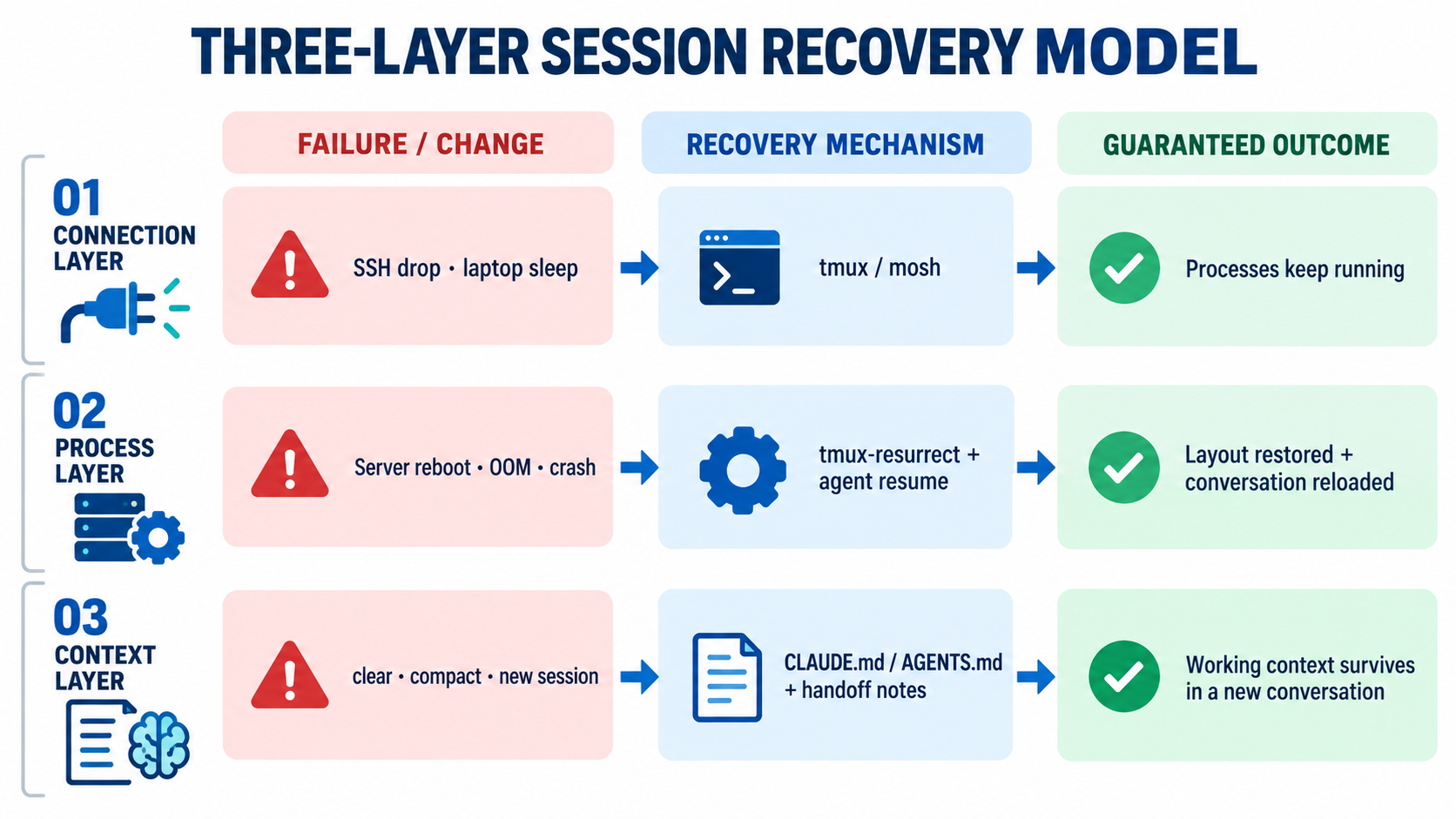
| Event | tmux session | Agent process | Conversation history | Recovery |
|---|---|---|---|---|
| SSH drop | kept | kept | kept | tmux attach |
| Server reboot | gone | gone | still on disk | resurrect + claude --resume / codex resume |
/clear, new session | kept | kept | starts fresh | context saved in files |
tmux-resurrect / continuum
tmux-resurrect saves and restores sessions, windows, pane layouts and working directories. tmux-continuum saves periodically and restores automatically when tmux starts.
git clone https://github.com/tmux-plugins/tpm ~/.tmux/plugins/tpm# append to ~/.tmux.conf
set -g @plugin 'tmux-plugins/tpm'
set -g @plugin 'tmux-plugins/tmux-resurrect'
set -g @plugin 'tmux-plugins/tmux-continuum'
set -g @continuum-restore 'on' # auto-restore when tmux starts
set -g @continuum-save-interval '15' # save every 15 minutes
run '~/.tmux/plugins/tpm/tpm'Press Ctrl-b I (capital i) inside tmux to install the plugins. Save manually with Ctrl-b Ctrl-s, restore with Ctrl-b Ctrl-r.
resurrect restores layouts and directories, but not the agent's in-memory state. The agent has to reload its conversation from disk through its own resume feature:
# Claude Code
claude --continue        # most recent conversation in this directory
claude --resume          # pick from a list (or pass a session ID)

# Codex CLI
codex resume             # pick from a list
codex resume --last      # most recent session
With the agent-session script from section 5, one command restores both the layout and the conversations after a reboot.
8. Where the tokens leak
Now the cost side. First, a common misconception:
An agent idling in tmux consumes no tokens. Tokens are spent only when the model is called. Costs grow not because a session "stays open for long" but because of conversations that run long and conversations resumed after a long break.
Every turn resends the full context
LLM APIs are stateless. On every request the agent sends system prompt + tool definitions + CLAUDE.md/AGENTS.md + the entire conversation so far + tool results. Once a conversation reaches 100K tokens, even "ok, continue" costs 100K+ input tokens.
Prompt caching softens this. If the request shares a prefix with the previous one, that part is read from cache at roughly 10% of the normal input price. That is why a big context stays affordable while you work in quick succession.
The trap: the cache expires while you are away
The cache has a TTL — 5 minutes by default on the Anthropic API, with a 1-hour option (Claude Code picks between them based on expected reuse). Leave the session open in tmux, go to lunch, come back and send a message:
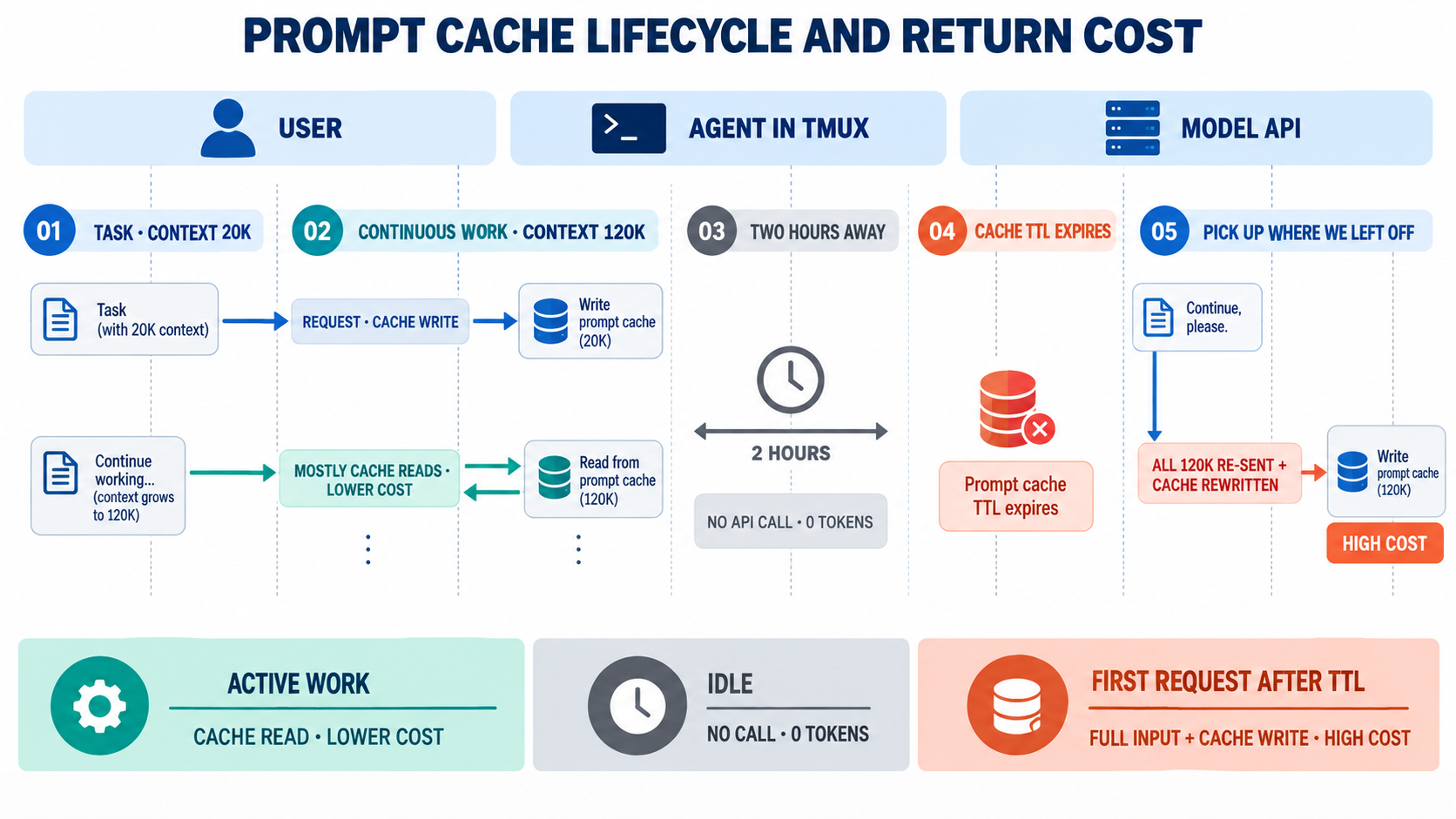
The first message after you return reprocesses the whole, now large, context without any cache discount. Cache writes cost more than plain input (about 1.25× for the 5-minute TTL, about 2× for 1-hour), so it can be even pricier. The longer you keep sessions around, the more often you hit this.
Other leaks
| Leak | Description |
|---|---|
| Fixed overhead | MCP tool definitions, long CLAUDE.md/AGENTS.md files and skill listings ride along on every turn |
| Huge tool output | Build logs, cat of large files and full test output pile up in context |
| Auto-compact | When context fills up it is summarized automatically — that is itself a model call, and you don't control what survives |
| Unattended automation | /loop, auto-retries and background agents really do keep calling the model while you're gone |
9. Token management strategies
The principle: long-lived sessions, short conversations. The tmux session (your workspace) can live for weeks, but the conversation (context) inside it should be cut per task, with durable context moved into files.
① Cut conversations per task
When a task is done, start the next one in a fresh conversation.
| Claude Code | Codex CLI | |
|---|---|---|
| New conversation | /clear | /new |
| Manual summary | /compact <what to keep> | /compact |
| Current usage | /context, /usage (/cost) | /status |
| Resume a previous one | /resume, claude --resume | /resume, codex resume |
If you move from "fix bug A" to "add feature B" in the same conversation, tens of thousands of tokens of A's debug logs ride along on every turn of B. A single /clear removes that cost.
② Compact before auto-compact kicks in
Auto-compact fires when context is already full, after several expensive turns — and the model decides what to keep. Compacting yourself at a natural break is better:
/compact Keep only the branch's goal, the list of modified files, remaining TODOs and approaches that failed. Drop logs and exploration.③ Keep context in files, not in the conversation
Conversations are ephemeral; files persist. Manage two kinds:
- Durable rules —
CLAUDE.md(Claude Code),AGENTS.md(Codex): build commands, coding conventions, pitfalls. Keep them short — they are a fixed cost on every turn. - Progress — a working note such as
HANDOFF.md. Have the agent update it before you step away:
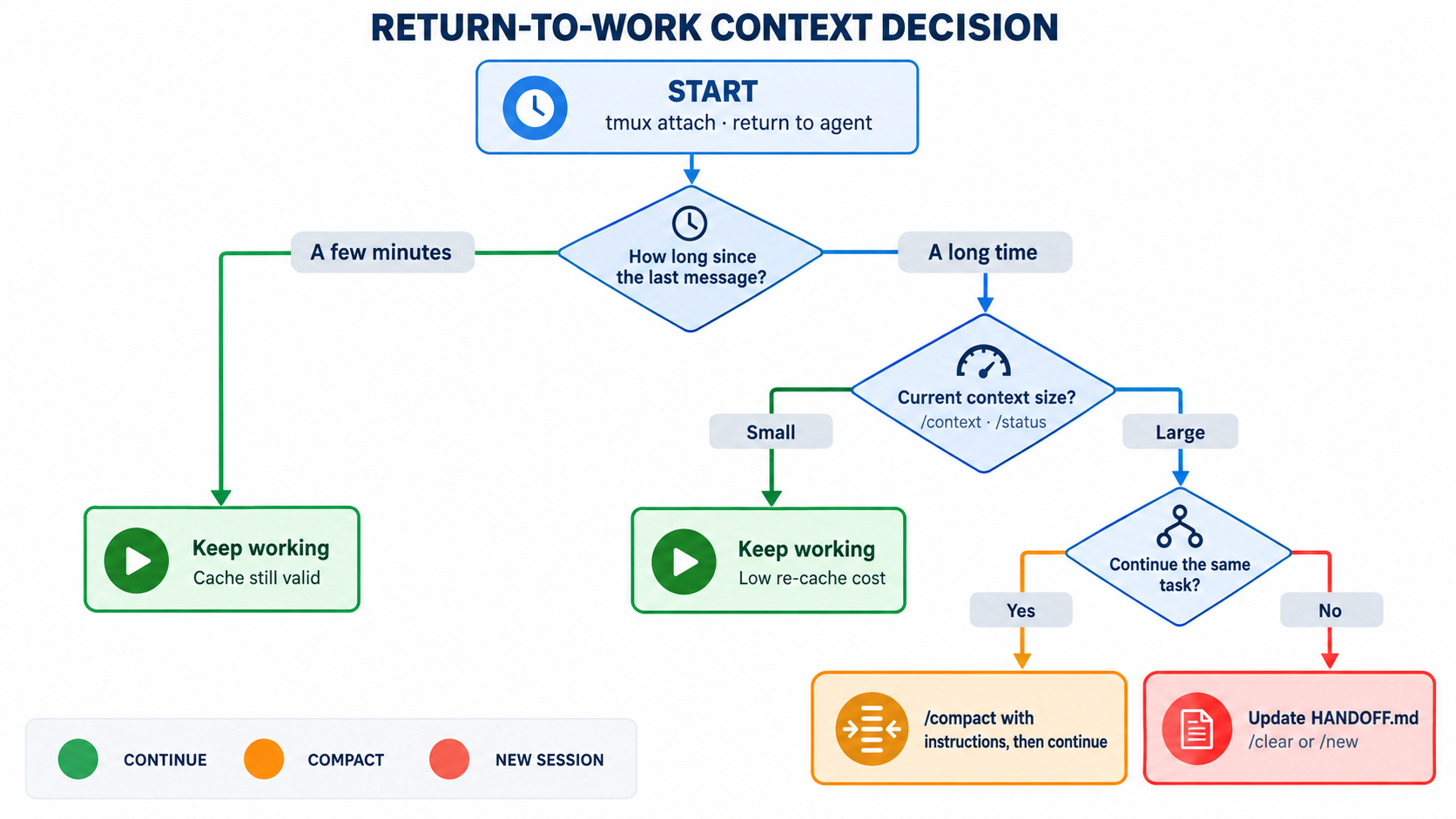
Summarize progress in HANDOFF.md: goal, done, next steps, caveats. Max 10 lines.When you return, don't reopen the stale conversation; start a fresh one with:
Read HANDOFF.md and continue from the next step.Instead of re-reading a 120K-token conversation uncached, you restart from a note of a few hundred tokens.
④ On return: continue or start fresh?
⑤ Cut fixed overhead
- Prune MCP servers: disable servers you are not using (Claude Code
/mcp, Codexcodex mcp). One server can add thousands of tokens of tool definitions to every turn. Use/contextto see the breakdown. - Slim down instruction files: keep only what is needed every time in CLAUDE.md/AGENTS.md. Move occasional detail into separate docs and just reference the path, e.g. "see
docs/deploy.mdfor deployment". - Pass paths, not pasted output: instead of pasting a huge log, say "find the cause of the error in
build.log" — the agent willgrep/tailonly what it needs. - Compress command output: CLI proxies that summarize output from
git, test runners and the like before it reaches the context (RTK-style tools, for example) can cut tool-output tokens substantially.
⑥ Delegate and pick the right model
- Delegate exploration to subagents: broad searches like "find the auth flow in this repo" go to a subagent. The trail of dozens of files read stays in the subagent; only the conclusion returns to the main conversation.
- Match model and reasoning effort to the task: a top-tier model at high reasoning effort is overkill for simple edits and formatting. Switch models with
/modelin Claude Code; in Codex use/modelormodel_reasoning_effortin~/.codex/config.toml.
⑦ Distinguish "kept alive" from "running"
Know whether an agent in tmux is waiting for input or running autonomously. Before you leave for the day, check:
- no
/loopor scheduled jobs are active - the agent isn't running a script that retries forever on failure
- if you do leave something running autonomously, you've set a budget (max turns, spend limit)
10. Monitoring — what you can see, you can manage
Inside the agent
- Claude Code:
/contextshows how many tokens the system prompt, tools, memory files and conversation each take;/usage(/cost) shows cumulative session usage./statuslinesets up a status line that always shows things like the model and context usage. - Codex CLI:
/statusshows the current model, token usage and remaining context.
Outside the agent
Claude Code stores transcripts as JSONL under ~/.claude/projects/. Tools such as ccusage aggregate usage by day or session:
npx ccusage@latest daily      # usage by day
npx ccusage@latest session    # usage by session
In the tmux status bar
With agents spread across windows it is easy to miss which one is working. monitor-activity from section 4 flags windows with new output; you can also put a usage summary on the right of the status bar.
Status-bar commands run every status-interval, so do the heavy aggregation in cron, write it to a file, and have the status bar only read that file.
#!/usr/bin/env bash
# ~/bin/agent-usage : write today's Claude Code spend to a file
today=$(date +%Y%m%d)
npx -y ccusage@latest daily --json --since "$today" 2>/dev/null \
  | jq -r '.totals.totalCost // 0' \
  | xargs printf 'claude $%.2f\n' > ~/.cache/agent-usage.txt
# crontab -e : refresh every 10 minutes
*/10 * * * * $HOME/bin/agent-usage# ~/.tmux.conf
set -g status-interval 60
set -g status-right '#(cat ~/.cache/agent-usage.txt) | %H:%M'ccusage's JSON structure may change between versions. Check the output of
npx ccusage@latest daily --jsonfirst and adjust thejqpath.npxandjqmay not be on cron's PATH, so setPATHat the top of the script.
11. Security checks
A session left open for long is also an attack surface left open for long.
- tmux sockets on shared servers: the socket is created under
/tmp/tmux-<UID>/with user-only permissions. Don't loosen them — anyone who can reach the socket can attach and instruct your agent. - Permission modes while you're away: don't leave an agent unattended for hours in a mode that auto-approves every tool call (Claude Code's
--dangerously-skip-permissions, Codex's full-auto/bypass modes). If you must, do it only in an isolated container or VM. - API keys: don't hard-code keys in
.tmux.confor scripts; use shell environment variables or each CLI's login. Be careful that keys don't get printed and linger in a 100,000-line scrollback. - Screen hygiene: if you step away from an attached session in a public place, get in the habit of detaching with
Ctrl-b d.
12. One-page summary
| Area | What to do |
|---|---|
| Basics | Always run agents inside tmux new -A -s <name> |
| Config | history-limit, escape-time 0, extended-keys, set-clipboard on |
| Automation | Per-project agent-session script for window layout + resume |
| Linux | Check KillUserProcesses → loginctl enable-linger, systemd user service if needed |
| macOS | Local runs: caffeinate -i or pmset; remote: Remote Login + tmux |
| Windows | Run tmux + agents inside WSL2, disable idle timeouts in .wslconfig, manage sleep and update restarts, keep projects on the WSL filesystem |
| Network | Frequent moves: mosh + tmux |
| Reboots | tmux-resurrect/continuum for layout + claude --resume / codex resume |
| Token principle | Long-lived sessions, short conversations — /clear / /new per task |
| On return | Long break and large context: don't just continue — compact, or restart from HANDOFF.md |
| Fixed overhead | Disable unused MCP servers, keep CLAUDE.md/AGENTS.md short, pass log paths |
| Observability | /context, /usage, /status, ccusage, tmux status bar |
| Security | No unattended auto-approve modes, keep socket permissions, no hard-coded keys |
tmux protects the agent's process; context kept in files protects its memory. Run both together and whether the connection drops or the server reboots, you can pick up the next task with a lean context.
13. Glossary
| Term | Meaning |
|---|---|
| tmux | A terminal multiplexer. Runs multiple sessions and windows inside one terminal and keeps their processes alive when the connection drops |
| Session / window / pane | tmux's hierarchy: a session is a workspace, a window is a tab within it, a pane is a split of a window |
| Prefix key | The key pressed before a tmux shortcut. Ctrl-b by default |
| Attach / detach | Connecting your screen to (attach) or disconnecting it from (detach) a running tmux session. Detached sessions keep running |
| tmux server / client | The background daemon that actually holds sessions and processes (server), and the terminal that displays them (client) |
| SIGHUP | The "hang up" signal sent to processes when their terminal disconnects. Default action is to terminate |
| TUI | Text User Interface — interactive programs such as Claude Code and Codex that draw their UI inside the terminal |
| systemd-logind | The Linux service that manages user login sessions. KillUserProcesses decides whether processes are cleaned up on logout |
| Linger | Keeps a user's systemd manager and processes running even when the user is not logged in (loginctl enable-linger) |
| OOM killer | The kernel mechanism that picks and kills a process when memory runs out |
| caffeinate / pmset | macOS commands to prevent sleep / configure power management |
| WSL2 | Windows Subsystem for Linux 2. Runs a real Linux kernel in a lightweight VM to provide a Linux environment on Windows |
| .wslconfig | Global WSL2 settings file (%UserProfile%\.wslconfig) for memory, idle timeouts and more |
| OSC52 | A terminal escape sequence that lets text copied in a remote shell or tmux reach your local clipboard |
| mosh | Mobile Shell. A UDP-based remote shell that survives IP changes and brief disconnects |
| tmux-resurrect / continuum | Plugins that save and restore tmux layouts / save and restore them automatically on a schedule |
| TPM | Tmux Plugin Manager, for installing and managing tmux plugins |
| Token | The unit in which models process text. API cost is calculated from input and output token counts |
| Context | Everything sent with a single model call: system prompt, tool definitions, instruction files, conversation history and tool results |
| Context window | The maximum number of tokens a model can take in a single call |
| Prompt cache | Stores input that shares a prefix with the previous request and reuses it cheaply and quickly. Cache reads cost about 10% of normal input |
| TTL | Time To Live — how long the cache lasts. After it expires, the next request is processed without the cache |
| Compact (compaction) | Summarizing a long conversation to shrink the context. Manual (/compact) or automatic (auto-compact) |
| CLAUDE.md / AGENTS.md | Project instruction files that Claude Code / Codex read automatically at session start. A fixed cost included in every turn |
| Handoff note | A file recording work progress (e.g. HANDOFF.md) — a summary for picking the work back up in a fresh conversation |
| MCP | Model Context Protocol. A standard for connecting external tools and data to agents. Connected servers' tool definitions take up context |
| Subagent | A separate agent the main agent delegates work to. It keeps the working trail in its own context and returns only the result |
| Reasoning effort | How deeply the model reasons before answering. Higher means better quality but more tokens and time |
| ccusage | An open-source CLI that reads Claude Code's local transcripts (JSONL) and aggregates token usage and cost by day or session |