
How to Use Plannotator — Review Your Coding Agent's Plans and Code in the Browser and Send Feedback Back
A guide to Plannotator, the open-source tool for annotating coding-agent plans, documents and diffs in a local browser and sending the feedback straight back to Claude Code, Codex and others. Official screenshots and videos, how it works, setup, commands, the Inbox, and sharing, remote and telemetry caveats.
Hand a coding agent a big task and you first get a plan. Reading a few dozen lines of plan in the terminal and then typing out "drop step 3, rename this function, write the tests first" is more tedious than it sounds. Reviewing the agent's diff is no better. You end up approving too quickly or pasting in long feedback.
Plannotator is an open-source tool aimed at exactly this. When the agent proposes a plan or finishes work, a review screen opens in your local browser; you mark up the document or diff directly, then send that feedback to the agent session with one click. Since the repository was created on 28 December 2025 it has gathered 14,481 GitHub stars and 1,432 forks, and the latest release is v0.29.2 (22 November 2026), per the GitHub API on 2026-11-23.
Plannotator is an external open-source project with no relationship to Data Dynamics. We cloned backnotprop/plannotator on 2026-11-23 and read the README, the per-agent READMEs and parts of the source. Every screenshot and video here is official project material; we did not install or run it ourselves.
TL;DR — Plannotator is a local, browser-based review tool for coding agents. Its core pieces are ① plan review, which intercepts the agent's plan through a hook so you can approve or deny it in the browser; ② annotation of Markdown, HTML, folders, URLs and running local sites; ③ code review of local changes or GitHub PRs and GitLab MRs as diffs; and ④ the Inbox, which gathers questions from many agents in one place. It supports more than ten agents, including Claude Code, Codex, Copilot CLI, Gemini CLI, OpenCode and Pi, and is dual-licensed under Apache-2.0 or MIT.
Watch the official videos first
Video is faster than prose. These are official videos posted by the developer (YouTube channel @backnotprop).
Claude Code plan mode plugin — shows the basic loop: the agent proposes a plan, the browser opens, you mark up and deny the plan, and the agent comes back with a revision. The README files this video under "(Legacy) Plan Mode", so screen details may differ from the current version.
Claude Code Plan Mode Plugin - Plannotator. Source: YouTube @backnotprop
Pi coding agent, visual plan mode extension — the same loop with the Pi agent.
Pi Coding Agent - Visual Plan Mode Extension. Source: YouTube @backnotprop
A demo of the newest feature, the Inbox, is published as an MP4 on the official site: watch the Plannotator Inbox demo (about 14 MB).
What Plannotator does
Think of it as adding one more review → feedback → revise loop between you and the agent. You read the agent's output in something that looks like a document editor rather than a terminal, mark what needs to change, and Plannotator turns those marks into structured feedback delivered as the agent's next message.
| Feature | When it opens | What you do |
|---|---|---|
| Plan review | Automatically, when the agent leaves plan mode | Mark up and comment on the plan → approve or deny |
| Annotate | /plannotator-annotate, /plannotator-last | Mark up a file, folder, URL, HTML or the agent's last reply → send feedback |
| Code review | /plannotator-review | Line comments and code suggestions on local changes or a PR/MR diff → send feedback or approve |
| Inbox | plannotator inbox | Answer questions, files and review requests left by several agents |
Every screen is served by a local server on your machine. By default plans, documents and diffs are not uploaded anywhere; the paths that do leave your machine (share links, URL fetching, telemetry) are covered under caveats below.
Annotating plans and documents
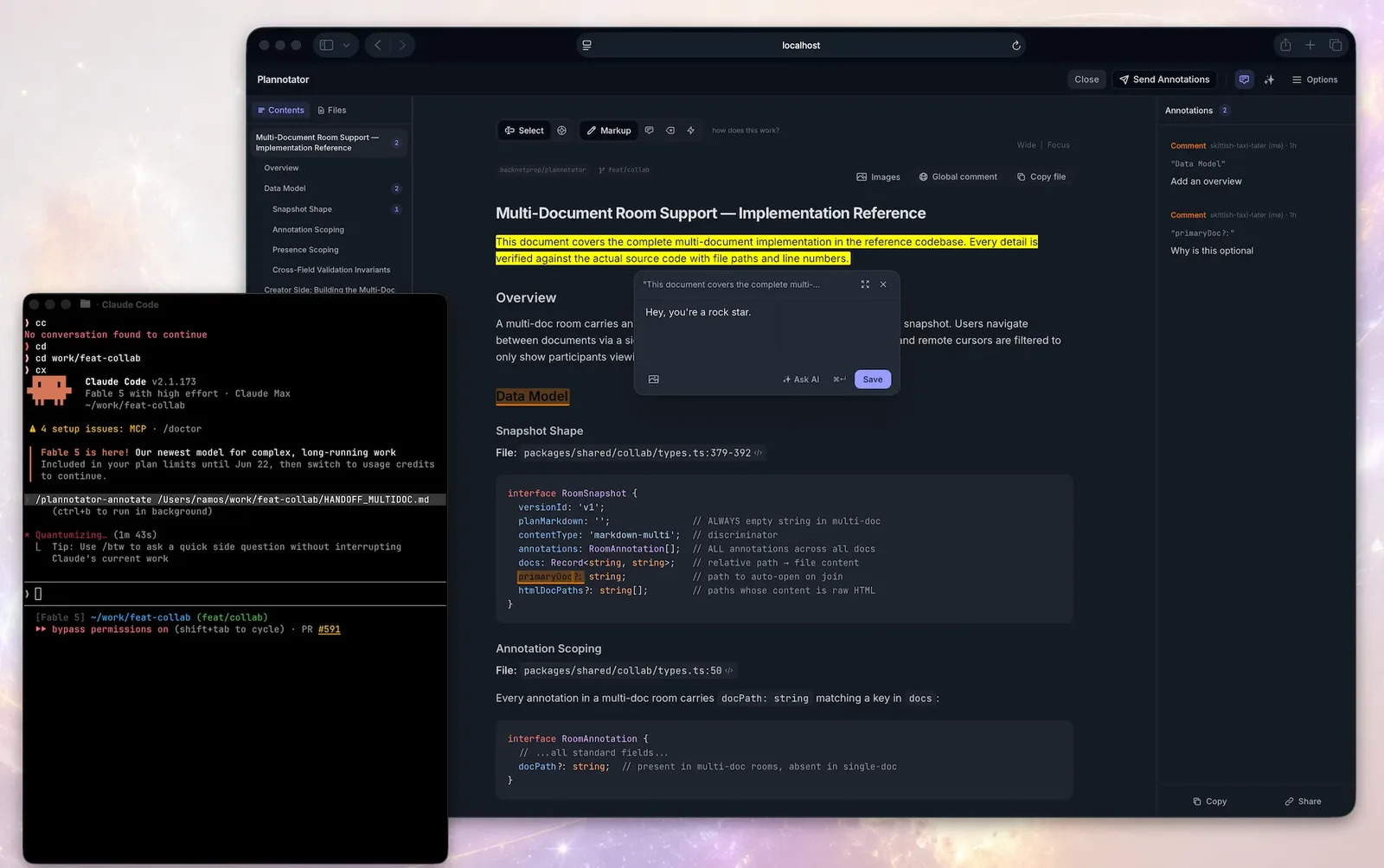
Document annotation. Source: backnotprop/plannotator repository README (Apache-2.0 / MIT)
The layout is simple.
| Area | Role |
|---|---|
| Left: Contents and Files | The document outline and the files in the folder. Numbers next to headings count the annotations in that section |
| Centre: document and toolbar | Select text to comment on it; Markup adds highlights, redlines and labels. Ask AI is available from the comment box |
| Right: Annotations | Everything you have marked so far, with Copy and Share at the bottom |
| Top: Send Annotations | Bundles every mark and sends it to the agent session as feedback |
Plan review uses the same screen. Deny the plan and your marks go to the agent as structured feedback; when the agent resubmits, a plan diff shows what changed since the previous version.
Code review
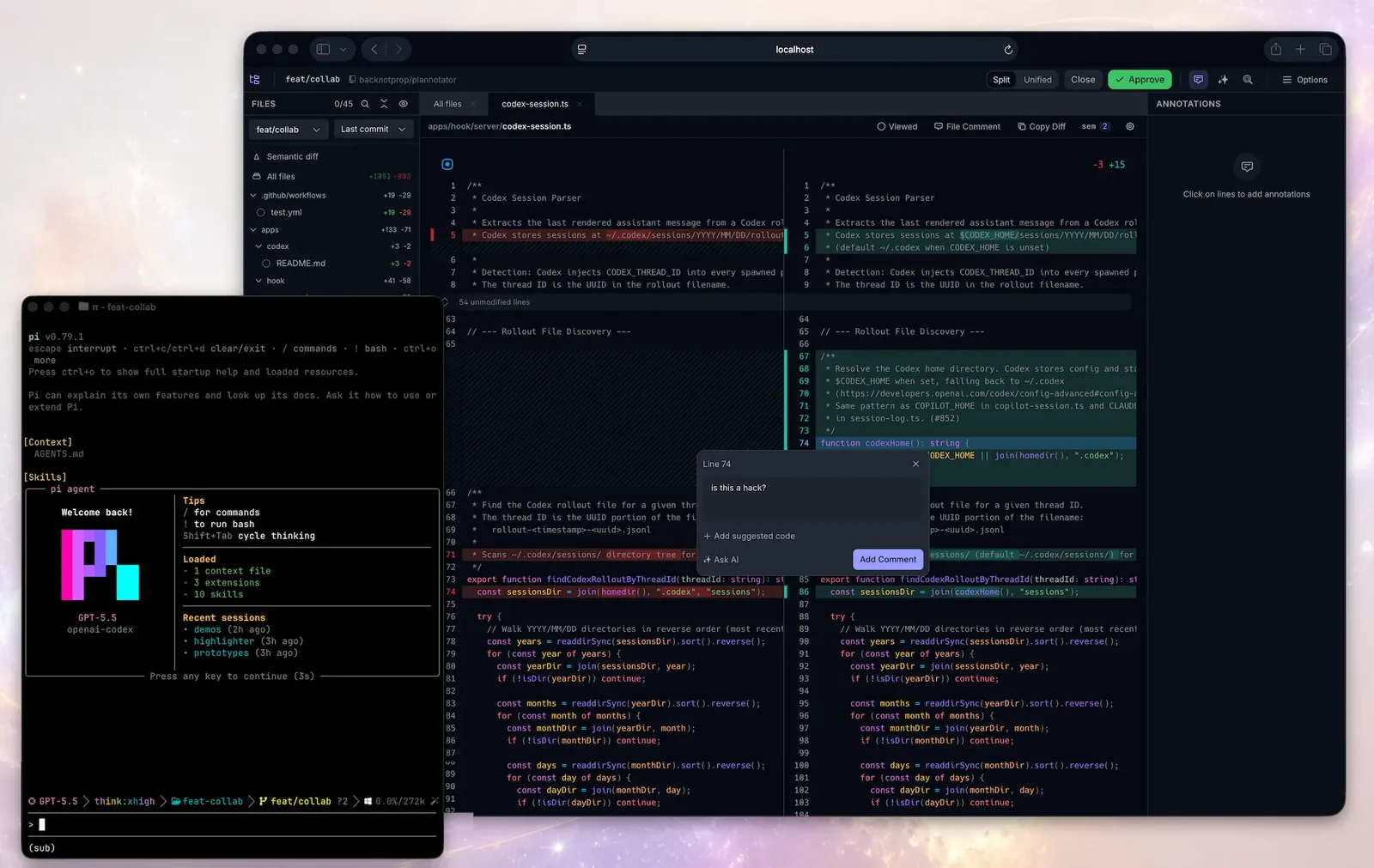
Code review. Source: backnotprop/plannotator repository README (Apache-2.0 / MIT)
It feels like a GitHub PR page: a file tree, split or unified diffs, line comments and suggested code. When you are done, Send Feedback returns your comments to the agent, or Approve sends it "LGTM". Besides Git it supports GitButler, Jujutsu (jj) and Perforce (p4), and passing a GitHub PR or GitLab MR URL reviews remote changes on the same screen.
For large changes, try a guided review. Press Guide (Cmd/Ctrl+Shift+G) and an agent sorts the diff into chapters — the heart of the change, then its effects, then the glue — with a short overview next to the real diff in each chapter.
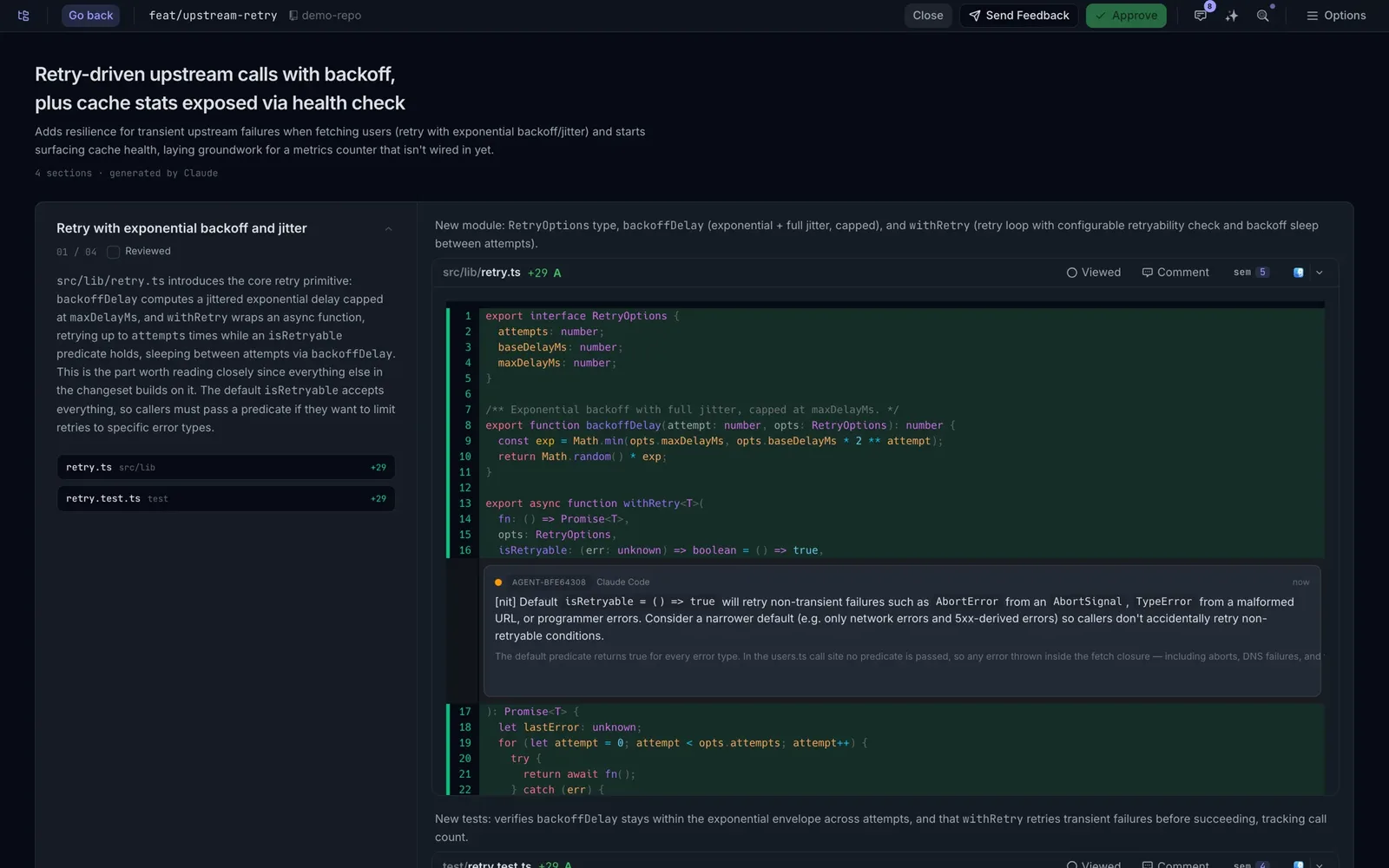
Guided review. The overview is marked as generated by Claude ("4 sections · generated by Claude"). Source: backnotprop/plannotator repository README (Apache-2.0 / MIT)
As the [nit] comment in the screenshot shows, you can also launch AI review agents that post comments on the diff. Their comments go back to the agent together with yours.
HTML artifacts and running sites
As more people ask agents for HTML reports and prototypes instead of Markdown, Plannotator added annotation of rendered HTML. Pass a localhost address and it opens your running app through a local proxy, so you comment on the real page while hot reload keeps working.
plannotator annotate http://localhost:5173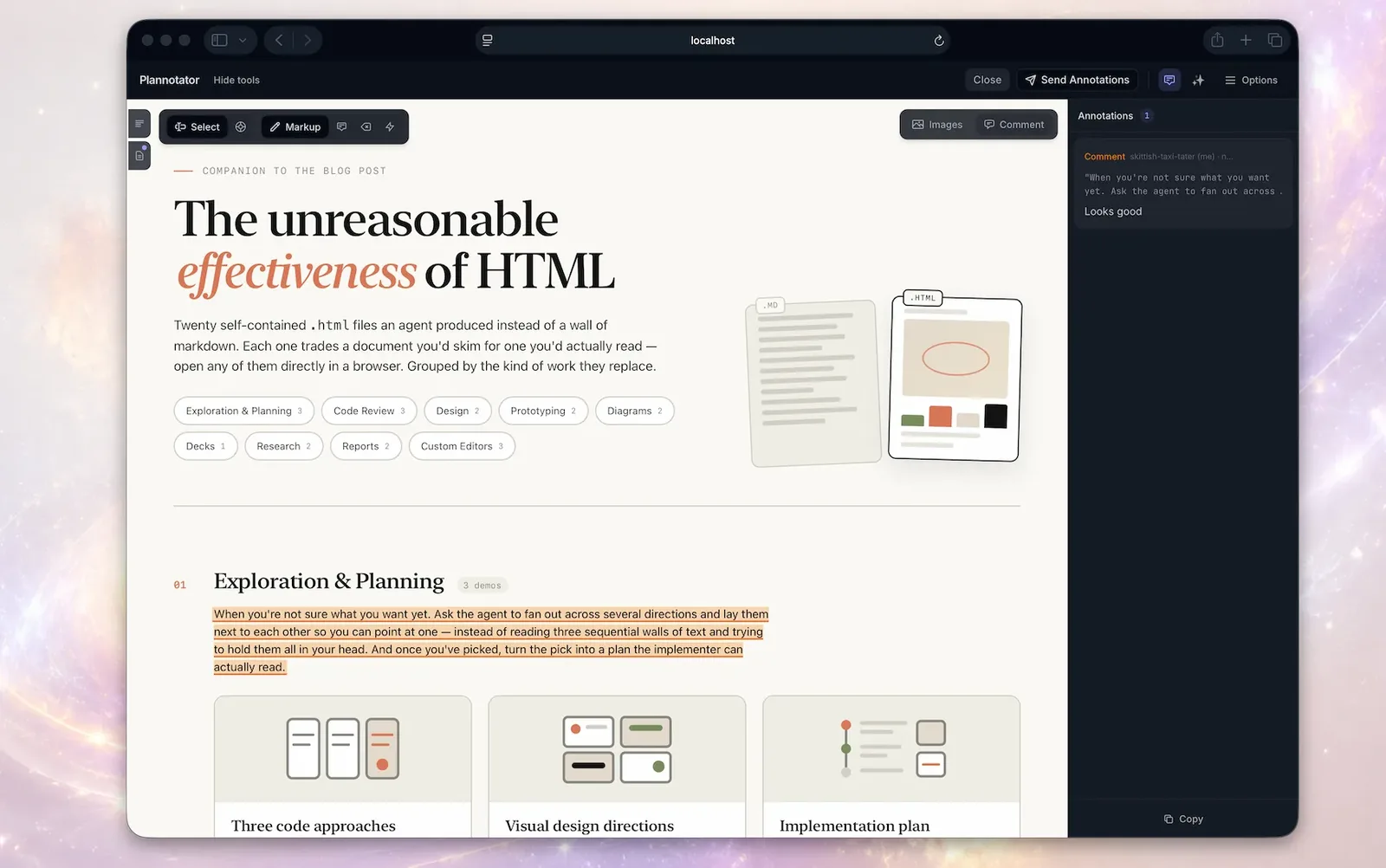
Annotating an HTML artifact. Source: backnotprop/plannotator repository README (Apache-2.0 / MIT)
Plannotator Inbox
The newest feature: one local window where your agents leave questions, files and review requests while they keep working. Answer a question with a click, annotate a file, and press Send when you are ready. Nothing holds an agent session open while you do, and your reply arrives as the next turn of the session that asked.
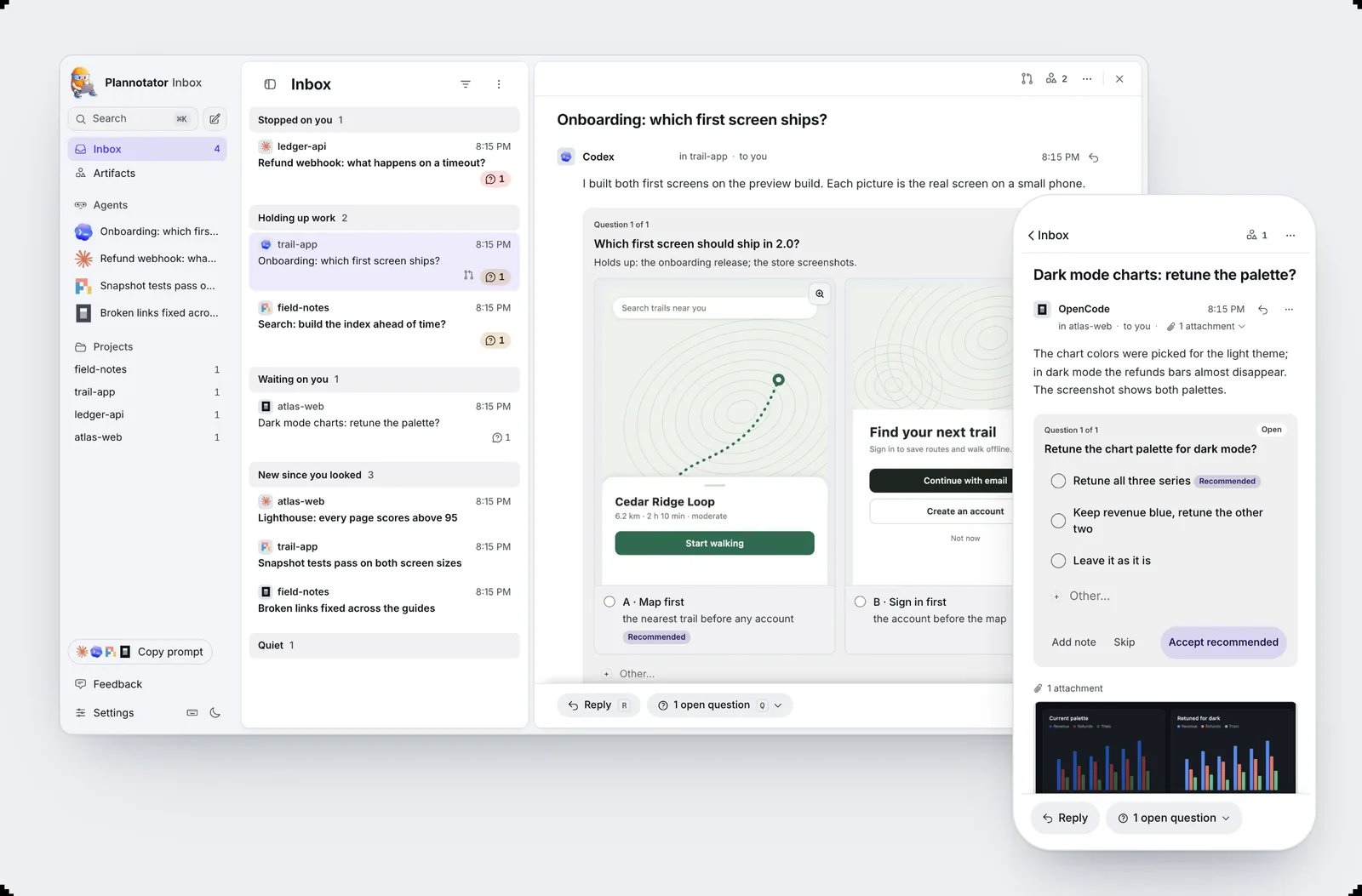
The Plannotator Inbox on desktop and phone. Source: backnotprop/plannotator repository README (Apache-2.0 / MIT)
Threads are grouped by what each agent needs from you: stopped on you, holding up work, waiting on you, and new since you looked. Questions show the agent's recommended option, and Accept recommended takes it in one click.
plannotator inboxClaude Code, Pi and OpenCode connect through Plannotator's plugins; any other agent connects over MCP with plannotator inbox mcp. plannotator inbox --help is written as a guide for agents to read.
In the terminal: Herdr Annotate
If you would rather review in the terminal, there is Herdr Annotate, a plugin for the agent multiplexer herdr. Inside herdr it lets you mark up terminal text, Markdown documents and agent replies and send the feedback as the agent's next message. It works with Claude Code, Codex, Pi, Copilot CLI and Droid replies.
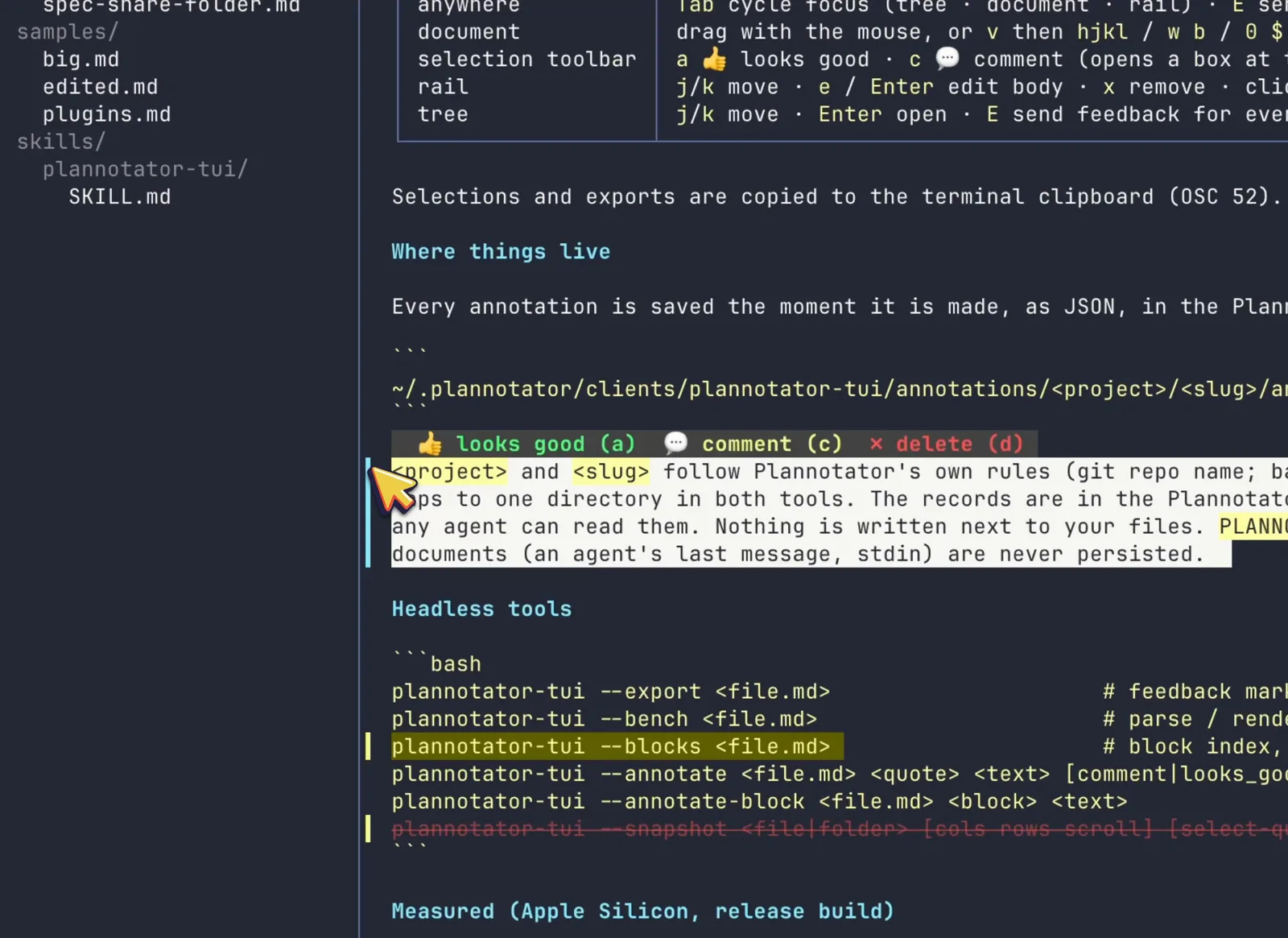
Reviewing a Markdown document in the terminal (TUI). Source: backnotprop/plannotator repository README (Apache-2.0 / MIT)
herdr plugin install plannotator/herdr-annotateTo use it without herdr, install Plannotator TUI with brew install plannotator/tap/plannotator-tui. Terminal annotations are saved in the Plannotator data directory, so they add up with your browser reviews.
How it works: intercepting the plan with a hook
Plan review needs no command because it is wired into each agent's hooks. With Claude Code the flow is:
Agent calls ExitPlanMode
  -> PermissionRequest hook fires
  -> Local server reads the plan from the hook input
  -> Browser opens the review UI
  -> You annotate, then approve or deny
  -> Approve: the agent proceeds
  -> Deny: structured feedback goes to the agent
  -> The agent revises; a plan diff shows what changed
To wire it up without the plugin system, add the hook to ~/.claude/settings.json. The timeout of 345,600 seconds (four days) is long because in the classic flow the agent waits until you decide.
{
  "hooks": {
    "PermissionRequest": [
      {
        "matcher": "ExitPlanMode",
        "hooks": [
          { "type": "command", "command": "plannotator", "timeout": 345600 }
        ]
      }
    ]
  }
}
On Claude Code 2.1.287 or newer, the plugin runs as the "Plannotator mod" by default and the flow changes. While plan review, code review or annotation is open, Claude ends its turn instead of waiting, and your decision arrives later as a message, so you can keep chatting. After you approve, Claude calls ExitPlanMode once more and works from the exact plan text you approved. Set PLANNOTATOR_CLAUDE_MOD=0 to go back to the classic flow; claude -p and SDK runs always use it.
Caution — in the mod flow Claude is not blocked while the review is open. The official docs warn that if you leave plan mode yourself before approving, Claude can start editing files.
Installation and usage, step by step
Step 1: Install
One installer puts the plannotator binary in place, detects your installed agents and configures hooks, skills and slash commands for each.
# macOS / Linux / WSL
curl -fsSL https://plannotator.ai/install.sh | bash
# Windows PowerShell
irm https://plannotator.ai/install.ps1 | iexAdd --minimal to install only the binary to ~/.local/bin without touching agent configs. Use --version vX.Y.Z to pin a version and --verify-attestation to verify SLSA build provenance during install. If company policy rules out piping remote scripts, download a GitHub release binary and its SHA256 file, verify, then install.
Step 2: Finish the setup for your agent
What remains after the installer differs a little per agent. The common ones:
| Agent | After the installer |
|---|---|
| Claude Code | /plugin marketplace add backnotprop/plannotator → /plugin install plannotator@plannotator → restart Claude Code |
| Codex | Nothing. Plan review is wired in through Codex's experimental Stop hook. Use skills such as $plannotator-review or !plannotator review instead of slash commands |
| Copilot CLI | /plugin marketplace add backnotprop/plannotator → /plugin install plannotator-copilot@plannotator → restart. Works in plan mode (Shift+Tab) |
| Gemini CLI | Nothing (requires 0.36.0+). Hook, policy and slash commands are configured automatically |
| OpenCode | Add "plugin": ["@plannotator/opencode@latest"] to opencode.json → restart |
| Pi | Skip the installer: pi install npm:@plannotator/pi-extension. Start with --plan or toggle with /plannotator-plan-mode |
For Amp, Droid, Kiro CLI, DeepSeek Harness and T3 Code, see the Install table in the README.
Step 3: Try it right away
The quickest check is to invoke it yourself from inside your agent.
/plannotator-last                   # annotate the agent's last reply
/plannotator-review                 # review your current diff, PR-style
/plannotator-annotate report.html   # annotate any file, folder or URL
Plan review needs no command: the next time your agent proposes a plan, it opens in your browser automatically.
Step 4: Everyday commands
Annotate
/plannotator-annotate README.md                  # a local Markdown file
/plannotator-annotate src/                       # browse and annotate a folder
/plannotator-annotate https://docs.rs/…          # fetch and annotate a URL
/plannotator-annotate report.html --render-html  # render HTML as-is
/plannotator-last                                # the agent's last message
Code review
/plannotator-review                          # uncommitted changes
/plannotator-review <github-pr-url>          # a GitHub PR
/plannotator-review <gitlab-mr-url>          # a GitLab MR
plannotator review --gitbutler               # a GitButler workspace
plannotator review --patch-file reading.diff # a unified diff you supply
Sessions
plannotator sessions            # list active Plannotator sessions
plannotator sessions --open 1   # reopen a session in the browser
plannotator archive             # browse saved plan decisions read-only
Step 5: Remote servers and devcontainers
SSH sessions are detected automatically and switch to fixed port 19432. Inside a devcontainer or Docker, turn on remote mode with environment variables.
export PLANNOTATOR_REMOTE=1
export PLANNOTATOR_PORT=9999   # forward this port
For plain SSH, add a port forward to ~/.ssh/config and open it in your local browser.
Host your-server
    LocalForward 19432 localhost:19432
Step 6: Integrations and cleanup
- VS Code extension: open plans in editor tabs, view diffs inline and add annotations from the gutter.
- Obsidian, Bear, Notion: save approved plans as notes automatically. Notion needs
NOTION_TOKEN. - Uninstall:
plannotator uninstallremoves the installed components and keeps your plans, history and settings. Add--purgeto remove local data too, or--dry-runto preview.
Check before adopting
Being local is the main appeal, but a few paths do leave your machine. Check these before using it on company code.
| Item | Default behaviour | How to turn it off or limit it |
|---|---|---|
| Share links | Small plans live in the link itself; large ones are encrypted, uploaded and expire after 7 days. Anyone with the full link can read it | PLANNOTATOR_SHARE=disabled; a self-hosted portal via PLANNOTATOR_SHARE_URL |
| Telemetry | On by default, with no in-app notice. Once a day per tool it sends a few values — version, usage-age bucket, tool name and the like — to ping.plannotator.ai (per the source comments: no ID, no OS, at most five pings per computer per day) | DO_NOT_TRACK=1 or NO_ANON_PING=1. There is no config key or settings switch |
| URL annotation | Uses the external Jina Reader service to fetch URLs | PLANNOTATOR_JINA=0 |
| AI features | Ask AI, review agents and guided review call an agent | PLANNOTATOR_AI=disabled |
| Remote mode | The server listens on every interface (0.0.0.0) with no login; anyone who can reach the port can use it, even with an SSH tunnel | Keep the port closed to networks you don't trust |
The exact telemetry payload is documented byte-for-byte in the comments of packages/shared/daily-ping.ts. If policy forbids outbound telemetry, putting DO_NOT_TRACK=1 in your shell profile is the simplest fix.
On the supply-chain side it is fairly thorough. Every release binary ships with a SHA256 file, SLSA build provenance has been attached since v0.17.2, and recent releases add a CycloneDX SBOM with its own attestation. The README includes gh attestation verify commands to check them yourself.
Wrapping up
Plannotator focuses on making people actually read and correct what agents produce. It replaces the habit of rubber-stamping plans in the terminal with a flow where your marks on the document become the feedback. Plan review hooks in automatically, code review feels like a familiar PR page, and the Inbox gathers "who is waiting on me" into one place when several agents run at once.
If you adopt it, start with one agent such as Claude Code or Codex and try plan review and /plannotator-review first. On company repositories, turn off telemetry (DO_NOT_TRACK=1) and sharing (PLANNOTATOR_SHARE=disabled) first, confirm the remote-mode port is not exposed, and then expand.
References
- backnotprop/plannotator — GitHub repository
- Plannotator official site
- Plannotator installation docs
- How sharing works
- Plannotator privacy policy
- Plannotator Inbox
- Code Review and guided review
- Herdr Annotate · Plannotator TUI
- YouTube: Claude Code Plan Mode Plugin - Plannotator
- YouTube: Pi Coding Agent - Visual Plan Mode Extension