
Open-Source React Component for Oracle SQL and PL/SQL: oracle-monaco-sql-editor
Data Dynamics has released a React editor component on GitHub under the MIT License that offers Oracle SQL and PL/SQL auto-completion and help pop-ups for functions and reserved words, and runs real queries through Node, Python or Java gateways.
Data Dynamics has released oracle-monaco-sql-editor, a React web editor component for Oracle SQL and PL/SQL, on GitHub. It is built on Monaco Editor, the editor engine behind VS Code, and is licensed under the MIT License.
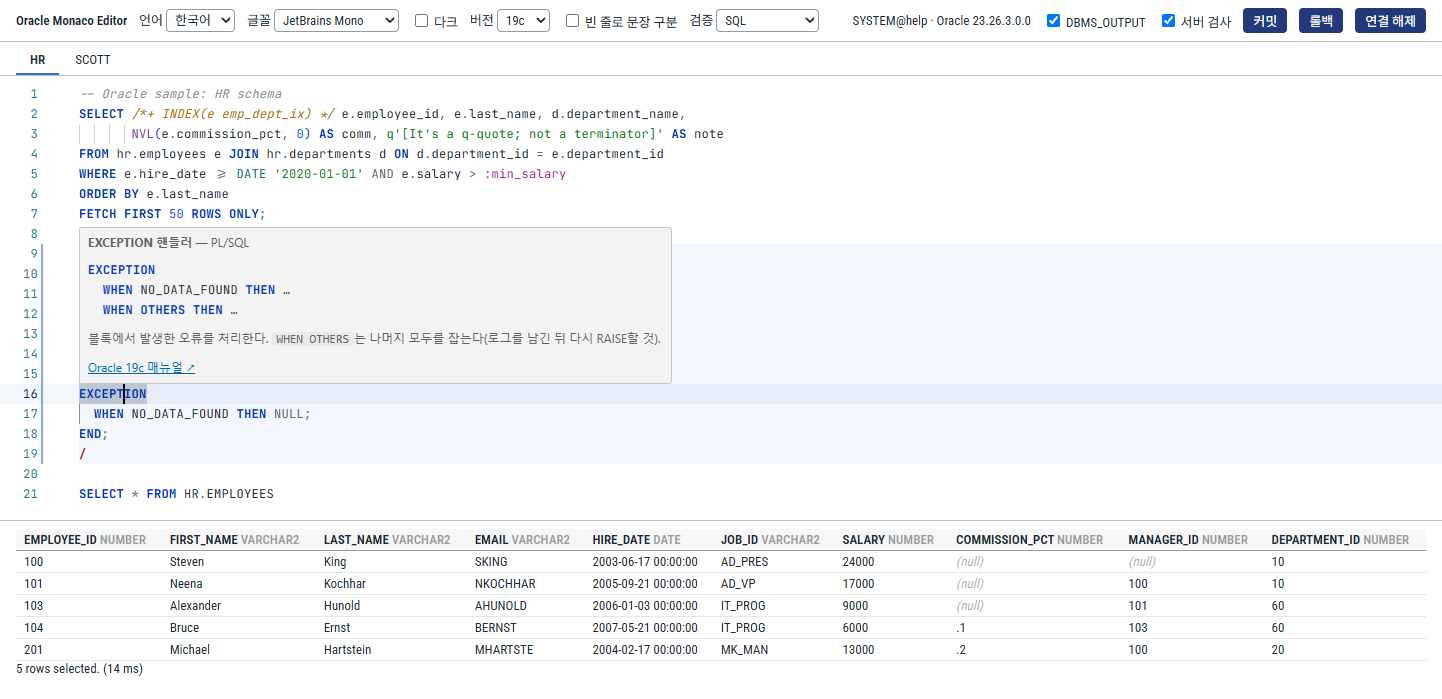
It builds on the architecture of our Monaco SQL editor for Trino, released alongside it, redesigned for Oracle-specific syntax and the way SQL*Plus and SQL Developer work. Teams that need an Oracle query editing and execution screen in an internal data portal or operations tool can drop in a single component.
Key features
Oracle SQL and PL/SQL editing
- Oracle-specific highlighting — recognizes
q'[…]'alternative quoting, optimizer hints/*+ … */, bind variables:name, substitution variables&var, database links@dblink,%TYPE/%ROWTYPEand the stand-alone/terminator. - Context-aware auto-completion — parses the statement under the cursor with an ANTLR grammar and suggests only what is valid at that position. It understands table aliases, CTE and inline view columns, PL/SQL variables and parameters, and trigger
:NEW/:OLD, and reads table, column and package information from Oracle'sALL_*dictionary views. - Statement splitting — separates SQL, PL/SQL blocks and SQL*Plus commands following SQL*Plus and SQL Developer rules.
- Formatter — indents PL/SQL blocks while preserving strings, comments and hints.
Help pop-ups for functions and reserved words
Shift+F1orCtrl/Cmd+Clickshows the syntax, description and examples for the item under the cursor. It covers about 250 built-in functions, about 90 reserved words and statements, pseudo-columns, data types and Oracle-supplied packages (DBMS_*,UTL_*), with links to the Oracle 19c, 21c and 23ai manuals.- Inside function parentheses, signature help highlights the current parameter; for package procedures, named-argument completion inserts
p_name =>. - Hovering over tables, columns, sequences and PL/SQL variables shows the type, NOT NULL, comments and object status (
INVALID). - Setting a target version (
19c,21c,23ai) hides newer syntax from completion and warns about it in validation. UI text and help are available in English, Korean, Japanese and Chinese.
Running real queries with Node, Python or Java servers
Browsers cannot connect to Oracle directly, so the repository includes three gateway servers with the same API and security model. Pick the one that fits your stack.
| Gateway | Stack |
|---|---|
| Node.js | Fastify + node-oracledb |
| Python | FastAPI + python-oracledb |
| Java | Spring Boot + ojdbc11 |
- Each user gets a dedicated Oracle session with transactions (commit and rollback),
ALTER SESSION, result paging, cancellation andDBMS_OUTPUT. Ctrl/Cmd+Enterruns the current statement,F5runs the whole script andF10shows the execution plan (EXPLAIN PLAN). Bind and substitution variables are filled in by prompting for values.- ORA errors and PL/SQL compile errors are marked at their position in the editor. Optional server validation catches table and column errors with EXPLAIN PLAN alone, without running the query, when you pause typing.
- If running a separate server is difficult, a connection through Oracle REST Data Services (ORDS) is also provided.
Get involved
Installation, usage and gateway setup are covered in the repository README and design document. Anyone can report bugs, suggest features or open pull requests on GitHub.